
Description
Avalon Nano 3
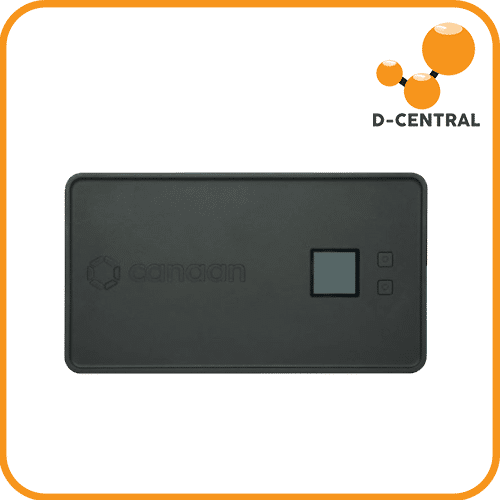
The Canaan Avalon Nano 3 is a compact, whisper-quiet Bitcoin solo miner designed for home use. At 4 TH/s and just 140W, it sits on your desk or shelf, connects to your Wi-Fi, and mines SHA-256 around the clock — no dedicated circuits, no industrial cooling, no noise complaints. This is Canaan’s entry into the home mining category that the Bitaxe helped pioneer: accessible, affordable, always-on Bitcoin mining for the individual. Powered by Canaan’s proprietary ASIC silicon, the Nano 3 delivers 4 TH/s at 35 J/TH efficiency on as little as 65W (depending on your power supply choice). The noise level sits between 33–40 dB — quieter than a normal conversation, comparable to background ambient noise in a quiet room. At 140W maximum, the heat output is gentle enough for a desk or nightstand, and warm enough to take the edge off a cold room during a Canadian winter. Every watt becomes heat. Every hash is a lottery ticket. D-Central stocks the Avalon Nano 3 in Canada with local support and the same expertise we bring to the entire open-source and home mining ecosystem. We have been selling solo miners and building the home mining category since 2016 — this is what we do.Technical Specifications
| Specification | Value |
|---|---|
| Algorithm | SHA-256 (Bitcoin) |
| Hash Rate | 4 TH/s |
| Power Consumption | Up to 140W (varies by PSU: 65W / 100W / 140W compatible) |
| Efficiency | 35 J/TH |
| Noise Level | 33–40 dB |
| Heat Exhaust | 40°C–60°C |
| Input Voltage | 110–240V AC (via USB-C PD power supply) |
| Power Supply | USB-C PD (65W, 100W, or 140W — user selectable) |
| Connectivity | Wi-Fi 2.4 GHz (USB module), Bluetooth (for app pairing), Ethernet (via USB adapter, sold separately) |
| Control | Avalon Family App (iOS / Android) + web interface via browser |
| Dimensions | 205 × 115 × 58.5 mm (8.1 × 4.5 × 2.3 in) |
| Weight | ~860 g (1.9 lbs) |
| ASIC Chip | Canaan proprietary |
| Release | Q2 2024 |
| Manufacturer | Canaan Creative |
Key Features
- True desktop form factor — at 205 × 115 × 58.5 mm and under 1 kg, the Nano 3 is roughly the size of a paperback book. It fits on a desk, shelf, or nightstand without demanding dedicated mining infrastructure
- Whisper quiet (33–40 dB) — quieter than a refrigerator. Run it in your office, bedroom, or living room without disturbing anyone. This is not a repurposed industrial ASIC — Canaan designed it specifically for living spaces
- Flexible power options — runs on USB-C PD power supplies from 65W to 140W. Use the power supply you already have, or choose your preferred balance of hash rate vs. power consumption. No APW power bricks, no 240V circuits
- App-controlled setup — pair via Bluetooth using the Avalon Family App, connect to your Wi-Fi network, configure your mining pool, and start hashing. The whole setup takes under 10 minutes
- Web interface available — beyond the mobile app, access the Nano 3 from any web browser on your network by entering its IP address for detailed monitoring and configuration
- Solo mining ready — point it at Public Pool, CK Solo, or your own Bitcoin full node and roll the dice for a full block reward. Every hash counts
Flexible Power: Choose Your Level
The Avalon Nano 3 adapts to whatever USB-C PD power supply you connect:| PSU Wattage | Approximate Hash Rate | Use Case |
|---|---|---|
| 65W | ~2 TH/s | Minimum power, ultra-quiet, always-on background mining |
| 100W | ~3 TH/s | Balanced performance and power consumption |
| 140W | 4 TH/s | Maximum hash rate, full performance |
Solo Mining: Every Hash Is a Lottery Ticket
The Avalon Nano 3 was built for solo mining. At 4 TH/s, your mathematical odds of hitting a solo block are long — but they are not zero. Pleb miners around the world are hitting blocks on devices with similar hash rates. The beauty of solo mining is that if you win, you win the entire block reward — no pool fees, no shared payouts, no middlemen. Point the Nano 3 at Public Pool, CK Solo, or connect it directly to your own Bitcoin full node for the most sovereign setup possible. This is Bitcoin mining in its purest form: your hardware, your node, your hash rate contributing to the decentralization of the network. See our Bitaxe Hub for more on the solo mining philosophy.Home Mining Comparison
The Nano 3 sits in the growing ecosystem of home-friendly Bitcoin miners. Here is how it compares:| Miner | Hash Rate | Power | Noise | Open Source |
|---|---|---|---|---|
| Bitaxe Supra | ~0.5 TH/s | ~15W | Ultra quiet | Yes |
| Bitaxe Ultra / Gamma | ~1.2 TH/s | ~15–25W | Ultra quiet | Yes |
| Avalon Nano 3 (this unit) | 4 TH/s | 65–140W | 33–40 dB | No (proprietary) |
| Bitaxe Hex | ~3 TH/s | ~90W | Quiet | Yes |
| Avalon Nano 3S | 6 TH/s | 140W | 33–40 dB | No (proprietary) |
What’s Included
- Canaan Avalon Nano 3 unit (4 TH/s)
- USB Wi-Fi module
- Quick-start guide
Frequently Asked Questions
Do I need a special power supply?
You need a USB-C Power Delivery (PD) adapter. Many modern laptop chargers are USB-C PD and will work. For full 4 TH/s performance, use a 140W USB-C PD adapter. A 65W adapter will still work but limits hash rate to approximately 2 TH/s. The power supply is not included — check if you already own a compatible USB-C PD charger before purchasing one.How does this compare to a Bitaxe?
The Nano 3 at 4 TH/s delivers roughly 3–8x the hash rate of a single Bitaxe board, but it is a proprietary device from Canaan rather than open-source hardware. The Bitaxe runs on community firmware (AxeOS) with full transparency. The Nano 3 uses Canaan’s app ecosystem with a polished consumer experience. Both are excellent solo mining devices. If open-source values matter to you, go Bitaxe. If you want maximum hash-per-watt in a turnkey package with app control, the Nano 3 delivers. Many of our customers own both.Can I use the Nano 3 as a space heater?
At 140W, the Nano 3 produces about 478 BTU/hr — enough to warm a small, well-insulated space or supplement heating in a room. It is not a replacement for a dedicated space heater like the Avalon Mini 3 (800W, 2,730 BTU/hr) or our S19 Space Heater Editions, but it does produce meaningful warmth for its size. In a cold Canadian home office, you will notice the difference.Can I mine on a pool instead of solo?
Yes. The Nano 3 supports any Stratum-compatible mining pool. Configure your preferred pool in the Avalon Family App or via the web interface. Solo mining maximizes your potential reward (full block reward if you hit a block), while pool mining provides consistent smaller payouts. The choice is yours — the Nano 3 supports both.How do I set it up?
Download the Avalon Family App on your smartphone, power on the Nano 3 with a USB-C PD power supply, pair via Bluetooth through the app, connect it to your 2.4 GHz Wi-Fi network, enter your mining pool credentials, and start hashing. Alternatively, once connected to your network, access the web interface from any browser using the device’s IP address. Setup takes approximately 5–10 minutes.Why D-Central
D-Central Technologies has been championing home mining and the pleb mining movement from Canada since 2016. We were early Bitaxe pioneers, we stock the full Canaan Avalon lineup, and we carry every open-source miner on the market because we believe every Bitcoiner should be able to participate in securing the network from their own home. When you buy the Avalon Nano 3 from D-Central, you get Canadian-based support from a team that mines Bitcoin, repairs miners, and lives this technology daily. We are not a warehouse with a checkout button — we are Bitcoin mining hackers who can help you set up, optimize, troubleshoot, and repair your hardware for the long haul. Every hash counts. Whether it comes from a 140 TH/s industrial ASIC or a 4 TH/s device on your desk, your hash rate is a vote for the decentralization of the Bitcoin network. Start mining. Explore the full home mining ecosystem.Do I need a special power supply?
You need a USB-C Power Delivery (PD) adapter. Many modern laptop chargers are USB-C PD and will work. For full 4 TH/s performance, use a 140W USB-C PD adapter. A 65W adapter will still work but limits hash rate to approximately 2 TH/s. The power supply is not included — check if you already own a compatible USB-C PD charger before purchasing one.
How does this compare to a Bitaxe?
The Nano 3 at 4 TH/s delivers roughly 3–8x the hash rate of a single Bitaxe board, but it is a proprietary device from Canaan rather than open-source hardware. The Bitaxe runs on community firmware (AxeOS) with full transparency. The Nano 3 uses Canaan’s app ecosystem with a polished consumer experience. Both are excellent solo mining devices. If open-source values matter to you, go Bitaxe. If you want maximum hash-per-watt in a turnkey package with app control, the Nano 3 delivers. Many…
Can I use the Nano 3 as a space heater?
At 140W, the Nano 3 produces about 478 BTU/hr — enough to warm a small, well-insulated space or supplement heating in a room. It is not a replacement for a dedicated space heater like the Avalon Mini 3 (800W, 2,730 BTU/hr) or our S19 Space Heater Editions, but it does produce meaningful warmth for its size. In a cold Canadian home office, you will notice the difference.
Can I mine on a pool instead of solo?
Yes. The Nano 3 supports any Stratum-compatible mining pool. Configure your preferred pool in the Avalon Family App or via the web interface. Solo mining maximizes your potential reward (full block reward if you hit a block), while pool mining provides consistent smaller payouts. The choice is yours — the Nano 3 supports both.
How do I set it up?
Download the Avalon Family App on your smartphone, power on the Nano 3 with a USB-C PD power supply, pair via Bluetooth through the app, connect it to your 2.4 GHz Wi-Fi network, enter your mining pool credentials, and start hashing. Alternatively, once connected to your network, access the web interface from any browser using the device’s IP address. Setup takes approximately 5–10 minutes.

Avis
Il n’y a pas encore d’avis.