
Description
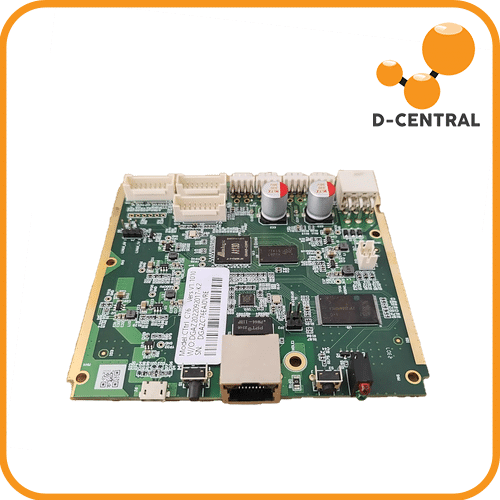
Antminer Amlogic A113d Control Board
The Bitmain Antminer AMlogic A113D Control Board (Ctrl_C76) is the factory replacement control board for a wide range of Antminer S19-series and S21-series SHA-256 miners. When your miner’s control board fails — no network connection, no web interface, hashboards not detected, or a bricked firmware update — this board restores your machine to full operation. Built on the AMlogic A113D processor, this is the same board Bitmain installs at the factory in current-generation aluminum-substrate hashboard miners.Unlike the older BeagleBone-based control boards found in earlier S19 models, the AMlogic A113D platform uses a micro-USB interface for firmware recovery instead of an SD card reader. This is an important distinction for firmware flashing and troubleshooting — if your miner currently has an AMlogic control board, this is the correct replacement. If it has a BeagleBone board (with SD card slot), you need a different part.
D-Central tests every control board before shipment. Our ASIC repair technicians swap these boards regularly and know the compatibility matrix inside and out. If you are unsure which control board your miner needs, contact us with your miner model and serial number and we will confirm the correct part.
Technical Specifications
| Specification | Value |
|---|---|
| Processor | AMlogic A113D |
| Board Model | Ctrl_C76 (also compatible with C81, C83 series) |
| Firmware Recovery | Micro-USB (no SD card reader) |
| Network | Ethernet (RJ45) |
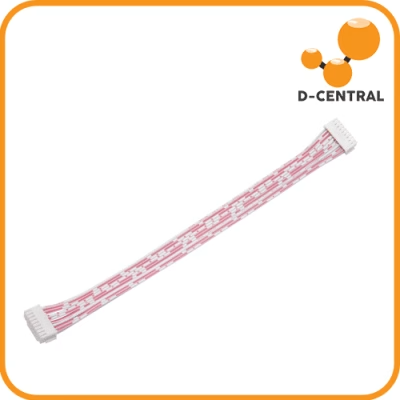
| Hashboard Interface | Ribbon cable connectors for up to 3 hashboards |
| Algorithm Support | SHA-256 (Bitcoin), air-cooled models |
| Hashboard Compatibility | Aluminum substrate hashboards |
| Condition | Tested & verified functional |
| Manufacturer | Bitmain (original OEM part) |
Compatible Miner Models
| Model | Notes |
|---|---|
| Antminer S19 | AMlogic variants (aluminum hashboard) |
| Antminer S19 Pro | AMlogic variants |
| Antminer S19j | AMlogic variants |
| Antminer S19j Pro | Aluminum plate version |
| Antminer S19j Pro+ | AMlogic variants |
| Antminer S19 XP | Air-cooled |
| Antminer S19j XP | Air-cooled |
| Antminer S19k Pro | AMlogic variants |
| Antminer S21 | Air-cooled |
| Antminer S21 Pro | Air-cooled |
| Antminer S21 XP | Air-cooled |
| Antminer T21 | Air-cooled |
| Antminer L9 | Air-cooled |
Important: This control board is designed for miners with aluminum substrate hashboards and the AMlogic processor platform. It is not compatible with older S19-series models that use the BeagleBone control board (identifiable by the presence of an SD card slot). If you are unsure which control board type your miner uses, contact us with your model and serial number.
Key Features
- Original Bitmain OEM part — the same AMlogic A113D control board that ships from the Bitmain factory. Full hardware and firmware compatibility guaranteed with supported models
- Wide model compatibility — covers the S19 family, S21 family, T21, and L9 air-cooled miners with aluminum hashboards, making it one of the most versatile replacement control boards available
- Tested before shipment — every board is verified functional by D-Central technicians to eliminate dead-on-arrival scenarios
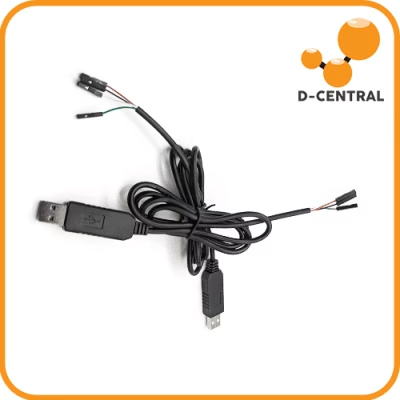
- Micro-USB firmware recovery — if you ever need to reflash firmware, the AMlogic platform uses a micro-USB connection directly to a PC. No SD card adapter, no card reader — just a USB cable
- Plug-and-play installation — disconnect the old board, install the new one, reconnect ribbon cables and Ethernet, power on. No firmware configuration required — the board initializes with default Bitmain firmware and detects your hashboards automatically
Common Control Board Failure Symptoms
You likely need a replacement control board if your miner exhibits any of these symptoms:
- No network connectivity — the miner does not appear on your network, no IP address assigned, Ethernet LEDs not active
- No web interface — you can ping the miner but the web dashboard does not load or returns errors
- Hashboards not detected — the web interface loads but shows 0/3 boards, even though the boards are confirmed functional individually
- Bricked after firmware update — a failed firmware flash left the control board unresponsive. In some cases, this can be recovered via micro-USB reflash; in others, the board needs replacement
- Fans spinning but no hashing — the PSU powers on, fans run, but no hash rate is produced and the control board is unresponsive
- Corrupted eMMC — the on-board storage is damaged, causing boot loops or failure to initialize
Installation
- Power off the miner and disconnect from the PSU completely
- Remove the miner’s top cover
- Disconnect the hashboard ribbon cables (1–3 cables) and Ethernet cable from the old control board
- Unscrew the mounting screws holding the control board in place
- Remove the old control board and install the AMlogic A113D replacement
- Secure with mounting screws
- Reconnect all hashboard ribbon cables and the Ethernet cable
- Reassemble the cover, reconnect the PSU, and power on
- Access the miner via its IP address (check your router’s DHCP table) to verify all hashboards are detected and hashing
The entire process takes approximately 10–15 minutes. If you need professional installation, D-Central’s repair team handles control board swaps as part of our standard repair service.
Frequently Asked Questions
How do I know if my miner uses an AMlogic or BeagleBone control board?
The quickest way is to check for an SD card slot. BeagleBone control boards have a visible SD card reader on the board’s edge. AMlogic A113D boards do not — they use a micro-USB port for firmware recovery instead. Generally, newer production runs of S19-series miners (2022+) and all S21-series models use the AMlogic platform. If in doubt, send us a photo of your current control board or your miner’s serial number.
Will this board come with firmware pre-installed?
Yes. The AMlogic A113D control board ships with Bitmain’s standard firmware on the eMMC storage. Once installed and powered on, it will boot with default Bitmain firmware and begin detecting your hashboards. You can then update to the latest firmware version through the web interface if desired.
Can I install Braiins OS on this board?
Braiins OS compatibility depends on the specific miner model and control board platform. For guaranteed Braiins OS support on S19 series, consider the Braiins BCB 100, which ships pre-installed with Braiins OS and is purpose-built for it. The AMlogic A113D board is designed to run Bitmain’s stock firmware.
My miner was bricked by a firmware update. Can I recover it with a micro-USB reflash?
In some cases, yes. The AMlogic platform supports firmware recovery via a micro-USB cable connected to a PC running Bitmain’s recovery tool. If the eMMC storage is intact but the firmware is corrupted, a USB reflash can restore the board without replacement. If the reflash fails or the eMMC is physically damaged, a full board replacement is the solution. Contact our repair team for diagnosis assistance.
Is this board compatible with immersion-cooled miners?
This listing covers air-cooled SHA-256 miners. Immersion-cooled variants (S21 Imm, S19 XP Hydro, etc.) may use different control board configurations. Contact us with your specific model to confirm compatibility before ordering.
Why D-Central
D-Central Technologies has been diagnosing and replacing Antminer control boards since the S9 era. Our repair facility in Laval, Quebec processes hundreds of miner repairs monthly, and control board failures are among the most common issues we see. We know the difference between an AMlogic board, a BeagleBone board, and a Zynq board because we handle all three. When you order from D-Central, we verify the board works before it ships — no gambling on untested parts from unknown sellers.
We stock replacement parts for the full Antminer lineup because we believe in keeping mining hardware running. A dead control board does not mean a dead miner — it means a $140 fix that restores thousands of dollars of hash power. Every hash counts, and getting your miner back online starts here. Explore our full ASIC repair services.
How do I know if my miner uses an AMlogic or BeagleBone control board?
The quickest way is to check for an SD card slot. BeagleBone control boards have a visible SD card reader on the board’s edge. AMlogic A113D boards do not — they use a micro-USB port for firmware recovery instead. Generally, newer production runs of S19-series miners (2022+) and all S21-series models use the AMlogic platform. If in doubt, send us a photo of your current control board or your miner’s serial number.
Will this board come with firmware pre-installed?
Yes. The AMlogic A113D control board ships with Bitmain’s standard firmware on the eMMC storage. Once installed and powered on, it will boot with default Bitmain firmware and begin detecting your hashboards. You can then update to the latest firmware version through the web interface if desired.
Can I install Braiins OS on this board?
Braiins OS compatibility depends on the specific miner model and control board platform. For guaranteed Braiins OS support on S19 series, consider the Braiins BCB 100, which ships pre-installed with Braiins OS and is purpose-built for it. The AMlogic A113D board is designed to run Bitmain’s stock firmware.
My miner was bricked by a firmware update. Can I recover it with a micro-USB reflash?
In some cases, yes. The AMlogic platform supports firmware recovery via a micro-USB cable connected to a PC running Bitmain’s recovery tool. If the eMMC storage is intact but the firmware is corrupted, a USB reflash can restore the board without replacement. If the reflash fails or the eMMC is physically damaged, a full board replacement is the solution. Contact our repair team for diagnosis assistance.
Is this board compatible with immersion-cooled miners?
This listing covers air-cooled SHA-256 miners. Immersion-cooled variants (S21 Imm, S19 XP Hydro, etc.) may use different control board configurations. Contact us with your specific model to confirm compatibility before ordering.

Avis
Il n’y a pas encore d’avis.