

DCENT_axe — D-Central Technologies
DCENT_axe: Open-Hardware Bitcoin Miner with Onboard LoRa Mesh
An open-hardware Bitcoin micro-miner in the Bitaxe lineage — three board form factors across six ASIC generations, each carrying an onboard SX1262 LoRa mesh radio and running DCENT_OS for ESP. Open hardware (CERN-OHL-S-2.0), open firmware (GPL-3.0). Open hardware in active design — DCENT boards are not shipping yet, but the firmware is real: DCENT_axe 0.3.0 factory images for six Bitaxe-class boards flash from the browser today. Read the source, audit it, and build along with us.
Where DCENT_axe Is Today
DCENT_axe is an in-progress, open-hardware project, not a product you can buy or flash yet. We are publishing it in the open as it comes together. Here is exactly where things stand — no roadmap theatre.
Design Phase
The project is in early design: KiCad board layouts are being drawn, not fabricated. There are no finished boards, no pick-and-place files signed off, and no accepted mining share on the hardware yet. Treat everything here as a work-in-progress spec.
What Exists Now
A public, GPL-3.0 / CERN-OHL-S repository with the hardware direction, and the firmware is now flashable: DCENT_axe 0.3.0 factory images for six Bitaxe-class boards (Gamma, Max, Ultra, Supra, Hex Ultra, Hex Supra) are live in the web flasher. DCENT boards themselves are still in design — if someone tells you DCENT_axe hardware is shipping, they are ahead of the truth.
How to Follow
Watch the repository, read the commits, open an issue, or join the Discord. This is built in the open so you can check our work — and, if you want, fork it and build your own.
What Is DCENT_axe?
DCENT_axe is D-Central’s open-hardware Bitcoin micro-miner — a complete board family in the Bitaxe lineage, not just another firmware fork. It is a salvaged-ASIC-friendly home miner, a solo / lottery-mining space heater, and — the part we care most about — a mesh node. Every board carries an onboard SX1262 LoRa radio, and every board runs the open-source DCENT_OS for ESP firmware.
Open Hardware
KiCad board designs across three form factors and six ASIC generations of the Bitaxe family, from current BM1370-class silicon down to salvaged chips pulled from decommissioned industrial miners. Licensed CERN-OHL-S-2.0 — the same strongly-reciprocal license as the original Bitaxe.
Open Firmware
The boards run DCENT_OS for ESP, our Rust firmware for ESP32-class miners: an AxeOS-compatible API surface, autotuning, a Stratum V2 track, and optional MCP-based AI control. GPL-3.0, developed in the open.
Onboard Mesh
An SX1262 LoRa radio on every board, plus a universal accessory connector. Off-grid telemetry, block beacons, and owner-authenticated control that keep working when the internet does not. This is the layer D-Central adds on top of the Bitaxe foundation.
Standing on the Shoulders of Giants
DCENT_axe is roughly ninety percent other people’s brilliant work, and we are not shy about saying so. The open-source Bitaxe ecosystem did the hard part. Our contribution is the last ten percent — the mesh layer and a few hardware flavours we thought the lineage was missing.
Skot & the Bitaxe
Skot9000 (Skot Croshere) designed the Bitaxe — the world’s first fully open-source ASIC Bitcoin miner — and gave it away under CERN-OHL-S. Every DCENT_axe board is a descendant of that work. There is no DCENT_axe without the Bitaxe.
OSMU & ESP-Miner
The Open Source Miners United (OSMU) community and the ESP-Miner / AxeOS project published the drivers, register maps, and web tooling that make an ESP32 talk to a Bitmain ASIC. Our firmware learns directly from their reference work.
Meshtastic & LoRa
The mesh layer stands on Meshtastic (Kevin Hester and contributors), the LoRa physical layer from Semtech’s SX1262, and the wider open mesh community. We are wiring a proven radio stack onto a proven miner — not inventing either.
The Hardware: Three Form Factors, Six Generations
The board family spans the Bitaxe lineage, so you can build around new silicon or salvage a chip from a dead industrial miner. The table below is the design target while layout is finalized — ASIC support and specs will be confirmed against real, fabricated boards, not a spreadsheet.
| ASIC Generation | Bitaxe Reference | Onboard Mesh | Design Status |
|---|---|---|---|
| BM1370 (S21-class) | Gamma / Gamma Turbo | SX1262 LoRa | In design |
| BM1368 (S21-derived) | Supra | SX1262 LoRa | In design |
| BM1366 (S19XP-derived) | Ultra | SX1262 LoRa | In design |
| BM1397 (S17-class) | Max / early Bitaxe | SX1262 LoRa | In design |
| Salvaged industrial ASICs | Community boards | SX1262 LoRa | Exploratory |
| Universal accessory connector | All boards | — | Design target |
Three physical form factors will cover this range; exact per-board specs, hashrate, and power are being validated as boards move from layout to prototype.
Onboard LoRa Mesh: Every Miner a Relay
This is the ten percent that is ours. Bitcoiners and mesh operators are chasing the same thing on different layers — a network no single company can switch off. So we put a radio on the miner.
Off-Grid Telemetry
Read hashrate, temperature, and health over LoRa when there is no WiFi and no internet — a solar cabin, a remote shed, a grid-down day. The miner reports for itself.
Block Beacons
Solo and lottery miners can beacon a found block across the mesh. A little theatre for a rare event — and a genuinely useful signal where connectivity is thin.
Owner-Authenticated Control
Send signed commands to your own miner over the mesh. Because every board is also a relay, a room full of DCENT_axe units becomes local mesh infrastructure — not just heaters.
Bitcoin decentralizes money; mesh decentralizes the network under it. Turning every miner into a relay is simply one more layer decentralized. That is the whole idea — nothing grander, and nothing less.
The Firmware: DCENT_OS for ESP
DCENT_axe does not ship its own separate firmware. The boards run DCENT_OS for ESP — the ESP32 member of the DCENT_OS family, our GPL-3.0 Rust mining firmware. Same project, same values, from an S9 in the basement to a Bitaxe on the desk.
- AxeOS-compatible API — a familiar surface so existing Bitaxe tooling and dashboards keep working.
- Autotuning — hashrate, efficiency, watt, and temperature targets, calculated at runtime rather than pulled from a preset table.
- Stratum V2 track — in development, following the path BraiinsOS+ pioneered for the protocol.
- Optional MCP AI control — expose the miner to a local AI agent over the Model Context Protocol, if you want it; entirely opt-in.
- Mesh integration — the firmware speaks to the onboard SX1262, so telemetry and control ride the LoRa layer natively.
How It Fits the Bitaxe Ecosystem
A stock Bitaxe running AxeOS is an excellent miner, full stop. DCENT_axe is not a replacement for it — it is another point on the map for people who want an onboard mesh radio and the DCENT_OS firmware. More open options for the same silicon is more decentralization, which is the point.
| Dimension | Stock Bitaxe + AxeOS | DCENT_axe (design target) |
|---|---|---|
| Hardware license | CERN-OHL-S-2.0 (open) | CERN-OHL-S-2.0 (open) |
| Firmware | AxeOS (C) | DCENT_OS for ESP (Rust), GPL-3.0 |
| Onboard radio | WiFi | WiFi + SX1262 LoRa mesh |
| Accessory connector | Board-dependent | Universal connector (design target) |
| AI control | — | Optional MCP, opt-in |
| Salvaged-ASIC boards | Community variants | Part of the design brief |
| Maturity | Shipping, 100k+ deployed | In design, no boards yet |
Roadmap
Hardware moves at the speed of hardware. We would rather ship a board that works than a date that slips.
Phase 1 — Design (now)
KiCad layout across the three form factors; SX1262 mesh integration; DCENT_OS-for-ESP firmware bring-up. Everything public, everything reviewable.
Phase 2 — Prototype
First fabricated boards, bring-up, and the first accepted share on real hardware. Validate specs, mesh range, and thermals against the design targets above.
Phase 3 — Public Beta
Published board files, a firmware image track, and build docs, targeted for the wider DCENT public-beta window in 2026 — an estimate, not a promise.
Build It Yourself, or Follow Along
Open hardware means you never have to wait for us or trust us. The board files are CERN-OHL-S-2.0; the firmware is GPL-3.0. Read it, fork it, improve it, or just watch it come together.
- Repository: github.com/DCentralTech/DCENT_axe — hardware direction, docs, and issues.
- Firmware: the DCENT_OS family, GPL-3.0, public on GitHub; flash it from the web flasher.
- Sibling project: DCENT_Raven retrofits the same LoRa mesh onto any existing Bitaxe via the accessory port — DCENT_axe builds it in.
- Honest expectations: firmware 0.3.0 flashes existing Bitaxe-class boards today via the web flasher; DCENT boards themselves are still in design and releasing soon — not yet a purchase.
- Get involved: join the Discord to follow the build, ask questions, or contribute.
Frequently Asked Questions
Is DCENT_axe hardware or firmware?
Both, but primarily it is open hardware — a family of Bitaxe-lineage miner boards with an onboard LoRa mesh radio. The firmware those boards run is DCENT_OS for ESP, a separate project in the DCENT_OS family.
Can I buy one or flash one today?
Not the boards, not yet — DCENT_axe hardware is in design and boards are releasing soon. The firmware side is live today: DCENT_axe 0.3.0 factory images for six Bitaxe-class boards (Gamma, Max, Ultra, Supra, Hex Ultra, Hex Supra) flash straight from the browser at d-central.tech/flash. If you already own a Bitaxe, you can run the firmware now.
What is the onboard LoRa mesh for?
Off-grid telemetry, block beacons, and owner-authenticated control that keep working without the internet — and, because every board is also a relay, turning a fleet of miners into local mesh infrastructure. It is the main thing D-Central adds to the Bitaxe design.
Which ASICs will it support?
The design targets six ASIC generations of the Bitaxe lineage — BM1370, BM1368, BM1366, and BM1397-class chips, plus salvaged industrial ASICs — across three physical form factors. Exact support is confirmed as boards are fabricated and tested.
What license is it under?
The hardware is CERN-OHL-S-2.0 (strongly-reciprocal open hardware); the firmware is GPL-3.0. Both are free to read, build, and fork.
Is this a fork of the Bitaxe?
It descends from the Bitaxe and honors its open-hardware license, but it is a complete D-Central board family with its own mesh layer and firmware — not a rebadged single board. We build on the Bitaxe; we do not claim to have created it.
Who builds DCENT_axe?
D-Central Technologies — but roughly ninety percent of what makes it possible is the work of Skot9000, the OSMU community, and the Meshtastic and LoRa ecosystems. Our part is the mesh integration and a few hardware flavours. We are Bitcoin mining hackers building in the open, not a factory shipping a black box.
Open-Source Bitaxe Miners in the Shop

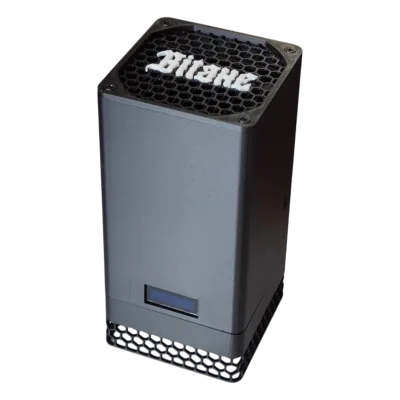
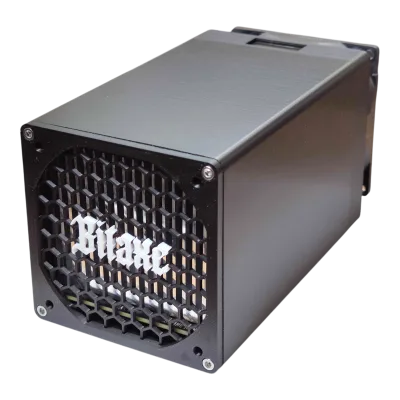


Related products, repair, and setup paths
- how D-Central diagnoses ASIC repairs
- ASIC troubleshooting library
- ASIC manuals and repair guides
- replacement hashboards
- ASIC control boards
- ASIC power supplies
- S19 family replacement hashboard
- C52 replacement control board
- APW12 S19 power supply
- immersion cooling hub
- home immersion cooling guide
- ASIC miners for immersion planning
- ASIC cooling parts
- airflow shroud before immersion
- compare miner specs in the database
- ASIC repair support
- Antminer S19 specs and profitability
- buy a tested Antminer S19
- Antminer S19 maintenance guide
- Antminer S19 repair service
- Antminer S21 specs
- Bitmain Antminer S21
- Antminer S21 maintenance guide
- BM1370BC S21 Pro chip
- Antminer S9 specs
- Bitmain Antminer S9
- Antminer S9 maintenance guide
- S9 hashboard repair parts bundle
Last reviewed July 10, 2026.