
Description
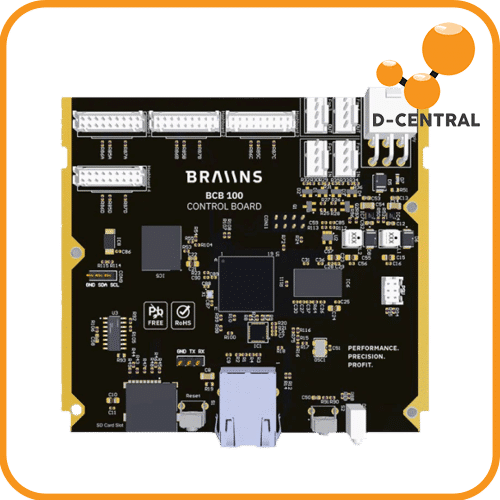
Braiins Bcb 100
The Braiins BCB 100 is an aftermarket control board for the Bitmain Antminer S19 series that ships pre-installed with Braiins OS — the most advanced open-source firmware in Bitcoin mining. Drop it into your S19 or S19j Pro, power on, and you immediately unlock autotuning, per-chip optimization, advanced monitoring, and significantly improved efficiency without touching a single firmware file. This is a hardware upgrade that replaces Bitmain’s stock control board entirely.Built on an STM32MP157C dual-core Cortex-A7 processor running at 650 MHz with a Cortex-M3 coprocessor, 128 MB operating memory, and 4 GB eMMC storage, the BCB 100 is a purpose-built Linux computer designed for one job: extracting maximum performance from your S19 hashboards. The 6-layer PCB with dedicated data and power planes ensures signal integrity under continuous operation. Ethernet connectivity via a 10/100 Mbps PHY keeps your miner on the network with rock-solid reliability.
Braiins OS autotuning analyzes each individual ASIC chip on your hashboards and finds the optimal voltage and frequency for maximum efficiency — something Bitmain’s stock firmware cannot do. The result: more hash per watt, lower power bills, longer hardware lifespan, and a miner that runs the way it should. D-Central sells the BCB 100 because we believe miners should control their own hardware. Our team installs these boards regularly and can help you through the upgrade.
Technical Specifications
| Specification | Value |
|---|---|
| Processor | STM32MP157C/F — dual-core ARM Cortex-A7 @ 650 MHz + Cortex-M3 coprocessor |
| Operating Memory | 128 MB (Micron) |
| Storage | 4 GB eMMC (Alliance Memory) |
| Ethernet | 10/100 Mbps Ethernet PHY |
| PCB | 6-layer (4 data layers + 2 power/ground layers) |
| Pre-installed Firmware | Braiins OS (open-source, autotuning-enabled) |
| Form Factor | Direct replacement for Bitmain S19-series control boards |
| Manufacturer | Braiins |
| Open Source | Yes — hardware schematics available on GitHub |
| Installation | Swap old control board → connect ribbon cables → power on |
Compatible Models
| Model | Status |
|---|---|
| Antminer S19 | Supported |
| Antminer S19 Pro | Supported |
| Antminer S19j | Supported |
| Antminer S19j Pro | Supported |
| Antminer S19 XP | In development |
| Antminer S19j Pro+ | In development |
| Antminer S19k Pro | In development |
| S19 Hydro models | Not compatible |
Note: Some early S19 models with BM1398 chips on Zynq control boards may not be fully supported yet. Check the Braiins compatibility page for the latest status if you have an older unit.
Key Features
- Braiins OS pre-installed — no firmware flashing, no SD card preparation, no SSH. Swap the board, plug in Ethernet, power on, and Braiins OS boots automatically with autotuning ready
- Autotuning per chip — Braiins OS individually profiles each ASIC chip on your hashboards and adjusts voltage and frequency for optimal efficiency. This typically yields 10–20% better efficiency compared to stock firmware
- Open-source hardware and firmware — the BCB 100 schematics are published on GitHub. The firmware is open-source. You can audit every line of code running on your mining hardware. No black boxes, no locked-down binaries. Sovereignty over your silicon.
- Drop-in replacement — physically designed to be a direct swap for the Bitmain stock control board. Disconnect the old board, connect the BCB 100, reconnect your hashboard ribbon cables and Ethernet, and power on. No modifications required.
- Advanced monitoring — detailed per-chain and per-chip stats, power consumption data, temperature monitoring, and hashrate graphs through the Braiins OS web dashboard
- Pool management — built-in support for multiple pool configurations with failover, plus native integration with Braiins Pool for enhanced payouts
Why Upgrade from Stock Firmware
Bitmain’s stock firmware runs your S19 at fixed frequencies and voltages — a one-size-fits-all configuration that leaves performance and efficiency on the table. Every ASIC chip is slightly different due to manufacturing variance (the « silicon lottery »). Braiins OS autotuning exploits this variance by finding the sweet spot for each individual chip.
The practical results:
- Higher efficiency (J/TH) — more hash per watt means lower electricity costs for the same output
- Underclock for savings — dial back power consumption while maintaining proportionally higher hash rate than stock
- Overclock for performance — push your hashboards beyond stock frequency with automatic voltage optimization
- Longer hardware lifespan — optimized voltages reduce thermal stress on ASIC chips
- Complete transparency — know exactly what software is running on your miner, because you can read the source code
Installation
- Power off the miner and disconnect from the PSU
- Remove the top cover of the miner enclosure
- Disconnect the hashboard ribbon cables and Ethernet cable from the old Bitmain control board
- Unscrew and remove the stock control board
- Install the BCB 100 in the same position and secure with screws
- Reconnect the hashboard ribbon cables and Ethernet cable
- Reassemble the enclosure, reconnect the PSU, and power on
- Access the Braiins OS dashboard via your miner’s IP address in a web browser
The swap takes approximately 10–15 minutes. If you want professional installation, D-Central’s repair team can handle the upgrade for you.
Frequently Asked Questions
Can I go back to Bitmain stock firmware after installing the BCB 100?
The BCB 100 is a physical hardware replacement — it is not a firmware flash. To revert, simply swap the BCB 100 out and reinstall your original Bitmain control board. Your hashboards are unmodified throughout the process. Keep your original control board as a backup.
Does the BCB 100 void my Bitmain warranty?
Replacing the control board may affect your Bitmain warranty depending on the terms of your specific purchase. However, most S19 units in the field are well past their original warranty period. The BCB 100 is designed for miners who want to take full control of their hardware performance rather than accept stock limitations. The hashboards themselves are untouched.
How much efficiency improvement can I expect?
Typical results with Braiins OS autotuning on S19-series hardware show 10–20% efficiency improvement (measured in J/TH) compared to stock firmware. The exact improvement depends on your specific hashboards and the silicon quality of your ASIC chips. Some boards respond better to autotuning than others — the silicon lottery applies.
Do I need to use Braiins Pool with this board?
No. While Braiins OS integrates natively with Braiins Pool, you can configure any Stratum-compatible mining pool. The BCB 100 and Braiins OS work with whatever pool you choose — Ocean, Demand Pool, F2Pool, or your own solo mining setup.
Is the BCB 100 itself open source?
Yes. The hardware schematics are published on Braiins’ GitHub repository. The firmware (Braiins OS) is also open-source. This level of transparency is rare in mining hardware and reflects the cypherpunk values that Braiins shares with the broader Bitcoin mining community.
Why D-Central
D-Central Technologies has been upgrading, modifying, and hacking ASIC miners since 2016. We are Bitcoin mining hackers — taking institutional-grade hardware and making it work better for the individual miner. The Braiins BCB 100 is exactly aligned with that mission: open-source hardware that gives you control over your mining operation.
We stock the BCB 100 in Canada and our repair team can install it for you if you prefer professional service. We also carry replacement hashboards, control boards, and parts for the full S19 lineup, so whether you are upgrading firmware, swapping a dead board, or building a space heater, we have the hardware and the expertise to make it happen.
Every hash counts — and with Braiins OS autotuning, every hash becomes more efficient. Take control of your miner. Explore our full ASIC repair and upgrade services.
Can I go back to Bitmain stock firmware after installing the BCB 100?
The BCB 100 is a physical hardware replacement — it is not a firmware flash. To revert, simply swap the BCB 100 out and reinstall your original Bitmain control board. Your hashboards are unmodified throughout the process. Keep your original control board as a backup.
Does the BCB 100 void my Bitmain warranty?
Replacing the control board may affect your Bitmain warranty depending on the terms of your specific purchase. However, most S19 units in the field are well past their original warranty period. The BCB 100 is designed for miners who want to take full control of their hardware performance rather than accept stock limitations. The hashboards themselves are untouched.
How much efficiency improvement can I expect?
Typical results with Braiins OS autotuning on S19-series hardware show 10–20% efficiency improvement (measured in J/TH) compared to stock firmware. The exact improvement depends on your specific hashboards and the silicon quality of your ASIC chips. Some boards respond better to autotuning than others — the silicon lottery applies.
Do I need to use Braiins Pool with this board?
No. While Braiins OS integrates natively with Braiins Pool, you can configure any Stratum-compatible mining pool. The BCB 100 and Braiins OS work with whatever pool you choose — Ocean, Demand Pool, F2Pool, or your own solo mining setup.
Is the BCB 100 itself open source?
Yes. The hardware schematics are published on Braiins’ GitHub repository. The firmware (Braiins OS) is also open-source. This level of transparency is rare in mining hardware and reflects the cypherpunk values that Braiins shares with the broader Bitcoin mining community.

Avis
Il n’y a pas encore d’avis.