
Description
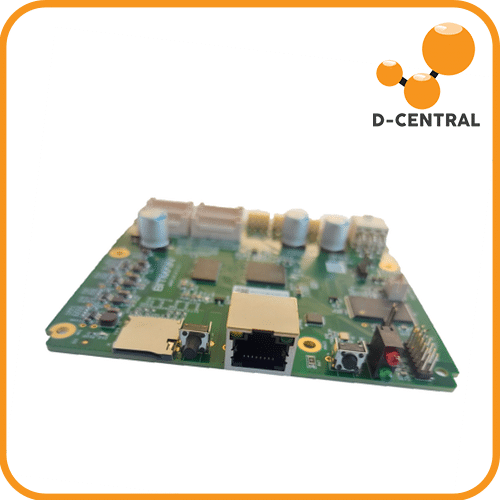
The Bitmain Xilinx 7007 Zync Control Board (Ctrl_C87) is a genuine replacement control board for a wide range of Antminer models. This board serves as the brain of your ASIC miner, managing hashboard communication, network connectivity, firmware execution, and pool configuration. If your miner’s original control board has failed, this direct replacement gets you back to hashing without replacing the entire machine.
| Specification | Details |
|---|---|
| Model | Ctrl_C87 (Xilinx Zynq 7007) |
| Chipset | Xilinx Zynq-7007S SoC |
| Manufacturer | Bitmain (OEM original) |
| Connectivity | Ethernet, hashboard data connectors |
| Condition | Refurbished / Tested |
Compatible Antminer Models
- Antminer S19
- Antminer S19 Pro
- Antminer T19
- Antminer S19j
- Antminer S19j Pro
- Antminer S19k Pro
- Antminer S19 XP
- Antminer L7
- Antminer D7
The Brain of Your Miner
The control board manages every aspect of your miner’s operation: it communicates with all three hashboards, handles network connectivity for pool configuration, runs the firmware (stock or custom like BraiinsOS/LuxOS), and monitors temperatures and fan speeds. When a control board fails, the entire miner goes offline — even if the hashboards and PSU are perfectly fine.
Direct Drop-In Replacement
The Ctrl_C87 is a direct replacement for the original control board in the compatible models listed above. No modifications, no adapters, no firmware changes needed. Remove the failed board, install this one, configure your pool settings, and your miner is back online.
Wide Model Coverage
This single control board revision covers the entire S19 family (S19, S19 Pro, S19j, S19j Pro, S19k Pro, S19 XP), the T19, and Bitmain’s Scrypt and X11 miners (L7, D7). This broad compatibility makes it an essential spare part for anyone running multiple Antminer models.
What’s Included
- 1x Bitmain Xilinx 7007 Zync Control Board (Ctrl_C87)
Frequently Asked Questions
How do I know if my control board is the problem?
Common symptoms of a failed control board include: miner not appearing on the network, miner booting but not detecting any hashboards, firmware corruption that persists after reflashing, and no response at all when powered on (with a confirmed working PSU). D-Central’s repair team can help diagnose remotely if you are unsure.
Will this work with custom firmware like BraiinsOS or LuxOS?
Yes. The Ctrl_C87 is the same hardware used in the original miners and is fully compatible with both stock Bitmain firmware and popular third-party firmware like BraiinsOS, LuxOS, and VNish.
What is the difference between Ctrl_C87 and Ctrl_C49?
Both are Xilinx Zynq-based control boards from Bitmain, but they are designed for different model generations. The C87 is the newer revision covering the S19 series and newer models. The C49 covers earlier models. Make sure to match the correct board to your miner model.
Does D-Central test these boards before shipping?
Yes. Every control board is tested in our workshop before it ships. We verify network connectivity, hashboard detection, and firmware boot to ensure you receive a working part.
Why Buy from D-Central?
D-Central Technologies stocks genuine Bitmain replacement parts and tests every board before it leaves our facility. Our ASIC repair team has been diagnosing and fixing Antminers since 2016 — we know which parts fail, why they fail, and how to get you back online fast. Every hash counts.

Avis
Il n’y a pas encore d’avis.