
Description
Overview
Miner down and you don’t know what to do?
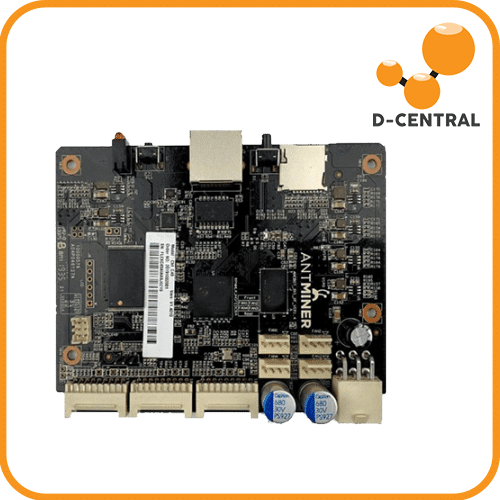
We know that when your mining machine is down, it feels like the world has come to an end. But we’re here to help – with our Replacement Control Board C49 for Antminer S17/S17PRO/T17, you can get your miner back up and running in no time.
Not only do we have the best replacement control boards in the business, but we also have a team of experts who are available 24/7 to help you get your miner back up and running. So don’t lose any more time and purchase a Replacement Control Board C49 for Antminer S17/ S17PRO / T17 today!. Built and shipped by D-Central Technologies, Canada’s leading Bitcoin mining experts since 2016.
Specifications
| Specification | Value |
|---|---|
| Weight | 135 g |
| Dimensions | 15 x 15 x 8 cm |
| SKU | DC-CTRL-BITMAXILIN2 |
Features
- Genuine replacement component for ASIC mining hardware
- Inspected and tested by D-Central ASIC repair technicians
- Compatible with specified miner models
- Extends the working life of your mining equipment
- Technical support available from our repair team
What’s Included
- 1x Bitmain Xilinx 7007 Zync Control board Ctrl_C49
Compatibility
Verify compatibility with your specific miner model and revision before ordering. D-Central repair technicians can help confirm compatibility — reach out via our support channels.
Frequently Asked Questions
How do I know if this part is compatible with my miner?
Check the compatibility section and specifications above for supported models. If your model is not listed or you are unsure, contact D-Central support — our repair technicians can confirm compatibility.
Can I install this part myself?
Some replacement parts are straightforward to install (fans, cables). Others like hashboards and control boards require technical knowledge. D-Central offers repair services if you prefer professional installation.
Is this a new or refurbished part?
Check the product description for condition details. All parts sold by D-Central are tested by our ASIC repair technicians before shipping, regardless of condition.
What if the part does not fix my problem?
Contact D-Central support. Our repair team can help diagnose the actual issue. Sometimes the root cause is different from what it appears. We offer full ASIC repair services if needed.
Why D-Central?
D-Central Technologies has been serving the Bitcoin mining community since 2016. Every product we sell is tested, and backed by our expert ASIC repair team. Ships from Canada with tracking.

Avis
Il n’y a pas encore d’avis.