If you have ever fired up an Antminer T19 in a spare bedroom and watched your family reach for ear protection within thirty seconds, you already understand the single biggest barrier to home mining: noise and heat management. The T19 pushes 75 dB of fan roar and dumps over 3 kW of thermal energy into whatever room it occupies. Without a plan, that is a recipe for domestic revolt — or worse, throttled hashboards and premature hardware failure.
The AC Infinity CLOUDLINE T4 inline duct fan is one of the most effective tools a home miner can deploy to tame that chaos. At 28 dBA and 205 CFM of directed airflow, it transforms a loud, overheating closet into a controlled exhaust system that actually works. This guide breaks down exactly how to pair these two pieces of hardware, why it matters for your hashrate and hardware longevity, and the configuration details you need to get it right.
Why Thermal Management Is Non-Negotiable for ASIC Miners
Every watt your ASIC consumes becomes heat. The Antminer T19 draws approximately 3,150 W at the wall, and every single watt of that eventually radiates as thermal energy. The onboard fans are designed for open-rack datacenter environments with engineered airflow — not a spare room in your house in Montreal or Calgary.
When ambient temperature around the miner climbs above 35°C, several things happen simultaneously:
- Hashrate drops. Bitmain firmware throttles clock speeds to protect the BM1398 chips. You paid for 84 TH/s and you are getting 70.
- Power efficiency degrades. Higher chip junction temperatures increase leakage current. Your J/TH ratio climbs from 37.5 toward 42+, meaning you burn more electricity per hash.
- Hardware lifespan shortens. Sustained thermal stress accelerates electromigration in ASIC dies and degrades solder joints on hashboards. This is how miners end up needing ASIC repair services years earlier than necessary.
- Fan bearings wear faster. The stock fans spin harder trying to compensate, burning out their own bearings in the process.
The solution is not more cooling inside the room. The solution is moving heated exhaust air out of the room entirely and replacing it with cooler ambient air. That is exactly what an inline duct fan does — and it does it quietly.
Antminer T19: Specs That Matter for Home Mining
The Antminer T19 uses the same generation of BM1398 custom ASIC chips found in the S19 and S19 Pro. It is a proven, reliable workhorse — and one of the most commonly deployed miners in home setups because of its balance between hashrate, efficiency, and availability on the secondary market.
| Specification | Antminer T19 |
|---|---|
| Algorithm | SHA-256 (Bitcoin) |
| Hashrate | 84 TH/s (±3%) |
| Power Efficiency | 37.5 J/TH (±5%) |
| Wall Power | ~3,150 W |
| Noise Level | 75 dB |
| Operating Temp Range | 5–40°C |
| ASIC Chip | BM1398 (same gen as S19/S19 Pro) |
| Dimensions | 195 × 290 × 400 mm |
| Weight | 14.2 kg |
At 75 dB, the T19 is roughly equivalent to a vacuum cleaner running continuously. In a Canadian basement with the door closed, that is manageable. In a spare bedroom on the main floor, it is a non-starter without intervention.
AC Infinity CLOUDLINE T4: Why Home Miners Love This Fan
The CLOUDLINE T4 was originally designed for hydroponic grow tents — another community that needs to move large volumes of air quietly through ducted systems. Home miners quickly discovered it works brilliantly for ASIC exhaust. The mixed-flow impeller design and PWM-controlled EC motor deliver serious airflow at a whisper.
| Specification | CLOUDLINE T4 |
|---|---|
| Duct Size | 4 inches (100 mm) |
| Airflow | 205 CFM |
| Noise Level | 28 dBA |
| Power Draw | 68 W |
| Motor Type | PWM-controlled EC motor |
| Smart Controller | Temp/humidity programming, timer, alarms |
| App Control | Bluetooth (AC Infinity app) |
| Dimensions | 6.9 × 11.9 × 7.4 in |
| Weight | 14.2 lbs (6.4 kg) |
The key number is that 28 dBA noise floor. That is quieter than a whisper. When paired with a shroud or duct adapter on the T19’s exhaust side, the CLOUDLINE T4 pulls hot air directly out of the miner and pushes it through insulated ducting to a window vent, dryer vent, or dedicated wall port. The miner’s own fans can run at lower RPM because back-pressure drops — which further reduces noise.
Installation: Step-by-Step Duct Configuration
This is not complicated, but doing it right makes a meaningful difference in performance. Here is the setup that works.
What You Need
- AC Infinity CLOUDLINE T4 (4-inch model)
- 4-inch insulated flexible ducting (6-10 feet)
- Duct clamps (2-4, depending on run length)
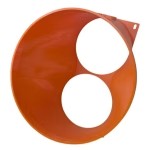
- ASIC shroud or duct adapter for the T19 exhaust side (D-Central carries universal ASIC shrouds that fit most Antminer models)
- Window vent kit, dryer vent, or dedicated wall exhaust port
- Aluminum foil tape for sealing joints
Step 1: Plan Your Airflow Path
The T19 pulls cool air in from the front and blasts hot exhaust out the back. Your duct system attaches to the exhaust side. Route the ducting to the nearest exterior wall or window with as few bends as possible — every 90-degree turn costs you approximately 15% of effective CFM.
Step 2: Attach the Shroud
Mount the shroud or duct adapter onto the T19’s exhaust fans. A proper shroud creates a sealed transition from the miner’s rectangular exhaust to a round 4-inch duct opening. This is the most critical joint in the system — air leaks here mean hot air recirculating into the room instead of going outside.
Step 3: Run the Ducting
Connect the insulated ducting from the shroud to the CLOUDLINE T4 intake. Keep the run as short and straight as possible. Use duct clamps at every connection point and seal with aluminum foil tape. Insulated ducting prevents condensation in Canadian winters when you are exhausting 50°C+ air through an unheated space.
Step 4: Mount the CLOUDLINE T4
The fan mounts on the wall or ceiling using the included hardware. Position it near the exterior exhaust point. Connect the final duct run from the fan output to your window vent or wall port.
Step 5: Configure the Smart Controller
This is where the CLOUDLINE T4 earns its keep. Program the smart controller to:
- Temperature trigger: Set the fan to ramp up when intake air exceeds 30°C and run at maximum above 35°C.
- Humidity alarm: Set an alert above 70% RH — Canadian basements can get damp, and moisture plus ASIC electronics is a bad combination.
- Timer schedule: If you are on time-of-use electricity pricing (common in Ontario and Quebec), schedule the miner and fan together during off-peak hours.
Pair the fan with the AC Infinity Bluetooth app for remote monitoring. You can check exhaust temperatures and fan speed from your phone without walking into the mining room.
Performance Impact: Before and After
Here is what changes when you add a proper duct exhaust system to a T19 running in a typical Canadian home setup:
| Metric | Without Exhaust Duct | With CLOUDLINE T4 Exhaust |
|---|---|---|
| Room Temperature | 40–50°C+ | 25–32°C |
| Sustained Hashrate | 65–78 TH/s (thermal throttling) | 82–84 TH/s (full rated) |
| Perceived Noise in Room | 75 dB (deafening) | 50–55 dB (significant reduction) |
| ASIC Chip Temp | 85–95°C (danger zone) | 65–75°C (healthy range) |
| Hardware Lifespan | Shortened (2–3 years) | Extended (4–5+ years) |
The noise reduction deserves special attention. The T19’s onboard fans are the primary noise source. When exhaust air is pulled away efficiently by the inline duct fan, the miner’s firmware detects lower exhaust temperatures and reduces fan RPM. You are not just adding a quiet fan — you are enabling the miner itself to run quieter.
Canadian Home Mining: Why This Setup Makes Even More Sense Up North
If you are mining in Canada, you have a structural advantage that most miners in warmer climates do not: cold ambient air for most of the year. During Canadian winters, outside air at -10°C to -25°C is essentially free cooling. A ducted exhaust system paired with a fresh air intake vent turns your mining room into a flow-through cooling system with near-zero cooling costs from October through April.
Even better — that 3,150 W of heat output from the T19 is not wasted. It is heating your home. Miners across Quebec, Ontario, and the Prairies are running ASICs as supplemental space heaters during the heating season, offsetting natural gas or electric baseboard costs while simultaneously stacking sats. D-Central’s Bitcoin Space Heaters are purpose-built for this dual-use approach, but even a standard T19 with proper ducting accomplishes the same principle.
In summer, the CLOUDLINE T4’s smart controller becomes essential — ramping airflow to maximum as ambient temperatures climb, keeping your miner within its operating envelope even during July heat waves.
Scaling Up: Multiple Miners, Larger Fans
The CLOUDLINE T4 at 205 CFM is well-suited for a single Antminer T19 or similar-class ASIC. If you are running two or three miners, consider stepping up to the CLOUDLINE T6 (6-inch, 402 CFM) or T8 (8-inch, 807 CFM). The same integration principles apply — shroud, insulated duct, inline fan, exterior exhaust.
For larger home mining operations (4+ ASICs), you are entering territory where D-Central’s mining consulting services can help design a proper ventilation and electrical layout. Getting the airflow engineering right at scale prevents the cascading thermal problems that turn a profitable operation into a repair bill.
Common Mistakes to Avoid
- Using uninsulated ducting in cold climates. Condensation will form inside the duct where hot exhaust meets cold exterior air. Water + running electronics = disaster. Always use insulated ducting or wrap standard ducting with pipe insulation.
- Too many bends in the duct run. Every 90-degree bend significantly reduces effective CFM. Plan the shortest, straightest path possible.
- Exhausting into an enclosed space. Venting into an attic or crawl space without an exterior exit just moves the heat problem. Always vent to the outside.
- Ignoring fresh air intake. If you are pulling air out of the room, air needs to come back in. A passive intake vent (louvered or filtered) on the opposite wall from the miner’s intake side completes the airflow circuit.
- Skipping the shroud. Without a sealed shroud adapter on the miner’s exhaust, much of the hot air recirculates. The shroud is not optional — it is what makes the entire duct system effective.
Maintenance Schedule
Keep the system running at peak performance with regular maintenance:
- Monthly: Check duct connections for loosening. Inspect the CLOUDLINE T4 impeller for dust buildup. Clean or replace intake filters if used.
- Quarterly: Blow out the Antminer T19 with compressed air. Check the shroud seal. Verify smart controller calibration against a standalone thermometer.
- Annually: Full teardown cleaning of both the miner and the fan. Inspect ducting for damage, mold, or blockage. Replace any degraded aluminum tape seals.
If your T19 develops hashboard issues, thermal cycling problems, or chip errors despite proper cooling, D-Central’s ASIC repair team has serviced thousands of Antminer units since 2016. We diagnose at the chip level — replacing individual BM1398 ASICs, reflowing solder joints, and testing hashboards on our bench before shipping them back.
The Bigger Picture: Home Mining and Decentralization
Every home miner running a T19 in their basement is a node of resistance against mining centralization. When hashrate concentrates in a handful of large industrial facilities, the Bitcoin network becomes vulnerable to regulatory capture, geographic disruption, and single points of failure. Every hash you contribute from your home — whether it is 84 TH/s from a T19 or 1.2 TH/s from a Bitaxe — pushes back against that concentration.
D-Central has been building tools for exactly this mission since 2016. From open-source solo miners like the Bitaxe to full ASIC repair services that keep older hardware running instead of ending up in landfills, everything we do is aimed at putting hashrate in the hands of individuals. A quiet, well-cooled T19 in your basement is not just a money printer — it is a vote for a more resilient Bitcoin network.
FAQ
Can a single CLOUDLINE T4 handle the heat output of an Antminer T19?
Yes. The T19 outputs approximately 3,150 W of heat, and the CLOUDLINE T4’s 205 CFM airflow is sufficient for a single unit in a room with adequate fresh air intake. For rooms with poor ventilation or ambient temperatures above 35°C, you may want to supplement with a passive intake vent or step up to the T6 model.
Does the inline duct fan reduce noise from the Antminer T19?
Significantly. The direct noise reduction comes from moving the loudest component (hot exhaust air) out of the room through ducting. The indirect reduction is even more impactful — when exhaust temperatures drop, the T19’s firmware reduces onboard fan RPM. Typical perceived noise reductions of 20-25 dB in the mining room are achievable with a properly sealed duct system.
Will this setup work in Canadian winter conditions?
Canadian winters are actually ideal. Sub-zero outside air provides free cooling, and the T19’s heat output offsets your home heating costs. The critical detail is using insulated ducting to prevent condensation where hot exhaust meets cold exterior air. A drip loop at the exterior exhaust point is also recommended.
Can I use this exhaust heat to warm my home?
Absolutely — this is dual-purpose mining in action. During the heating season, route the T19’s exhaust through a longer duct run within your home’s living space before venting outside, or use a diverter valve to redirect warm air into the room when heating is desired. D-Central’s Bitcoin Space Heaters are purpose-built for this concept, integrating the miner into a heating appliance form factor.
What size duct fan do I need for multiple ASICs?
For two miners, the CLOUDLINE T6 (6-inch, 402 CFM) is the minimum. For three or four, use the T8 (8-inch, 807 CFM). Beyond four units, you should design a proper multi-zone ventilation system — D-Central’s mining consulting team can help architect the right solution.
How often should I clean the duct fan and ducting?
Monthly visual inspections, quarterly compressed air cleaning of the impeller, and annual full teardown. Mining environments generate fine particulate from ASIC fan wear and ambient dust. A clogged impeller loses CFM, and reduced airflow means higher miner temperatures.
Is the CLOUDLINE T4 worth the electricity cost?
At 68 W, the T4 adds roughly $4-7 CAD per month to your electricity bill at typical Canadian residential rates (7-12 cents/kWh). The return is a miner running at full rated hashrate instead of thermally throttled — the hashrate difference alone is worth far more than the fan’s power cost. It also extends hardware lifespan, deferring expensive repairs or replacement.
Since this guide was written, our airflow line has grown into the full D-Central Shroud System — including Whatsminer 140 mm shrouds and rigid duct fittings that pair naturally with an inline fan setup like the CLOUDLINE. A dedicated Cloudline duct coupler is in development.