Description
Antsniffer Diagnostic Tool
The Antsniffer diagnostic tool is an essential diagnostic tool for ASIC mining repair.
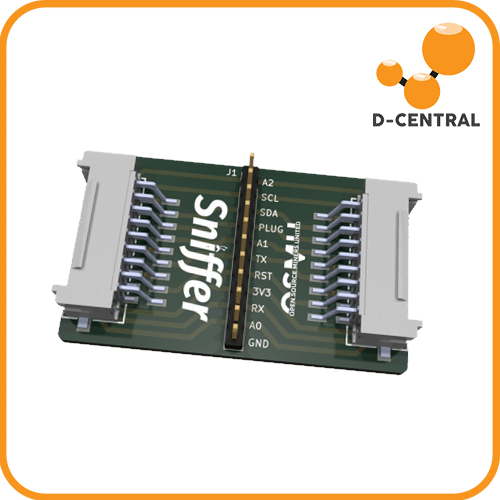
The AntSniffer is an open-source signal analyzer purpose-built for tapping into Antminer hashboard data cables. If you’ve ever stared at a dead hashboard wondering what’s actually happening between the control board and the ASIC chips, this tool gives you the answer. Plug it inline, fire up a logic analyzer, and decode the conversation your hardware is having — or failing to have.
Designed by SirVapesALot and released under the MIT License (GitHub repository), the AntSniffer is a 4-layer PCB with two SMD connectors that match the standard Antminer 18-pin data cable. It taps the signal path non-destructively, breaking out every data connection to a labeled pin header for probing with your logic analyzer of choice.
Whether you’re diagnosing a hashboard that won’t enumerate, reverse-engineering ASIC communication protocols, or learning how mining hardware works at the signal level — the AntSniffer is the tool that makes the invisible visible.
Technical Specifications
| Parameter | Detail |
|---|---|
| PCB Layers | 4-layer |
| Connectors | 2x SMD (matches Antminer 18-pin data cable) |
| Signal Breakout | All data connections to labeled pin header |
| Power Indicator | LED confirms successful 3.3V connection |
| License | MIT License (open-source) |
| Designed By | SirVapesALot |
| Required Equipment | Logic analyzer (not included) |
Key Features
- Non-destructive signal tapping — Sits inline on the hashboard data cable without interrupting normal operation
- Full signal breakout — Every data connection labeled and accessible via pin header for clean probing
- 3.3V LED indicator — Instant visual confirmation that the AntSniffer has a successful power connection
- Universal Antminer compatibility — Standard 18-pin connector fits Antminer hashboard data cables across multiple models
- Open-source design — Full schematics and PCB files available on GitHub for review, modification, and learning
Use Cases
- Hashboard diagnostics — Identify communication failures between control boards and hashboards that cause chips to go offline
- ASIC repair workflow — Pair with D-Central’s ASIC Repair services knowledge to diagnose before you replace
- Firmware development — Analyze signal timing and protocol behavior for custom firmware projects
- Educational deep-dives — Understand exactly how Antminer control boards enumerate and communicate with ASIC chips
- Quality assurance — Verify repaired hashboards are communicating correctly before reassembly
Compatibility
The AntSniffer uses the standard Antminer 18-pin data cable connector, making it compatible with hashboard development, testing, and troubleshooting across the Antminer product line. A logic analyzer (such as Saleae Logic, DSLogic, or similar) is required to capture and decode the signals.
Frequently Asked Questions
Do I need a logic analyzer to use the AntSniffer?
Yes. The AntSniffer breaks out hashboard signals to a pin header — you need a logic analyzer to capture and decode those signals. Popular options include the Saleae Logic series, DSLogic, or any analyzer that supports the required sample rates for UART/SPI communication.
Will the AntSniffer work with non-Bitmain miners like Whatsminer or Avalon?
No. The AntSniffer is specifically designed for the Antminer 18-pin data cable connector used between Bitmain control boards and hashboards. MicroBT (Whatsminer) and Canaan (Avalon) use different connector types and pinouts.
Can I use this to diagnose a hashboard that shows 0 ASIC chips?
That’s exactly what this tool is built for. A hashboard reporting zero chips typically has a communication failure. The AntSniffer lets you tap the data cable and see whether signals are being sent, received, or lost — helping you isolate the fault to the control board, the cable, or the hashboard itself.
Is any soldering required?
No soldering required. The AntSniffer uses SMD connectors that accept standard Antminer 18-pin data cables. You connect it inline between the control board and the hashboard, then probe the labeled pin header with your logic analyzer leads.
Where can I find the source files and documentation?
The full open-source design files are available on GitHub under the MIT License. You’ll find schematics, PCB layout files, and community documentation for getting started with signal analysis.
Do I need a logic analyzer to use the AntSniffer?
Yes. The AntSniffer breaks out hashboard signals to a pin header — you need a logic analyzer to capture and decode those signals. Popular options include the Saleae Logic series, DSLogic, or any analyzer that supports the required sample rates for UART/SPI communication.
Will the AntSniffer work with non-Bitmain miners like Whatsminer or Avalon?
No. The AntSniffer is specifically designed for the Antminer 18-pin data cable connector used between Bitmain control boards and hashboards. MicroBT (Whatsminer) and Canaan (Avalon) use different connector types and pinouts.
Can I use this to diagnose a hashboard that shows 0 ASIC chips?
That’s exactly what this tool is built for. A hashboard reporting zero chips typically has a communication failure. The AntSniffer lets you tap the data cable and see whether signals are being sent, received, or lost — helping you isolate the fault to the control board, the cable, or the hashboard itself.
Is any soldering required?
No soldering required. The AntSniffer uses SMD connectors that accept standard Antminer 18-pin data cables. You connect it inline between the control board and the hashboard, then probe the labeled pin header with your logic analyzer leads.
Where can I find the source files and documentation?
The full open-source design files are available on GitHub under the MIT License. You’ll find schematics, PCB layout files, and community documentation for getting started with signal analysis.
Reviews
There are no reviews yet.