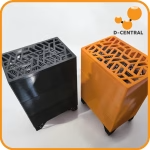
The BitChimney: Where Thermodynamics Meets Decentralization
You are heating your home anyway. Every Canadian winter, every Quebec hydro bill, every baseboard heater running at full tilt is electricity converted to heat with zero other output. The BitChimney changes that equation. It is the same heat, the same watts, the same warmth in the room — but now that electricity also mines cryptocurrency on its way to becoming thermal energy. That is not marketing spin. That is the first law of thermodynamics applied with cypherpunk intent.
The BitChimney is D-Central Technologies’ chimney-style Bitcoin space heater built around the Antminer L3+, a proven Scrypt-algorithm ASIC miner. The L3+ mines Litecoin (LTC) directly and Dogecoin (DOGE) via merge mining — meaning you earn both simultaneously from a single device. The miner sits inside a vertical chimney enclosure that exploits natural convection: heat rises, cool air enters from below, and the chimney effect creates a self-reinforcing airflow pattern that distributes warmth throughout the room without requiring large, noisy fans.
At approximately 800W from the wall, the BitChimney produces ~2,730 BTU/hr of heat — equivalent to a standard portable ceramic space heater. It runs on a normal 120V / 15A household outlet. No electrician, no 240V circuit, no data-center infrastructure. Plug it in, connect Ethernet, configure your mining pool, and start heating your room while earning Litecoin and Dogecoin. The economics are simple: the electricity cost is identical to running a conventional space heater of the same wattage, but the BitChimney gives you crypto mining revenue on top of the heat.
D-Central pioneered the Bitcoin space heater concept for home miners. The BitChimney is a purpose-built product — not a bare miner propped up in a corner, not a DIY hack with duct tape and a cardboard box. It is an engineered chimney enclosure that manages airflow, reduces noise, and directs heat where you want it. This guide covers everything from unboxing to pool configuration to seasonal maintenance. By the end, your BitChimney will be hashing and heating.
Every watt of electricity that enters an ASIC miner exits as heat. A 800W miner produces 800W of heat — identical to a 800W electric space heater. The conversion is 1W = 3.412 BTU/hr. This is not clever marketing — it is thermodynamics. The BitChimney simply adds a second output to your heating bill: cryptocurrency. Your electricity cost stays the same. Your room temperature stays the same. But now you are also mining.
The BitChimney’s Antminer L3+ runs the Scrypt hashing algorithm. Scrypt is the proof-of-work algorithm used by Litecoin (LTC). Through merge mining (also called Auxiliary Proof-of-Work), the same Scrypt hashes that mine Litecoin simultaneously validate Dogecoin (DOGE) blocks — at zero additional power cost. You earn both LTC and DOGE from one device, and you can convert your mining rewards to Bitcoin through any exchange or swap service. The decentralization of hash power across multiple chains strengthens the entire ecosystem.
What’s Included / What You Need
The BitChimney ships as a complete, ready-to-run unit. Here is what comes in the box and what you need to supply yourself.
In the Box
- BitChimney chimney enclosure — D-Central’s custom vertical chimney housing with integrated sound dampening and airflow management
- Antminer L3+ — pre-installed Scrypt ASIC miner (~504 MH/s hashrate)
- Power supply unit (PSU) — APW3++ or compatible, pre-wired to the L3+ inside the enclosure
- Power cord — NEMA 5-15P plug (standard North American 3-prong) for 120V operation
- Quick start card — basic setup reference with QR code linking to this guide
What You Need to Supply
- Ethernet cable — Cat5e or better, length depending on your router distance (1–15 meters). The L3+ has no WiFi — wired Ethernet is required.
- A computer or phone on the same local network — for accessing the miner’s web-based configuration interface
- A Litecoin wallet address — for receiving mining payouts. A self-custody wallet (hardware wallet, Electrum-LTC, or Litecoin Core) is strongly recommended over exchange addresses.
- A mining pool account (optional but recommended) — Litecoinpool.org, ViaBTC, F2Pool, or similar Scrypt pool with merge mining support
- A grounded electrical outlet — standard 120V/15A outlet, preferably on a dedicated or lightly loaded circuit
The Antminer L3+ only supports wired Ethernet. If running an Ethernet cable to your router is impractical, D-Central sells Vonets WiFi bridge adapters that plug into the miner’s Ethernet port and connect to your WiFi network. It is a clean, reliable solution for rooms without Ethernet jacks. Check the D-Central shop for current availability.
Technical Specifications
Here are the complete specifications for the BitChimney. These numbers are what you need to plan your installation — electrical load, heat output, room sizing, and noise expectations.
BitChimney — Core Specifications
| Product | BitChimney |
|---|---|
| Manufacturer | D-Central Technologies (Canada) |
| Miner Platform | Bitmain Antminer L3+ |
| Algorithm | Scrypt |
| Mineable Coins | Litecoin (LTC) + Dogecoin (DOGE) via merge mining |
| Hashrate | ~504 MH/s |
| Power Consumption | ~800W from wall (miner + PSU) |
| Input Voltage | 100–240V AC (ships with 120V NEMA 5-15P cord) |
| Circuit Requirement | 15A minimum (120V) — dedicated circuit recommended |
| Heat Output | ~2,730 BTU/hr (~800W thermal) |
| Heating Equivalent | Small-to-medium portable ceramic space heater |
| Connectivity | Ethernet (RJ45) — no WiFi (use Vonets bridge for wireless) |
| Enclosure Design | Vertical chimney — natural convection airflow |
| Sound Dampening | Integrated acoustic treatment in chimney enclosure |
| Power Supply | APW3++ (included, pre-wired) |
| Warranty | 90 days |
BitChimney — Physical Dimensions
| Enclosure Form Factor | Vertical chimney (tall, narrow profile) |
|---|---|
| Footprint | Compact — designed to sit in a corner or beside furniture |
| Weight (assembled) | ~7–9 kg (15–20 lbs) including miner and PSU |
| Intake | Bottom / lower sides — cool room air drawn in by natural convection + fan assist |
| Exhaust | Top — heated air rises and exits through upper chimney opening |
| Cable Exit | Rear or base — power cord and Ethernet route out cleanly |
BitChimney — Noise Level Comparison
| Configuration | Noise Level | Real-World Comparison |
|---|---|---|
| Stock Antminer L3+ (bare, no enclosure) | 70–75 dB | Vacuum cleaner, loud conversation |
| BitChimney (chimney enclosure) | ~50–55 dB | Normal conversation, light rain on a window |
| Typical room background noise | 35–40 dB | Quiet office, light HVAC hum |
| Standard electric space heater | 0–5 dB | Near silent (no moving parts) |
The chimney enclosure reduces noise by ~20 dB compared to running a bare L3+ on a shelf. That is a significant reduction — roughly perceived as one-quarter the loudness to the human ear. The BitChimney is not silent (no ASIC miner is), but it is quiet enough for a home office, living room, or bedroom. For additional noise reduction tips, see our ASIC Noise Reduction Guide.
Installation Location Planning
Where you place the BitChimney determines both its heating effectiveness and mining efficiency. The chimney design relies on natural convection — hot air rises — so placement matters more than it would for a fan-forced heater. Spend a few minutes planning before you plug anything in.
Room Size and Heating Coverage
At ~2,730 BTU/hr, the BitChimney is sized to heat a small to medium room as a primary heat source, or to supplement heating in a larger space. Here is a practical sizing guide:
Room Sizing Guide
| Room Size | Insulation Quality | BitChimney Role | Expected Performance |
|---|---|---|---|
| 80–120 sq ft (home office, small bedroom) | Good (modern windows, insulated walls) | Primary heat source | Fully sufficient — comfortable room temperature maintained |
| 80–120 sq ft | Poor (old windows, drafty) | Primary heat source | Adequate — may need supplemental heating on extreme cold days (-25 C) |
| 120–200 sq ft (bedroom, den) | Good | Primary or supplemental | Good — raises room temperature noticeably, may not fully replace baseboard |
| 200–300 sq ft (living room) | Any | Supplemental only | Supplemental — reduces load on main heating system |
| 300+ sq ft | Any | Supplemental / zone heating | Noticeable warmth near the unit, minimal impact on whole-room temperature |
The sweet spot for the BitChimney is a 80–150 sq ft room with decent insulation. In a well-insulated home office, it will be your only heater. In Quebec and Ontario, where electricity rates are some of the lowest in North America, the economics are particularly compelling — you are already paying for electric heat; the BitChimney just adds a revenue stream to the same expense.
Placement Guidelines
- Hard, flat, non-combustible surface. Hardwood floor, tile, concrete, or a sturdy metal/wood shelf. Never on carpet, rugs, or fabric surfaces. The BitChimney produces real heat — treat it like any 800W appliance.
- Vertical clearance above the chimney exhaust. Maintain at least 60 cm (2 feet) of clear space above the chimney opening. The exhaust air rises upward — do not place the unit under a low shelf, in a closet, or beneath hanging curtains.
- Side clearance. Maintain 15–30 cm (6–12 inches) clearance on all sides to allow cool air intake at the base. Do not push the unit flush against a wall or wedge it into a tight corner where air cannot circulate.
- Near an Ethernet jack or router. The L3+ requires wired Ethernet. Plan your cable run before you commit to a location. Cable management is easier to sort out before the unit is running and producing heat.
- Near a dedicated electrical outlet. Plug the BitChimney directly into a wall outlet or a heavy-duty surge protector. Avoid extension cords — especially thin, cheap ones that are not rated for continuous 800W loads.
- Corner or wall placement is fine — as long as you maintain the side and vertical clearance. The chimney design directs heat upward, so corner placement works better than it does for front-exhaust heaters.
Place the BitChimney in the coldest room of your house — the room that otherwise requires the most electric baseboard heating. The cooler ambient air actually benefits the miner (lower intake temperature = lower chip temperatures = more stable hashing), and the heat output replaces the baseboard unit that was running anyway. Cold climate is not a disadvantage for miners — it is an engineering advantage. We are the North.
Ventilation Requirements
The BitChimney does not produce combustion byproducts — no carbon monoxide, no open flame. It is purely electric. However, 800W of continuous heat in a small room can cause temperature to rise beyond comfort levels if there is no way for excess heat to escape.
- Minimum ventilation: At least one window that can be cracked open, or a functional HVAC air return vent in the room.
- Small rooms (under 100 sq ft): Monitor room temperature for the first few days. If the room exceeds your comfort level (typically above 25 C / 77 F), crack a window slightly or leave the door open to adjacent rooms.
- In summer: The BitChimney produces the same 800W of heat regardless of season. In warm months, you will likely want to shut it down or move it to a ventilated space (garage, basement). See the Seasonal Considerations section.
Never operate the BitChimney in a bathroom, laundry room, or any area with high humidity or risk of water splashes. The recommended operating humidity is below 75% RH. Condensation on electronics causes corrosion, short circuits, and permanent damage to the L3+ hashboards and control board. If you spill liquid on the unit, disconnect power immediately at the wall outlet — do not touch the unit until it is unplugged.
Assembly and Setup
The BitChimney ships fully assembled — the L3+ miner and PSU are pre-installed inside the chimney enclosure. Setup is a plug-and-connect process, not a construction project. Total time from unboxing to hashing: approximately 15–30 minutes, most of which is network configuration.
Step 1 — Unboxing and Inspection
- Inspect the packaging before opening. If the shipping box shows severe dents, crushing, or water damage, photograph it before opening and contact D-Central support.
- Remove the BitChimney carefully from the packaging. The unit weighs approximately 7–9 kg (15–20 lbs) — support the base as you lift it out.
- Verify all components are present:
- BitChimney chimney enclosure with L3+ and PSU installed
- Power cord with correct plug type for your region
- Quick start card
- Inspect the enclosure — check for cracks, loose panels, or shipping damage. Look through the intake and exhaust openings to verify nothing has shifted or come disconnected during shipping.
- Remove any shipping inserts — foam padding, cable ties, or protective inserts inside the chimney must be removed before operation.
Step 2 — Place the BitChimney
- Choose your location based on the placement guidelines above.
- Set the unit on a hard, flat surface with the chimney exhaust pointing straight up. The unit should sit stable and level — no wobbling.
- Verify clearance: 60 cm above, 15–30 cm on sides, unobstructed intake at the base.
- Route your Ethernet cable from your router or switch to the miner’s Ethernet port (accessible through the enclosure). Run cable along baseboards or under rugs for a clean installation. Secure the cable connection — ensure you hear a click when the RJ45 connector seats.
Step 3 — Connect Power
- Connect the power cord to the PSU’s power input socket on the enclosure.
- Plug the power cord into the wall outlet. There is no power button on the APW3++ PSU — it powers on immediately when connected to mains power.
- Listen and observe. Within 3–5 seconds, you should hear fans spin up. Within 30–60 seconds, the miner’s control board will boot, and you will feel warm air beginning to rise from the chimney exhaust as the L3+ initializes its hashboards.
- Verify the indicator lights — through the enclosure, you should see green LEDs on the L3+ control board indicating normal boot. Flashing red or no lights at all indicate a problem — see FAQ.
The L3+ takes approximately 2–5 minutes to fully initialize after first power-on. All four hashboards must enumerate, warm up, and begin hashing. Do not unplug the unit or attempt configuration during this boot sequence. Wait until you can feel consistent warm air rising from the chimney before proceeding to network configuration.
Electrical Requirements
The BitChimney draws approximately 800W of continuous power from the wall. This is the combined draw of the L3+ miner and the APW3++ power supply (which itself consumes some power as conversion loss). Understanding your electrical circuit capacity is essential for safe, reliable operation.
Circuit Capacity and the 80% Rule
The National Electrical Code (NEC) in the US and Canadian Electrical Code (CEC) require that continuous loads — anything running for more than 3 hours — must not exceed 80% of the circuit breaker’s rated capacity. A Bitcoin space heater runs 24/7. It is the definition of a continuous load.
BitChimney vs. Circuit Capacity
| Circuit Type | 120V / 15A | 120V / 20A |
|---|---|---|
| Maximum Power | 1,800W | 2,400W |
| 80% Continuous Limit | 1,440W | 1,920W |
| BitChimney Draw | ~800W | ~800W |
| Remaining Capacity | ~640W available | ~1,120W available |
| Circuit Utilization | ~56% | ~42% |
The BitChimney sits comfortably within the 80% continuous limit of a standard 15A circuit. At ~800W, it uses about 56% of the continuous capacity on a 15A/120V circuit — well within safe operating parameters. That said, a dedicated circuit (one where the BitChimney is the only device plugged in) is still the ideal setup. If the circuit is shared with other devices — a desk lamp, a computer monitor, a small appliance — make sure the total combined draw stays below 1,440W.
Electrical Safety
- No extension cords. Plug the BitChimney directly into a wall outlet or a heavy-duty surge protector rated for at least 1,000W continuous (look for 12 AWG or 14 AWG power strips, not cheap 16 AWG strips from the dollar store). Extension cords, especially long or thin ones, introduce resistance, generate heat at the connectors, and are a fire risk for continuous loads.
- Grounded outlet required. The BitChimney uses a 3-prong grounded plug. Do not use a 3-to-2 prong adapter (cheater plug). The grounding prong is a safety feature that protects you from shock if an internal fault occurs.
- No daisy-chaining. Do not plug the BitChimney’s surge protector into another power strip or extension cord.
- Identify your breaker. Know which breaker in your panel controls the outlet you are using. Label it if it is not already labeled. If the breaker trips, you need to know which one to reset.
The APW3++ power supply contains high-voltage capacitors that can deliver a lethal shock even when unplugged. Never remove the PSU cover, attempt to repair the PSU, or insert any objects into the PSU housing. If you suspect a PSU fault (burning smell, sparking, no output), disconnect the power cord at the wall and contact D-Central’s ASIC Repair service. PSU repair is a job for professionals with high-voltage training.
For a deeper dive into electrical planning for home mining setups, see our Space Heater Electrical Guide and 120V Bitcoin Mining Guide.
Network Setup
The Antminer L3+ inside the BitChimney has a web-based management interface. You access it through a web browser on any computer or phone connected to the same local network. All configuration — pool settings, worker names, fan speeds, firmware updates — happens through this interface.
Step 1 — Find the Miner’s IP Address
The L3+ obtains an IP address from your router via DHCP automatically at boot. You need to find this address to access the configuration interface. There are several ways to do this:
- Router admin page — Log into your router (typically 192.168.1.1 or 192.168.0.1) and check the connected devices / DHCP client list. Look for a device named “Antminer” or an unfamiliar device that appeared when you plugged in the miner.
- Network scanner app — Advanced IP Scanner (Windows), Angry IP Scanner (cross-platform), or Fing (iOS/Android). Scan your local network and look for the new device.
- Bitmain IP Reporter — Available from Bitmain’s support site. This Windows utility detects Antminer devices on the local network and reports their IP addresses.
# Scan your local network for devices with open port 80 (web interface)
nmap -sn 192.168.1.0/24 | grep -B 2 "Bitmain|Antminer"

# Or simply scan for all live hosts:
nmap -sn 192.168.1.0/24
Step 2 — Access the Web Interface
- Open a web browser on your computer or phone (Chrome, Firefox, Safari, or Edge).
- Type the miner’s IP address into the address bar — for example: http://192.168.1.105
- You will see a login prompt. The default credentials are:
- Username: root
- Password: root
- After logging in, you will see the Antminer dashboard showing system status, hashboard information, and configuration tabs.
The factory default password (root / root) is well known. If your home network is compromised, an attacker could redirect your mining output to their own wallet. After logging in for the first time, go to System > Administration and change the password to something unique. This is basic operational security — your miner, your password, your coins.
Step 3 — Set a Static IP (Recommended)
By default, the L3+ uses DHCP and gets a new IP address from your router each time it boots. This means the address could change after a power outage or router restart, making it harder to find the miner’s interface. Setting a static IP ensures it always has the same address.
- In the L3+ web interface, navigate to Network.
- Change the protocol from DHCP to Static.
- Set an IP address outside your router’s DHCP range but within your subnet — for example, 192.168.1.200.
- Set the subnet mask to 255.255.255.0.
- Set the gateway to your router’s IP (e.g., 192.168.1.1).
- Set DNS to 8.8.8.8 (Google) or 1.1.1.1 (Cloudflare), or your router’s IP if it provides DNS.
- Click Save & Apply. The miner will reconnect on the new static IP.
Mining Configuration — Litecoin + Dogecoin
The Antminer L3+ mines Scrypt — the proof-of-work algorithm used by Litecoin. Through merge mining, most Litecoin pools also mine Dogecoin simultaneously at zero additional cost. You configure the pool in the L3+ web interface, and the pool handles the rest. Here is how to set it up.
Step 1 — Choose a Mining Pool
For the BitChimney’s ~504 MH/s hashrate, pool mining is the practical choice. Solo mining on Scrypt with 504 MH/s would take an extremely long time to find a block. A pool distributes rewards proportionally to your contributed hashrate, giving you steady, predictable payouts.
Recommended Scrypt pools with Litecoin + Dogecoin merge mining:
- Litecoinpool.org — One of the oldest and most reliable Litecoin pools. Merge mines DOGE automatically. PPS (Pay Per Share) payout — steady income, no variance. Free to join, 0% pool fee for LTC (they profit from merge-mined coins).
- ViaBTC — Large multi-coin pool with Scrypt support. PPS+ payout. Supports LTC + DOGE merge mining. Small pool fee applies.
- F2Pool — Major global pool with LTC mining. PPS payout. Good uptime and infrastructure.
- ProHashing — Algorithmic profit-switching pool. Can mine the most profitable Scrypt coin at any given time. Good for maximizing revenue.
Just as Bitcoin’s security depends on hash power being distributed across many pools, so does Litecoin’s. Avoid putting all your hashrate on the largest pool. If one pool controls >50% of the network hashrate, it threatens the security of the chain. Choose a pool that aligns with your values — and consider supporting smaller pools that need the hashrate. Decentralization is not just a Bitcoin principle. It is a principle.
Step 2 — Configure Pool Settings
- In the L3+ web interface, navigate to Miner Configuration > General Settings.
- You will see three pool slots (Pool 1, Pool 2, Pool 3). The miner uses Pool 1 as the primary, Pool 2 as first failover, and Pool 3 as second failover. Configure at least Pool 1 and Pool 2.
- Enter the pool URL, worker name, and password for each slot.
Example configuration using Litecoinpool.org:
Pool 1 (Primary):
  URL:      stratum+tcp://us.litecoinpool.org:3333
  Worker:   YourUsername.bitchimney1
  Password: x

Pool 2 (Failover):
  URL:      stratum+tcp://us2.litecoinpool.org:3333
  Worker:   YourUsername.bitchimney1
  Password: x

Pool 3 (Second Failover):
  URL:      stratum+tcp://stratum.f2pool.com:8888
  Worker:   YourLTCWalletAddress.bitchimney1
Password: x- Click Save & Apply. The miner will disconnect from the current pool (if any) and reconnect to Pool 1.
- Navigate to Miner Status to verify. Within 1–2 minutes, you should see:
- All 4 hashboards reporting (chain 0, chain 1, chain 2, chain 3)
- Total hashrate approaching ~504 MH/s (it may fluctuate by +/- 5%)
- Pool connection status showing Alive
- Accepted shares incrementing
Merge-Mining Dogecoin
If your chosen pool supports merge mining (most major Litecoin pools do), Dogecoin mining happens automatically. You do not need to configure anything extra on the miner itself. The pool software handles the Auxiliary Proof-of-Work for Dogecoin using the same Scrypt hashes your L3+ is already producing.
To receive your Dogecoin payouts:
- On Litecoinpool.org: Go to your account settings and add a DOGE payout address. LTC and DOGE payouts are handled separately by the pool.
- On ViaBTC / F2Pool: DOGE payouts are typically deposited to your pool account balance, which you can withdraw to a DOGE wallet.
Converting Mining Rewards to Bitcoin
The BitChimney mines LTC and DOGE, but if you are a Bitcoin maximalist (and we are), you probably want to stack sats. Options for converting your mining rewards:
- SideShift.ai or FixedFloat — No-account instant swap services. Send LTC/DOGE, receive BTC directly to your wallet. No KYC for reasonable amounts.
- Nicehash exchange — Convert LTC to BTC and withdraw.
- Any exchange — Kraken, Bitfinex, or your preferred exchange. Deposit LTC/DOGE, sell for BTC, withdraw to cold storage.
- Directly via the pool — Some pools (like ProHashing) can auto-convert your earnings and pay out in BTC.
The L3+ uses the Scrypt algorithm, which mines Litecoin — not the SHA-256 algorithm used by Bitcoin. This is by design. The L3+ was built as a Scrypt miner. Running it on Scrypt is what it does best, and it does it at ~800W which fits perfectly within a 120V home outlet. The mining rewards (LTC + DOGE) can be easily converted to Bitcoin. The heat output is identical regardless of which algorithm the chips are crunching — 800W in, 800W of heat out. Physics does not care about the algorithm. If you want to mine Bitcoin (SHA-256) directly as a space heater, check out D-Central’s S9 and S17 Space Heater Editions.
Heating Performance
Let us talk about the heat. The BitChimney converts ~800W of electrical power into ~2,730 BTU/hr of thermal energy. That is not an approximation — it is physics. Every watt of electricity that enters the L3+ exits as heat. The conversion factor is 1W = 3.412 BTU/hr. A conventional 800W ceramic space heater produces the exact same amount of heat. The difference is that the BitChimney also mines Litecoin and Dogecoin.
Heat Output in Context
BitChimney Heat Output vs. Common Heaters
| Device | Power Draw | Heat Output | Mines Crypto? |
|---|---|---|---|
| BitChimney | ~800W | ~2,730 BTU/hr | Yes — LTC + DOGE |
| Small ceramic space heater (low setting) | 750W | ~2,559 BTU/hr | No |
| Medium ceramic space heater (high setting) | 1,500W | ~5,118 BTU/hr | No |
| Electric baseboard (3 ft section) | 750W | ~2,559 BTU/hr | No |
| Oil-filled radiator (medium) | 900W | ~3,071 BTU/hr | No |
The Chimney Advantage
The vertical chimney design offers a practical advantage over horizontal space heater enclosures: natural convection assist. Hot air rises. The chimney form factor exploits this physical property to create an upward draft through the enclosure without relying entirely on fans. Cool room air enters at the base, passes over the L3+’s heatsinks and hashboards, absorbs heat, and rises naturally through the chimney column and out the top. This convection effect supplements the built-in fans, creating more airflow at lower fan speeds — which means less noise for the same heat distribution.
The rising column of warm air from the chimney top also promotes better room circulation than a horizontal exhaust. Heat that exits upward disperses across the ceiling and then down the walls, eventually circulating through the entire room. A horizontal exhaust creates a hot jet of air in one direction and a cold spot behind the unit. The chimney design heats the room more evenly.
Thermostat Integration Tips
The BitChimney does not have a built-in thermostat — it produces a constant ~800W of heat whenever it is powered on. Unlike a conventional space heater that cycles on and off, the BitChimney runs continuously because it is mining. Here are strategies for managing room temperature:
- Let it run, open a window slightly. The simplest approach. If the room gets too warm, crack a window. The miner keeps hashing and earning. Yes, you are technically venting some heat outside — but the mining revenue continues regardless.
- Smart plug with temperature trigger. Use a smart plug (TP-Link Kasa, Shelly, etc.) paired with a temperature sensor. Set a rule: when room temperature exceeds 25 C, cut power to the smart plug. When it drops below 22 C, restore power. The miner will power down and boot back up automatically. Note: frequent power cycling shortens the lifespan of the L3+ — do not set a tight temperature band that causes rapid on/off cycling.
- Zone your home heating. Turn off or reduce the baseboard heater / HVAC register in the room where the BitChimney operates. Let the BitChimney handle that room’s heat load. Your central heating system heats the rest of the house as normal.
- Seasonal operation. Run the BitChimney October through April (Canadian heating season). Shut it down or relocate it to a ventilated space during summer months.
In Quebec, residential electricity costs approximately $0.07–0.09 CAD/kWh. Running the BitChimney at 800W for 24 hours consumes 19.2 kWh/day, costing roughly $1.34–$1.73 CAD/day. A conventional 800W space heater running the same hours costs exactly the same. The difference: the BitChimney earns LTC + DOGE mining rewards that offset some or all of that electricity cost. The heat is identical. The mining revenue is a bonus. In cold months, when you would be running a heater anyway, the effective cost of mining approaches zero.
Maintenance and Care
The BitChimney is an industrial-grade mining device housed in a custom enclosure. It needs periodic attention to keep running efficiently. Dust is the primary enemy — it insulates heatsinks, clogs fans, and raises chip temperatures. A well-maintained BitChimney runs cooler, quieter, and lasts longer.
Dust Management (Monthly)
Dust accumulates on the L3+’s heatsinks and fan blades, reducing airflow and thermal efficiency. In a home environment, dust buildup is inevitable — pet hair, fabric fibers, cooking particles, and general household dust all find their way into the intake.
- Power off and unplug the BitChimney before any cleaning. Wait 5 minutes for the heatsinks to cool.
- Use compressed air (canned air or an electric air duster) to blow dust out of the intake and exhaust openings. Short, controlled bursts — do not hold the fan blades still while blowing air, as this can damage the bearings. Blow from the exhaust side downward, pushing dust back out through the intake where it can be vacuumed.
- Vacuum the area around the unit — the floor beneath and around the BitChimney collects dust that would otherwise be drawn back into the intake.
- Wipe the exterior with a dry or slightly damp cloth. Do not use water or cleaning chemicals near the electronics.
Cut a piece of magnetic or adhesive air filter mesh (available at hardware stores, used for PC cases) and place it over the BitChimney’s intake openings. This catches the majority of dust and pet hair before it reaches the heatsinks. Clean or replace the filter monthly. A $5 filter extends the time between deep cleanings and keeps your hashrate stable.
Fan Inspection (Every 3 Months)
Fans are mechanical components with bearings that wear over time. Listen for changes in noise — grinding, clicking, or rattling indicates a failing bearing.
- Listen for unusual sounds during normal operation. A healthy fan produces a consistent hum or whoosh. Intermittent buzzing, grinding, or clicking means the fan is dying.
- Check fan speeds in the L3+ web interface (Miner Status page). Fan RPMs should be consistent and within the expected range. A fan reporting 0 RPM is either disconnected or dead.
- Replace failing fans promptly. A dead fan means reduced airflow, higher chip temperatures, thermal throttling, and eventually hashboard shutdowns. Fan replacement on the L3+ is a straightforward swap — D-Central stocks compatible replacement fans.
Hashboard Health Monitoring
The L3+ has 4 hashboards, each contributing approximately ~126 MH/s to the total hashrate. Monitor their health through the web interface:
# SSH into the L3+ (default credentials: root / root — change this!)
ssh root@192.168.1.200

# Check miner status and hashboard health
cat /var/log/messages | grep "chain"

# Check chip temperatures across all hashboards
cat /tmp/freq_config

# View real-time miner API data
echo '{"command":"stats"}' | nc localhost 4028 | python -m json.tool

# Check pool connectivity and share status
echo '{"command":"pools"}' | nc localhost 4028 | python -m json.tool
In the web interface, navigate to Miner Status and verify:
- All 4 chains (hashboards) active — if a chain shows 0 MH/s or is missing, that hashboard has a problem
- Chip temperatures within normal range — the L3+ typically runs at 50–75 C. Temperatures above 85 C indicate cooling issues (dust, fan failure, blocked airflow)
- Hardware error rate (HW) — a small number of hardware errors is normal. A rapidly increasing HW count or HW errors above 1% of total accepted shares indicates chip degradation or overheating
- Consistent hashrate — total hashrate should hover around ~504 MH/s (+/- 5%). Sustained drops below 400 MH/s suggest a hashboard issue
Seasonal Considerations
The BitChimney’s dual-purpose value proposition is strongest during the heating season. Here is how to think about year-round operation:
- October – April (Heating Season): Run the BitChimney as your room’s heater. The heat is useful, the mining revenue is a bonus. This is the unit’s peak value period.
- May – September (Warm Months): The BitChimney still produces 800W of heat. In summer, that heat is unwanted. You have several options:
- Shut it down. Power off the BitChimney for the summer. No electricity cost, no mining revenue, no unwanted heat. The simplest option.
- Move it to a ventilated space. Garage, basement, or utility room with a window or exhaust fan. The miner keeps earning while the heat is vented outside or into a large, unoccupied space.
- Keep mining if AC costs are acceptable. If your air conditioning system can handle an additional 800W of heat load and the mining revenue exceeds the additional AC electricity cost, keep running. This math usually does not work out in most climates unless electricity is very cheap.
- Before shutdown (spring): Clean the unit thoroughly (compressed air, dust removal). Unplug and store in a dry location, ideally covered or bagged to prevent dust accumulation during the off-season.
- Before startup (fall): Clean the unit again (storage dust), inspect fan blades and power cables, verify Ethernet connectivity, and update firmware if a new version is available. Then plug in and reconfigure your pool settings if needed.
Firmware Updates
Bitmain periodically releases firmware updates for the L3+. Check the Antminer support page for the latest firmware. Updates can improve hashrate stability, fix bugs, add features, and address security vulnerabilities.
- Download the firmware file (.tar.gz) from Bitmain’s official website. Only download from official sources — never from random third-party links.
- In the L3+ web interface, navigate to System > Upgrade.
- Select the downloaded firmware file and click Flash image…
- Wait for the process to complete. The miner will reboot automatically. Do not power off during the firmware update — interrupting the flash can brick the control board.
For detailed firmware guidance, see our Antminer Firmware Update Guide.
Troubleshooting Common Issues
Before contacting support, check these common issues and their solutions.
BitChimney Will Not Power On
- Check the wall outlet. Plug in a lamp or phone charger to verify the outlet has power.
- Check the circuit breaker. The breaker may have tripped. Reset it at the panel.
- Inspect the power cord. Look for damage, burns, or loose connections at both ends (wall plug and PSU input).
- Listen for the PSU. A working APW3++ emits a faint hum or click when first connected to power, even before the miner boots. Dead silence means the PSU may have failed.
- If the PSU has failed: Contact D-Central ASIC Repair. Do not attempt to open or repair the PSU yourself.
Low Hashrate or Missing Hashboard
- Check the Miner Status page. If a chain (hashboard) shows 0 MH/s, that hashboard is not hashing. This could be a loose ribbon cable, failed chip, or power connector issue.
- Power cycle the unit. Unplug for 30 seconds, plug back in. Many transient hashboard issues resolve after a clean reboot.
- Check temperatures. If chip temperatures are above 85 C, the hashboard may be thermal throttling. Clean the dust, verify fan operation, ensure clearance around the chimney.
- Check hardware errors (HW count). If HW errors are climbing rapidly on a specific chain, that hashboard may have a failing ASIC chip. Contact D-Central ASIC Repair for diagnosis.
Cannot Connect to Web Interface
- Verify the Ethernet cable is plugged in securely at both the miner and the router/switch. Check for link lights on both ends.
- Verify you are on the same network. Your computer must be connected to the same router as the miner.
- Re-scan for the IP address. If you set DHCP, the IP may have changed. Use a network scanner to find the current address.
- Try a different browser or clear your cache. Sometimes the browser caches an old IP or stale session.
- Factory reset the network settings — press and hold the small reset button on the L3+ control board (accessible through the enclosure) for 5 seconds. This resets the miner to DHCP mode with default credentials.
Excessive Noise
- Dust buildup. Clogged heatsinks cause fans to spin faster. Clean the unit with compressed air.
- Fan bearing failure. Grinding or clicking from a fan means the bearing is worn. Replace the fan.
- Vibration. The unit may be vibrating against the surface it sits on. Place a rubber mat or anti-vibration pad underneath.
- For comprehensive noise reduction strategies, see our ASIC Noise Reduction Guide.
Safety Summary
1. Never open the power supply unit. Lethal voltages inside, even when unplugged.
2. Maintain 60 cm (2 ft) clearance above the chimney exhaust and 15–30 cm (6–12 in) on all sides.
3. Never block the intake or exhaust openings. Never drape anything over the enclosure.
4. Place on a hard, flat, non-combustible surface only. Never on carpet, rugs, bedding, or fabric.
5. Never operate in wet or high-humidity areas (bathrooms, laundry rooms).
6. Use a grounded outlet. No cheater plugs. No extension cords unless heavy-duty rated.
7. Keep away from children and pets — the exhaust air and enclosure surface can reach 50–70 C (122–158 F).
8. If you smell burning, see sparks, or hear arcing — disconnect power at the breaker immediately. Do not touch the unit.
9. Keep a fire extinguisher rated for electrical fires (Class C / Class BC) accessible in the room.
Frequently Asked Questions
Can the BitChimney run on a standard 120V household outlet?
Yes. The BitChimney draws approximately ~800W from the wall, well within the 1,440W continuous limit of a standard North American 15A/120V circuit (after applying the NEC/CEC 80% rule). No special wiring or 240V circuits required. A dedicated circuit is recommended but not strictly necessary as long as the total load on the circuit stays within the 80% limit. See our 120V Bitcoin Mining Guide for the full breakdown.
How much does it cost to run the BitChimney per month?
At 800W running 24/7, the BitChimney consumes approximately 576 kWh per month. Multiply by your electricity rate. In Quebec (~$0.07–0.09 CAD/kWh), that is roughly $40–52 CAD/month. In Ontario (~$0.10–0.14 CAD/kWh), roughly $58–81 CAD/month. In the US at the national average (~$0.12 USD/kWh), roughly $69 USD/month. Remember: during heating season, you would be spending this electricity on a conventional space heater anyway. The BitChimney adds mining revenue on top of the same heat output.
How much Litecoin / Dogecoin will I earn?
Mining rewards depend on current network difficulty, LTC and DOGE prices, pool fees, and your specific pool. At ~504 MH/s, the L3+ contributes a measurable amount of Scrypt hashrate to whatever pool you join. Use a mining profitability calculator (whattomine.com, minerstat.com) to estimate current daily earnings based on real-time network conditions. The key insight: during heating season, your electricity cost is already committed to heating. The mining revenue is essentially “found money” — whatever LTC and DOGE you earn is revenue you would not have if you used a conventional space heater.
Why does the BitChimney mine Litecoin instead of Bitcoin?
The BitChimney is built around the Antminer L3+, which uses the Scrypt hashing algorithm — optimized for Litecoin and Dogecoin. Bitcoin uses the SHA-256 algorithm, which requires different ASIC hardware (like the Antminer S9 or S19). The L3+ at ~800W is an ideal fit for the chimney form factor and 120V home operation. You can easily convert your LTC/DOGE earnings to Bitcoin using swap services or exchanges. If you want a space heater that mines Bitcoin (SHA-256) directly, check out D-Central’s S9 and S17 Space Heater Editions.
How loud is the BitChimney compared to a bare L3+?
The chimney enclosure reduces noise by approximately ~20 dB compared to a bare L3+ running stock fans. A bare L3+ runs at 70–75 dB (vacuum cleaner level). The BitChimney operates at approximately 50–55 dB (normal conversation level). It is not silent — no ASIC miner is — but it is quiet enough for a home office or living room. Most users describe it as a noticeable but not intrusive background hum, similar to a loud refrigerator or quiet dishwasher. For additional noise tips, see our ASIC Noise Reduction Guide.
Does the BitChimney need WiFi or can it work on Ethernet only?
The Antminer L3+ only supports wired Ethernet. There is no built-in WiFi. You must run an Ethernet cable from the BitChimney to your router or network switch. If running a cable is impractical, D-Central sells Vonets WiFi bridge adapters that plug into the L3+’s Ethernet port and connect wirelessly to your WiFi network. This is a clean, reliable workaround that many customers use.
Can I run the BitChimney year-round, even in summer?
Technically yes — the BitChimney will run whenever it has power and internet. The question is whether you want 800W of heat in your room during summer. Most users shut down or relocate the BitChimney to a ventilated space (garage, basement) during warm months. If you have a room with adequate ventilation or AC that can handle the extra heat load, year-round mining is possible. The mining revenue must justify the additional cooling cost. In most Canadian climates, the heating season (October–April) is the BitChimney’s prime operating window.
What maintenance does the BitChimney need?
Monthly: Blow out dust with compressed air, vacuum around the unit. Every 3 months: Inspect fans for bearing wear (listen for grinding/clicking), check hashboard health in the web interface. Seasonally: Deep clean before startup in fall and before shutdown in spring. As needed: Replace fans if they fail, update firmware when new versions are released. The L3+ is a proven, mature platform — with basic dust management, it will run for years. See the Maintenance section above for detailed procedures.
What if a hashboard fails — can D-Central repair it?
Absolutely. D-Central Technologies has been repairing ASIC miners since 2016, with 2,500+ miners repaired to date. Our technicians have deep experience with the L3+ platform, including hashboard-level component repair (chip replacement, voltage domain diagnosis, thermal pad replacement). If your BitChimney develops a hashboard issue, contact our ASIC Repair service. We offer mail-in repair service across Canada and the US. You can ship just the L3+ miner (removed from the chimney enclosure) for diagnosis and repair.
Is the BitChimney as efficient as a regular space heater?
In terms of heat output per watt consumed, the BitChimney is exactly as efficient as any resistive electric heater — 100%. Every watt in becomes a watt of heat. This is physics, not opinion. An 800W ceramic heater and the 800W BitChimney produce identical heat (~2,730 BTU/hr). The BitChimney is not more efficient or less efficient at heating. It is equally efficient at heating, plus it mines cryptocurrency. The only “less efficient” scenario is if you compare it to a heat pump (which can achieve 200–300% effective efficiency by moving outdoor heat indoors). But a heat pump costs thousands to install. The BitChimney costs a fraction of that and earns money while it heats.
Why D-Central Technologies
D-Central Technologies did not stumble into Bitcoin space heaters as a side project. We pioneered the concept of dual-purpose mining for the home miner. Since 2016, we have been taking institutional-grade mining hardware and hacking it for the people — the home miners, the garage operators, the cypherpunks running ASICs in their basements to heat their homes and strengthen the decentralization of proof-of-work networks.
The BitChimney exists because we believe every home should have the option to mine while they heat. We are not just selling you hardware — we are providing the entire ecosystem: the device, the knowledge base, the repair service when something breaks, and the community of thousands of home miners who have been building this movement alongside us.
Here is what you get when you buy from D-Central:
- Since 2016 — Eight years of hands-on experience in the mining industry. We have repaired, modified, and deployed more ASIC miners than we can count.
- 2,500+ miners repaired — When your BitChimney needs service, you are sending it to people who have seen every failure mode the L3+ can produce. We fix it, we do not just replace it.
- Canadian company, Canadian support — Based in Laval, QC. Real people answering your questions. Phone: 1-855-753-9997.
- Full-service model — Hardware sales, ASIC repair, mining consulting, hosting, and training. No competitor offers this complete lifecycle. We support you from first purchase to year-five repair.
- Bitcoin Mining Hackers — We do not build products for data centers. We build products for you — the home miner, the person who wants sovereignty over their hash power, their heat, and their coins.
Bitcoin Space Heaters — Full Collection
Browse D-Central’s complete Bitcoin Space Heater lineup: the BitChimney, fully assembled S9 and S17 Space Heater Editions, and DIY cases for your own hardware. Dual-purpose heating and mining, designed in Canada for Canadian winters. Your electricity bill was going to pay for heating anyway — now it also mines crypto.
D-Central ASIC Repair
If your BitChimney’s L3+ develops a hashboard issue, fan failure, or control board problem, D-Central’s repair team has you covered. With 2,500+ miners repaired since 2016, our technicians have deep expertise in every Antminer platform — including the L3+ Scrypt miner. Mail-in repair service across Canada and the US. Diagnosis, component-level repair, and full testing before return.
Bitcoin Space Heater Assembly & Maintenance Guide
The comprehensive guide covering all D-Central space heater products — S9 Edition, S17 Edition, BitChimney, and DIY cases. Detailed assembly instructions, heat output calculations, noise comparisons, room sizing tables, and full maintenance procedures. If this BitChimney guide answered your installation questions, the assembly guide goes deeper on long-term operation and optimization.
Related Guides and Resources
Continue building your home mining knowledge with these D-Central resources:
- Space Heater Electrical Guide — Detailed electrical planning for Bitcoin space heater installations: circuit sizing, wire gauge, breaker panels, and multi-unit setups.
- Bitcoin Space Heater Assembly & Maintenance Guide — The complete guide to all D-Central space heater products, including deep dives on assembly, heat calculations, and long-term maintenance.
- ASIC Noise Reduction Guide — Comprehensive strategies for making ASIC miners quieter: fan swaps, enclosure mods, placement tricks, and sound dampening techniques.
- 120V Bitcoin Mining Guide — Everything you need to know about mining on standard North American household power: what fits on 120V, the 80% rule, and D-Central’s 120V-compatible products.
- Antminer L3+ Maintenance & Repair Guide — In-depth L3+ maintenance, diagnostics, troubleshooting, and repair procedures. The technical companion to this BitChimney guide.