The Antminer 17 Series — the T17, S17, T17+, S17+, and S17 Pro — shipped with Bitmain’s 7nm BM1397 chips and delivered serious hashrate for their generation. But anyone who has operated these machines knows the dirty secret: the stock cooling solution was never engineered for the thermal loads these chips actually produce under sustained operation. The result is delamination, thermal throttling, premature chip failure, and hashboards that end up in the repair queue instead of hashing blocks.
At D-Central Technologies, we have repaired thousands of Antminer 17 Series hashboards. We have seen the failure patterns firsthand — and we have engineered the solutions. This guide breaks down the heatsink upgrade paths available for the 17 Series, the delamination problem that makes them necessary, alternative firmware options that complement hardware upgrades, and a step-by-step installation walkthrough so you can do it yourself or understand exactly what our ASIC repair team does when you send your machine to us.
Why the Antminer 17 Series Needs Heatsink Upgrades
The stock Antminer 17 Series uses individual small heatsinks mounted to each BM1397 chip with thermal adhesive. This design has three fundamental problems:
1. Inadequate thermal transfer. The small heatsink footprint does not dissipate heat fast enough under full load, especially in ambient temperatures above 25°C. Chips run hotter than spec, and thermal throttling kicks in — costing you hashrate and sats.
2. Delamination-prone mounting. The thermal adhesive used on stock heatsinks degrades over time. As the bond weakens, heatsinks lift off the chip surface, creating air gaps that act as thermal insulators. The chip overheats. The hashboard drops. You lose revenue.
3. Uneven cooling across the hashboard. With dozens of individual heatsinks, manufacturing variance means some chips run cooler and some run hotter. The hottest chip on the board becomes your bottleneck — and your failure point.
Heatsink upgrades solve all three problems simultaneously. A properly engineered replacement heatsink delivers uniform cooling across the entire hashboard, uses mechanical mounting (screws, not adhesive) for reliable long-term contact, and provides significantly more thermal mass and surface area for heat dissipation.
Retrofit Heatsink Upgrade: The Workhorse Solution
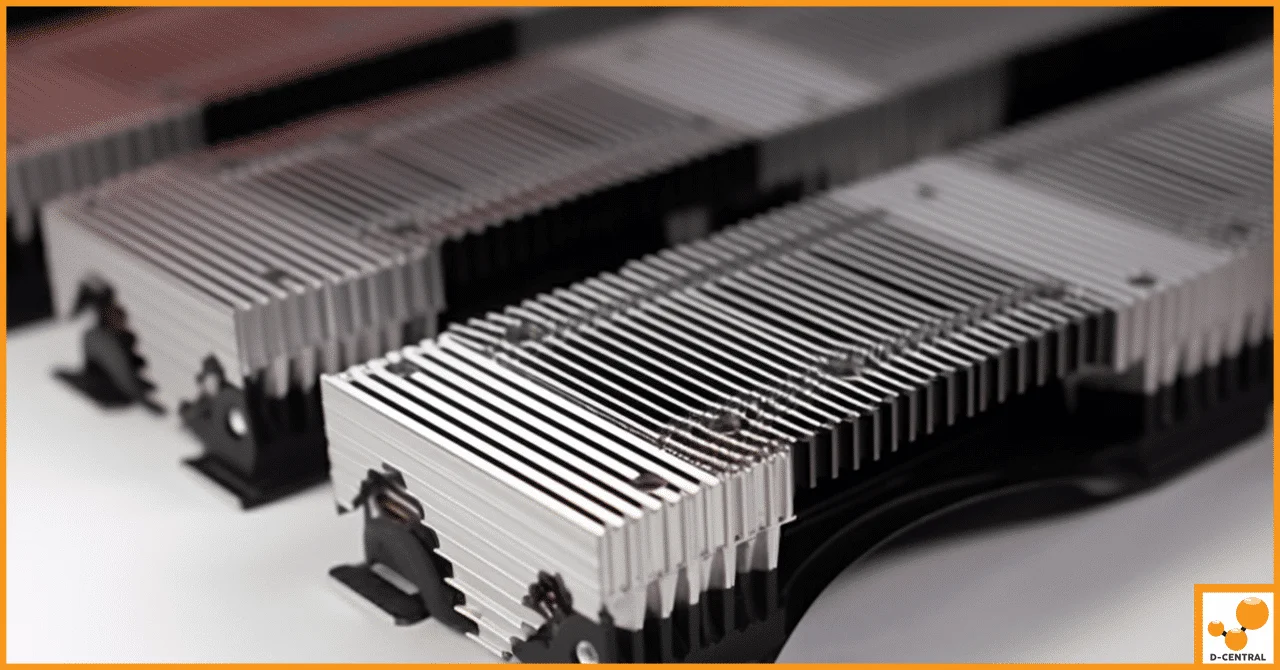
The Retrofit Heatsink replaces all individual stock heatsinks on each hashboard with a single, large-format aluminum heatsink that spans the entire chip array. This is the upgrade we recommend most often at D-Central — it is proven, reliable, and dramatically improves thermal performance.
| Specification | Stock Heatsinks | Retrofit Heatsink |
|---|---|---|
| Coverage | Individual per chip | Full hashboard (all chips) |
| Mounting Method | Thermal adhesive | Mechanical (screws + thermal paste) |
| Thermal Mass | Low | High |
| Delamination Risk | High (adhesive degradation) | Eliminated (mechanical mount) |
| Cooling Uniformity | Variable | Uniform across all chips |
| Immersion Compatible | Limited | Yes — air and immersion |
| Maintenance | Difficult (re-adhesion needed) | Easy (unscrew, clean, reapply paste) |
Key advantages:
- Eliminates delamination entirely — mechanical mounting means no adhesive to degrade.
- Drops chip temperatures 10-15°C — more thermal mass, better surface area, uniform contact pressure.
- Compatible with all 17 Series variants — S17, S17 Pro, S17+, T17, T17+.
- Future-proof maintenance — if you ever need to access chips, unscrew the heatsink, service the board, and remount. No messy adhesive removal.
- Works in immersion setups — if you are running dielectric fluid cooling, the retrofit heatsink performs excellently as an immersion-ready thermal interface.
This is the upgrade that transforms a 17 Series from a liability into a reliable hashing machine. If you are running these units for home heating with Bitcoin mining, the retrofit heatsink is essential — you need stability and uptime, not surprise failures in the middle of a Canadian winter.
Hydro Heatsink Upgrade: Maximum Cooling Performance
For operators who want to push their 17 Series to the absolute limit — or who need to solve noise problems for home mining environments — the Hydro Heatsink Upgrade replaces the entire air cooling system with a water-cooled loop.
| Metric | Stock Air Cooling | Hydro Heatsink |
|---|---|---|
| Chip Temperature Reduction | Baseline | Up to 20°C lower |
| Noise Level | ~82 dB (motorcycle-loud) | ~30 dB (whisper-quiet) |
| Hashrate Impact | Baseline (throttles when hot) | Up to 10% increase (cooler = faster) |
| Fan Requirement | 2x high-RPM industrial fans | None (radiator fan only) |
| Home Mining Friendly | No (too loud) | Yes |
| Compatibility | Stock | S17, S17 Pro, select T17 models |
The hydro upgrade uses a radiator, pump, and liquid coolant loop to transfer heat away from the chips far more efficiently than air ever could. The elimination of the stock industrial fans is the biggest win for home miners — dropping from 82 dB to around 30 dB turns an unusable machine into something you can run in a utility room or garage without ear protection.
This upgrade pairs exceptionally well with a Bitcoin Space Heater conversion. The waste heat from the radiator can be directed into living spaces during heating season, effectively turning your electricity bill into both sats and warmth. That is the dual-purpose mining philosophy we champion at D-Central — every watt should work twice.
Understanding the Delamination Problem
Delamination is the single biggest failure mode in the Antminer 17 Series. Understanding it is critical for any operator running these machines.
What happens: The layers within the BM1397 chip package begin to separate due to thermal cycling — the repeated expansion and contraction as chips heat up under load and cool down during idle periods. Once separation begins, the thermal pathway from the chip die to the heatsink is compromised. The chip runs hotter, which accelerates the delamination, creating a destructive feedback loop that ends with a dead chip and a dead hashboard.
Contributing factors:
- Manufacturing variance in chip packaging — some chips shipped from the factory with marginal bond quality between internal layers.
- Stock heatsink adhesive degradation — as the thermal adhesive ages and loses contact pressure, chips run hotter, which accelerates delamination.
- Dust and humidity — particulate accumulation acts as thermal insulation, and moisture can corrode the internal layer bonds. Canadian operators know this well — basement humidity is a real factor.
- Overvoltage and power supply instability — running chips above spec voltage increases thermal stress. A clean, properly rated PSU is not optional.
- Vibration and physical handling — repeated shipping, moving, or operating on unstable surfaces transmits mechanical stress to the chip packages.
The fix: At D-Central, our ASIC repair process for delaminated 17 Series hashboards includes our proprietary reflow process, replacement of failed chips with higher-quality components, and installation of retrofit heatsinks to prevent recurrence. Every hashboard ships with a full green chip map confirming all chips are operational, backed by a 3-month warranty.
Alternative Firmware: Software Optimization After Hardware Upgrades
Hardware upgrades and firmware optimization are complementary — the heatsink gives you thermal headroom, and custom firmware lets you use that headroom intelligently. Two options worth considering:
BraiinsOS+ — Open-source firmware from Braiins (the team behind Stratum V2). If you care about decentralization and protocol-level improvements to mining, this is the firmware that aligns with those values. Key features include auto-tuning that optimizes each chip individually, Stratum V2 support for improved pool communication security, SSH access for remote management, and per-chip performance monitoring. The open-source nature means the code is auditable — no black boxes, no hidden phone-home behavior.
VNish — A proprietary firmware focused on stability and performance tuning. Features include overclocking and undervolting profiles, automatic optimization algorithms, fan control with temperature protection, and a web dashboard for monitoring. VNish tends to extract maximum performance from healthy hardware, making it a strong choice after a heatsink upgrade when your chips are running cool and stable.
Important warning: Flashing alternative firmware carries risks. It can void your manufacturer warranty, and a failed flash can brick the control board. Always back up the stock firmware before flashing, download only from official sources, and follow the installation instructions precisely. If you are not comfortable with firmware operations, our mining consulting team can advise you on the best configuration for your specific setup.
Step-by-Step Heatsink Upgrade Installation
Whether you are installing a retrofit heatsink yourself or want to understand what our repair team does, here is the complete process:
Tools required:
- Phillips-head screwdriver (sized for ASIC screws)
- Precision tweezers or needle-nose pliers
- Thermal paste syringe (high-quality paste — we use optimized thermal compound in our shop)
- Isopropyl alcohol (99%) and lint-free cloths
- Anti-static wrist strap
- Clean, well-lit workspace
Procedure:
- Power down and disconnect. Remove the power cable and network cable. Wait 60 seconds for capacitors to discharge. Never work on a powered miner.
- Open the enclosure. Remove the screws securing the miner case and carefully lift the cover to expose the hashboards.
- Remove hashboards. Disconnect the ribbon cables and power connectors from each hashboard. Note the orientation and position of each board — they must go back in the same slots.
- Remove stock heatsinks. Carefully pry or unscrew the existing individual heatsinks from each chip. If they are adhesive-mounted, use gentle lateral pressure — do not pull straight up, as this risks damaging the chip.
- Clean the chip surfaces. Apply isopropyl alcohol to a lint-free cloth and thoroughly clean each chip surface. Remove all old thermal adhesive and paste residue. The chip surface must be clean and smooth for optimal thermal transfer.
- Apply thermal paste. Using a syringe, apply a thin, even layer of thermal paste to each chip. The layer should be just enough to cover the chip surface without excess — too much paste is almost as bad as too little.
- Mount the retrofit heatsink. Align the heatsink over the chip array, ensuring the screw holes line up with the hashboard mounting points. Tighten screws in a cross pattern (like tightening lug nuts) to ensure even pressure across all chips.
- Reassemble. Reconnect the hashboard cables to the control board, reinstall the boards in the enclosure, and close the case.
- Test. Power on and monitor chip temperatures for the first 30 minutes. All chips should report temperatures within 5°C of each other. If one chip is significantly hotter, the heatsink may need reseating in that area.
Estimated time: 45-60 minutes per hashboard for an experienced technician. Budget 2-3 hours for your first complete miner if you are doing this for the first time.
If this process sounds like more than you want to tackle, send your hashboards to D-Central. Our repair team does this every day, with the tools, thermal compounds, and diagnostic equipment to do it right the first time. Visit our shop for heatsink upgrade kits, or contact our ASIC repair team to have us handle the entire upgrade.
Choosing the Right Upgrade Path
| Your Situation | Recommended Upgrade | Why |
|---|---|---|
| Running 17 Series in a dedicated mining room/facility | Retrofit Heatsink | Best reliability per dollar, eliminates delamination, noise is acceptable in a dedicated space |
| Home mining — need quiet operation | Hydro Heatsink | Drops noise to livable levels, enables dual-purpose heating |
| Experiencing delamination/chip failures | D-Central Repair + Retrofit Heatsink | Fix failed chips with reflow process, then prevent recurrence with proper cooling |
| Planning immersion cooling | Retrofit Heatsink | Designed for compatibility with dielectric fluid cooling |
| Converting to a Bitcoin Space Heater | Hydro Heatsink | Quiet operation + directed heat output for home integration |
The D-Central Advantage for 17 Series Upgrades
We are not a generic hardware vendor recommending products we have never installed. D-Central has been repairing and upgrading Antminer hardware since 2016, operating out of our facility in Laval, Quebec. We are Bitcoin Mining Hackers — we take institutional-grade mining technology and make it work for home miners, small operations, and anyone who believes that decentralized hashrate matters.
For Antminer 17 Series upgrades specifically:
- Proprietary reflow process — our chip repair technique exceeds Bitmain’s factory standards for bond quality.
- Full green chip maps — every hashboard ships with diagnostic proof that all chips are operational.
- 3-month warranty — we stand behind our work.
- Optimized thermal compounds — we use professional-grade thermal paste, not the generic compounds found in most kits.
- Canadian quality and service — real humans, real expertise, real accountability. Based in Canada, shipping worldwide.
Whether you are maintaining a fleet of 17 Series units or breathing new life into a single miner for your home setup, the heatsink upgrade is the single highest-impact modification you can make. It directly addresses the biggest failure mode in these machines and unlocks performance that Bitmain’s stock cooling solution leaves on the table.
Browse our shop for heatsink upgrade kits and thermal compounds, explore our Bitaxe Hub if you are interested in open-source solo mining alongside your ASIC fleet, or send your hashboards to our repair team and let us handle it. Every hash counts.
Frequently Asked Questions
What is the biggest benefit of upgrading the heatsinks on an Antminer 17 Series?
Eliminating delamination risk. The stock thermal adhesive mounting is the primary failure mode in these machines. A retrofit heatsink uses mechanical mounting (screws) that provides consistent contact pressure indefinitely, dropping chip temperatures 10-15°C and extending hashboard lifespan significantly.
Which 17 Series models are compatible with the retrofit heatsink?
The retrofit heatsink is compatible with all Antminer 17 Series variants: S17, S17 Pro, S17+, T17, and T17+. The hydro heatsink is compatible with S17, S17 Pro, and select T17 models. Contact our team if you are unsure about compatibility with your specific hardware revision.
Can I install a heatsink upgrade myself?
Yes, if you are comfortable working with electronics. The process requires basic tools (screwdriver, thermal paste, isopropyl alcohol) and takes 45-60 minutes per hashboard. The most critical step is proper thermal paste application and even screw tightening. If you prefer professional installation, D-Central’s ASIC repair team handles these upgrades daily with professional-grade tools and thermal compounds.
Should I upgrade firmware before or after replacing heatsinks?
After. Install the heatsink upgrade first to establish stable, cool operating temperatures, then flash alternative firmware like BraiinsOS+ or VNish to optimize performance within your improved thermal envelope. The cooler chips give the firmware more headroom for auto-tuning and performance optimization.
Is the hydro heatsink upgrade worth the extra cost over the retrofit?
It depends on your environment. If noise is not a concern (dedicated mining room or hosting facility), the retrofit heatsink delivers excellent thermal performance at a lower cost. If you are home mining and need quiet operation, or if you are building a Bitcoin Space Heater setup where directed heat output matters, the hydro upgrade is worth the premium.
How does D-Central’s repair process handle delaminated chips?
Our proprietary reflow process restores the bond integrity of delaminated chips. For chips that are beyond recovery, we replace them with higher-quality components. Every repaired hashboard receives a full diagnostic scan, and we ship with a green chip map confirming all chips are operational, backed by a 3-month warranty on our work.
Can I use a heatsink-upgraded 17 Series for immersion cooling?
Yes. The retrofit heatsink is designed to work in both air-cooled and immersion-cooled configurations. The mechanical mounting and full-coverage design are actually ideal for dielectric fluid cooling, where uniform thermal transfer across the entire hashboard is critical for performance.
What thermal paste should I use for the heatsink upgrade?
Use a high-quality, non-conductive thermal paste rated for sustained high-temperature operation. Avoid cheap generic thermal compounds — they dry out and lose effectiveness quickly in the sustained thermal environment of an ASIC miner. D-Central carries optimized thermal compound in our shop that is specifically selected for ASIC mining applications.