ASIC Miner Repair Cost Guide: Pricing by Component and Model
One of the most common questions we receive at D-Central Technologies is: “How much will it cost to repair my ASIC miner?” The answer depends on several variables, but we can provide realistic price ranges based on our experience repairing thousands of miners since 2016. The following table provides estimated repair cost ranges for the most common ASIC miner models. These are industry-typical ranges — actual costs depend on the specific fault, parts availability, and your repair provider.| Repair Type | Antminer S9 | Antminer S17 | Antminer S19 | Antminer S21 |
|---|---|---|---|---|
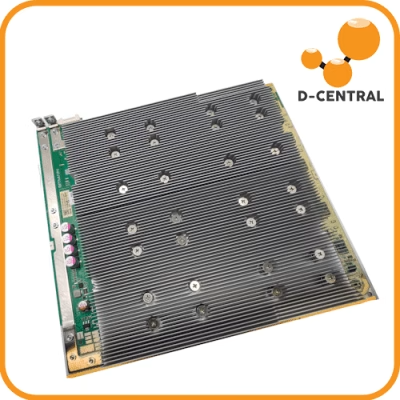
| Hash Board Repair | $100-250 | $150-350 | $200-500 | $300-600 |
| Control Board Repair | $75-150 | $100-200 | $100-250 | $150-300 |
| PSU Repair/Replacement | $50-150 | $75-200 | $100-300 | $100-300 |
| Fan Replacement | $30-60 | $40-80 | $50-100 | $50-100 |
| ASIC Chip Replacement (per chip) | $15-30 | $20-50 | $30-75 | $40-100 |
| Full Diagnostic (inspection fee) | $50-75 | $50-100 | $75-125 | $75-150 |
| Firmware Reflash / Recovery | $25-50 | $50-100 | $50-100 | $50-100 |
Whatsminer Repair Cost Ranges
| Repair Type | M20/M30 Series | M50/M60 Series |
|---|---|---|
| Hash Board Repair | $150-400 | $250-550 |
| Control Board Repair | $100-250 | $150-300 |
| PSU Repair/Replacement | $100-250 | $150-350 |
| Fan Replacement | $40-80 | $50-100 |
Repair vs. Replace: The 50% Decision Rule
One of the most important decisions a miner faces is whether to repair or replace a faulty ASIC miner. The industry standard rule of thumb is the 50% rule: if the total repair cost exceeds 50% of the cost of a comparable replacement unit, it is generally more economical to replace.| Scenario | Repair Cost | Replacement Cost | Repair/Replace Ratio | Recommendation |
|---|---|---|---|---|
| S9 hashboard repair | $150 | $150 (used S9) | 100% | Replace |
| S19 hashboard repair | $350 | $2,500 (used S19) | 14% | Repair |
| S21 hashboard repair | $500 | $5,000 (new S21) | 10% | Repair |
| S17 multiple board failure | $800 | $600 (used S17) | 133% | Replace or upgrade |
- Age of the miner: Older models (S9, S17) have lower replacement costs, making repair less attractive. Newer models (S19, S21) are expensive to replace, making repair almost always worthwhile.
- Parts availability: Parts for older models become scarcer over time, driving repair costs up and timelines out.
- Efficiency considerations: If the repair cost approaches the price difference between your current model and a newer, more efficient model, upgrading may be the smarter move. An S19 repair that costs $500 might not make sense when $3,000 more gets you an S21 with 40% better efficiency.
- Warranty on repair: A repair from a reputable center like D-Central comes with a warranty, giving you confidence in the investment.
What Drives ASIC Repair Costs Up or Down
Understanding the cost factors helps you anticipate your repair bill before you ship your miner.Factors That Increase Cost
- Multiple failed chips: A hashboard with 3-5 failed ASIC chips costs significantly more than one with a single failure. Each chip requires individual desoldering, replacement, and resoldering.
- PCB trace damage: If the circuit board traces themselves are damaged (from power surges, liquid exposure, or physical impact), trace repair is labor-intensive and time-consuming.
- Rare or discontinued parts: Parts for older or discontinued models (S17, L3+, etc.) may be harder to source, adding to the cost.
- Corrosion or liquid damage: Water, humidity, or chemical exposure causes widespread damage that requires extensive cleaning and multiple component replacements.
- Rush service: If you need expedited repair to minimize downtime, expect to pay a premium.
Factors That Decrease Cost
- Simple issues: Blown fuses, loose connectors, or single fan failures are quick, inexpensive fixes.
- Firmware issues: Many “dead” miners simply need a firmware reflash — one of the cheapest repairs.
- Batch repairs: Sending multiple miners for repair at once may qualify for volume discounts.
- Common models: S19 and S9 parts are widely available, keeping costs competitive.
- Early diagnosis: Catching issues early (reduced hashrate, abnormal temperatures) before they cascade into larger failures keeps repair costs lower.
Factors Affecting ASIC Miner Repair Costs
The cost of repairing an ASIC miner depends on several factors, including the complexity of the issue, the parts that need to be replaced or repaired, and the labor involved in the process. Here are the most common factors that influence the repair cost:- Complexity of the issue: Simple issues like resetting the miner or updating the firmware can be resolved quickly and at a lower cost. More complex issues like replacing damaged components or repairing the circuit board require more time and expertise, resulting in a higher repair cost.
- Parts required for repair: The type and cost of the parts that need to be replaced or repaired influence the overall repair cost. High-quality, genuine parts are usually more expensive, but they are more reliable and have a longer lifespan.
- Labor cost: Labor cost is based on the technician’s experience and expertise, as well as the time required to complete the repair. Skilled technicians with specialized knowledge in ASIC miner repair may charge higher rates, but they are more likely to provide reliable and efficient service.
DIY vs. Professional Repair: When to Attempt It Yourself
Not every ASIC issue requires professional repair. Here is a guide to help you decide when to DIY and when to send your miner to a professional like D-Central.| Issue | DIY Difficulty | Tools Needed | DIY or Professional? |
|---|---|---|---|
| Firmware update/reflash | Easy | Computer, SD card | DIY |
| Fan replacement | Easy | Screwdriver | DIY |
| Dust cleaning / thermal paste | Easy | Compressed air, thermal paste | DIY |
| Network/configuration issues | Easy-Medium | Computer | DIY |
| PSU testing/replacement | Medium | Multimeter | DIY if you have experience |
| Hashboard voltage testing | Medium-Hard | Multimeter, oscilloscope | DIY if experienced; otherwise Professional |
| ASIC chip replacement | Hard | Hot air station, solder, flux, microscope | Professional |
| PCB trace repair | Very Hard | Microscope, micro soldering tools | Professional |
| BGA reballing | Expert | BGA rework station, stencils | Professional |
- How to Use a Multimeter for ASIC Miner Repair
- Antminer Error Codes: Complete Diagnostic Guide
- APW12 PSU Troubleshooting Guide
How to Estimate ASIC Miner Repair Time
Estimating the repair time for an ASIC miner depends on several factors, including the complexity of the issue, the availability of parts, and the technician’s expertise. General guidelines:- Initial diagnosis: A thorough examination of the device, including checking for visible damage, testing functionality, and reviewing error logs. This typically takes a few hours to one business day.
- Ordering parts: If replacement parts are needed and are not in stock, ordering can add several days to several weeks depending on the supplier’s location and shipping times.
- Repair process: Simple repairs (fan swap, firmware reflash) take minutes to hours. Complex repairs (multi-chip hashboard repair) can take several hours to several days.
- Testing and burn-in: After repair, the miner should be run for 24-48 hours to verify stable operation at full hashrate. This testing period is essential and should not be skipped.
- Simple repairs (fan, firmware, PSU swap): 1-3 business days
- Standard hashboard repair: 5-10 business days
- Complex multi-board repair: 10-20 business days
- Repairs requiring special-order parts: 2-6 weeks
Importance of ASIC Miner Repair Warranty
A warranty is an essential factor to consider when selecting an ASIC miner repair service provider. A warranty ensures that the repair work and any replacement parts used are of high quality and will function correctly for a specified period. It also provides peace of mind, knowing that if any issues arise after the repair, they will be addressed without incurring additional costs. When evaluating a warranty, consider its duration, the scope of coverage, and any limitations or exclusions. A comprehensive warranty that covers both parts and labor with a reasonable duration is ideal.Understanding the ASIC Miner Repair Process
The ASIC miner repair process typically involves several stages:- Initial diagnosis: Thorough examination of the device, checking for visible damage, testing functionality, and reviewing error logs.
- Troubleshooting and diagnostics: In-depth examination, testing individual components, and isolating the specific problem area.
- Repair or replacement of damaged components: Repairing may involve soldering, reflowing, or reballing. Replacing involves sourcing the appropriate part and installing it.
- Testing and verification: Running diagnostic tests, monitoring performance, and checking for any additional issues. At D-Central, every repaired miner goes through a full burn-in test at operating hashrate.
- Return of the repaired device: The device is returned with a detailed report outlining the repair work carried out, parts replaced, and recommendations for ongoing maintenance.
Troubleshooting and Diagnostics in ASIC Miner Repair
Troubleshooting and diagnostics play a crucial role in the ASIC miner repair process. Key techniques and tools include:- Visual inspection: Checking for visible signs of damage such as burnt or discolored components, cracked parts, or loose connections.
- Functional testing: Testing the device’s various components including power supply, fans, and hashing boards to determine which part is not functioning correctly.
- Diagnostic tools: Multimeters, oscilloscopes, and thermal imaging cameras provide valuable information about the device’s electrical and thermal performance. By using these tools, technicians can gain a deeper understanding of the issue and determine the most appropriate repair strategy.
Common ASIC Miner Error Codes and Their Repair Implications
Understanding error codes can help you estimate repair complexity and cost before sending your miner in.| Error Code / Symptom | Likely Cause | Typical Repair | Estimated Cost Range |
|---|---|---|---|
| Missing hashboard(s) | Connector issue or board failure | Reseat connectors or hashboard repair | $0 (DIY) – $500 |
| Low hashrate / missing ASIC chips | Failed ASIC chips on hashboard | Chip replacement | $100-500 |
| High temperature warnings | Failed fans, dust buildup, thermal paste | Fan replacement, cleaning, repaste | $30-150 |
| No power / won’t boot | PSU failure or control board issue | PSU replacement or control board repair | $50-300 |
| Eeprom / firmware errors | Corrupted firmware or NAND | Firmware reflash or NAND replacement | $25-150 |
| Intermittent hashrate drops | Failing chip, loose connection, PSU instability | Diagnostic + targeted repair | $75-400 |
Sourcing ASIC Miner Repair Parts
One of the most critical aspects of the ASIC miner repair process is sourcing the appropriate parts. Replacement parts must be compatible to maintain optimal performance. Here are your options:- Manufacturer: The most reliable source. Genuine parts guaranteed compatible.
- Authorized distributors: Close relationship with manufacturers, genuine parts at competitive prices.
- Repair centers with parts inventory: D-Central maintains a large inventory of replacement parts for all major ASIC brands, reducing repair turnaround time significantly.
- Third-party suppliers: Cost-effective but exercise caution regarding quality and authenticity.
Identifying a Reputable ASIC Miner Repair Service Provider
When selecting an ASIC miner repair service provider, consider:- Experience: Choose a provider with a proven track record. D-Central has been repairing ASIC miners since 2016 with 60+ model-specific repair pages documenting their expertise.
- Expertise: ASIC miners are complex devices requiring specialized knowledge and equipment.
- Warranty: A provider that offers a warranty on repair work is a strong indicator of quality and confidence.
- Reputation: Research reviews, ask for referrals from other miners, and check the provider’s credentials.
- Parts inventory: A repair center with parts in stock can complete repairs faster than one that needs to order everything.
- Transparency: Reputable providers give you a diagnostic report and repair estimate before proceeding, and do not charge for work you have not approved.
Why Choose D-Central for ASIC Repair
D-Central Technologies is Canada’s leading ASIC repair center, operating since 2016 from our facility in Montreal, Quebec. Here is what sets D-Central apart:- Deep expertise: Over 8 years of ASIC repair experience across all major manufacturers (Bitmain, MicroBT, Canaan, Innosilicon).
- Comprehensive parts inventory: Hashboards, control boards, PSUs, fans, ASIC chips, and more — in stock and ready for repair.
- Model-specific expertise: 38+ dedicated repair pages covering every major ASIC model, from the S9 to the S21.
- Retail-focused: We serve individual miners and small operations, not just institutions. Every repair gets personal attention.
- Full testing: Every repaired miner undergoes a complete burn-in test before being returned to the customer.
- Warranty on repairs: All repairs come with a warranty on parts and labor.
- Canadian-based: No international shipping complications for Canadian miners. We also serve the US and ship worldwide.
How to Reduce Your ASIC Repair Costs Long-Term
Prevention is always cheaper than repair. Here are proven strategies to minimize repair frequency and costs:- Maintain proper airflow and cooling. Overheating is the number one cause of ASIC failure. Ensure clean air intake, proper exhaust, and replace fans at the first sign of degradation.
- Clean your miners regularly. Dust buildup insulates chips and blocks airflow. Compressed air cleaning every 3-6 months extends miner life significantly.
- Use quality power infrastructure. Unstable power, voltage spikes, and brownouts damage PSUs and hashboards. Use surge protectors and ensure stable, adequate power supply.
- Monitor your miners. Watch for dropping hashrate, rising temperatures, and error codes. Catching problems early prevents cascading failures.
- Keep firmware updated. Manufacturers release firmware updates that fix bugs and improve stability.
- Control humidity. Humidity causes corrosion, especially on connectors and PCB traces. Keep your mining environment dry.
FAQ
How much does it cost to repair an Antminer S19 hashboard?
Typical S19 hashboard repair costs range from $200-500 depending on the number of failed chips and the extent of damage. A single-chip replacement on the lower end, multiple chips or trace damage on the higher end. Contact D-Central for a specific quote.
Is it worth repairing an old Antminer S9?
It depends on the repair cost vs. replacement cost. Used S9s sell for $100-200 CAD. If the repair exceeds 50% of that, replacing is usually more economical. However, S9s repurposed as Bitcoin Space Heaters may justify repair since they serve a dual purpose (heating + mining).
How long does ASIC repair typically take?
Simple repairs (fan swap, firmware): 1-3 business days. Standard hashboard repair: 5-10 business days. Complex repairs or those requiring special-order parts: 2-6 weeks. Testing and burn-in adds 1-2 days to any repair.
Can I repair an ASIC miner myself?
Yes, for simple issues: firmware reflash, fan replacement, cleaning, connector reseating. For chip-level hashboard repair, you need specialized tools (hot air rework station, microscope, multimeter) and significant practice. See our Multimeter Guide for diagnostic fundamentals.
What is the most common ASIC miner failure?
Hashboard failures (failed ASIC chips) are the most common issue, followed by fan failures and PSU degradation. Overheating, dust accumulation, and power instability are the leading causes of all three.
Does D-Central repair Whatsminer and Avalon miners?
Yes. D-Central repairs all major ASIC brands including Bitmain (Antminer), MicroBT (Whatsminer), Canaan (Avalon), and Innosilicon. See our full repair service page for supported models.
Should I repair or replace my broken ASIC miner?
Apply the 50% rule: if repair cost exceeds 50% of replacement cost, consider replacing. For newer models (S19, S21, M60S), repair is almost always more economical. For older models (S9, S17), replacement or upgrading is often the better choice unless the miner serves a dual purpose like heating.
What tools do I need for basic ASIC diagnostics?
A multimeter is the most essential tool for basic ASIC diagnostics. It lets you test power supply voltages, check hashboard resistance, and identify open/short circuits. Beyond that, a thermal camera or infrared thermometer helps identify hot spots.
Where can I buy ASIC replacement parts?
D-Central Technologies stocks a comprehensive inventory of ASIC replacement parts including hashboards, control boards, PSUs, fans, and individual ASIC chips for all major brands. Browse the parts catalog.
How much does it cost to repair an Antminer S19 hashboard?
Typical S19 hashboard repair costs range from $200-500 depending on the number of failed chips and the extent of damage. A single-chip replacement on the lower end, multiple chips or trace damage on the higher end. Contact D-Central for a specific quote.
Is it worth repairing an old Antminer S9?
It depends on the repair cost vs. replacement cost. Used S9s sell for $100-200 CAD. If the repair exceeds 50% of that, replacing is usually more economical. However, S9s repurposed as Bitcoin Space Heaters may justify repair since they serve a dual purpose (heating + mining).
How long does ASIC repair typically take?
Simple repairs (fan swap, firmware): 1-3 business days. Standard hashboard repair: 5-10 business days. Complex repairs or those requiring special-order parts: 2-6 weeks. Testing and burn-in adds 1-2 days to any repair.
Can I repair an ASIC miner myself?
Yes, for simple issues: firmware reflash, fan replacement, cleaning, connector reseating. For chip-level hashboard repair, you need specialized tools (hot air rework station, microscope, multimeter) and significant practice. See our Multimeter Guide for diagnostic fundamentals.
What is the most common ASIC miner failure?
Hashboard failures (failed ASIC chips) are the most common issue, followed by fan failures and PSU degradation. Overheating, dust accumulation, and power instability are the leading causes of all three.
Does D-Central repair Whatsminer and Avalon miners?
Yes. D-Central repairs all major ASIC brands including Bitmain (Antminer), MicroBT (Whatsminer), Canaan (Avalon), and Innosilicon. See our full repair service page for supported models.
Should I repair or replace my broken ASIC miner?
Apply the 50% rule: if repair cost exceeds 50% of replacement cost, consider replacing. For newer models (S19, S21, M60S), repair is almost always more economical. For older models (S9, S17), replacement or upgrading is often the better choice unless the miner serves a dual purpose like heating.
What tools do I need for basic ASIC diagnostics?
A multimeter is the most essential tool for basic ASIC diagnostics. It lets you test power supply voltages, check hashboard resistance, and identify open/short circuits. Beyond that, a thermal camera or infrared thermometer helps identify hot spots.
Where can I buy ASIC replacement parts?
D-Central Technologies stocks a comprehensive inventory of ASIC replacement parts including hashboards, control boards, PSUs, fans, and individual ASIC chips for all major brands. Browse the parts catalog.