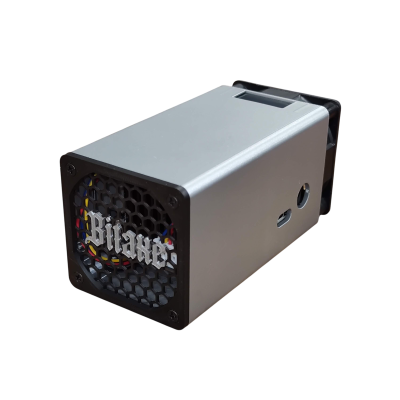
DCENT_axe — D-Central Technologies
The First AI-Native BitAxe Firmware
DCENT_axe is a clean-room Rust rewrite of BitAxe firmware with a built-in MCP server. Memory-safe. AI-controllable. Stratum V2 ready. Your BitAxe just got an upgrade it never saw coming. Currently in closed beta — public beta expected summer 2026.
What is DCENT_axe?
DCENT_axe is a clean-room implementation — not a fork, but deeply inspired by the AxeOS project that proved open-source BitAxe firmware is viable. It is a ground-up rewrite of BitAxe firmware in Rust — the same language powering critical infrastructure at Mozilla, Cloudflare, and the Linux kernel. Every line of code was written from scratch, using ESP-Miner only as a protocol reference. The result is firmware that cannot suffer from buffer overflows, use-after-free crashes, or the memory corruption bugs that plague C-based mining firmware.
But memory safety is just the foundation. The real breakthrough is the built-in MCP (Model Context Protocol) server — making DCENT_axe the world’s first AI-native miner firmware. Any MCP-compatible AI assistant (Claude, OpenClaw, or custom agents) can monitor your hashrate, adjust your frequency and voltage, manage pools, run autotuning, and optimize your miner through natural language. You do not need to learn config files or memorize API endpoints. Just tell your AI what you want.
DCENT_axe supports every major BitAxe ASIC chip: the BM1370 (Gamma, GT), BM1366 (Ultra, Hex Ultra), BM1368 (Supra, Hex Supra), and BM1397 (Max). It ships with Stratum V1 and version rolling (ASICBoost) today, with Stratum V2 encrypted mining in active development — a first for any BitAxe firmware. This is what firmware looks like when Bitcoin miners build it for Bitcoin miners.
Built on ESP-IDF v5.3+ with Rust. Runs on the same ESP32-S3 hardware inside every BitAxe. Flash it, connect to WiFi, and your miner is smarter than it was five minutes ago.
Why DCENT_axe?
Every feature exists because a miner needed it. No bloat. No telemetry. No closed-source blobs. Here is what sets DCENT_axe apart from every other BitAxe firmware on the planet.
AI-Native Control (MCP)
The world’s first miner firmware with a built-in MCP server. 12+ tools let any compatible AI monitor hashrate, adjust frequency and voltage, manage pools, run autotuning, and control fan speed — all through natural language. Connect Claude, OpenClaw, or your own agent. Your miner becomes a conversation, not a config file.
Memory-Safe Rust
Zero buffer overflows. Zero use-after-free. Zero undefined behaviour. Rust’s ownership model catches at compile time the entire class of memory bugs that cause mysterious ASIC crashes, watchdog resets, and corrupted mining jobs. The firmware either compiles correctly or it does not compile at all. No silent corruption.
Stratum V2 Ready
DCENT_axe is the first BitAxe firmware implementing Stratum V2 with Noise protocol encryption. Your mining traffic is encrypted end-to-end — no ISP snooping, no MITM attacks, no hashrate hijacking. Plus bandwidth-efficient binary framing and job declaration support. The future of mining protocol, available today.
Smart Autotuner
Four tuning modes for every scenario: Max Hashrate pushes your chip to its limit. Best Efficiency finds the sweet spot of J/TH. Target Watts holds a power budget you set. Target Temperature keeps thermals where you want them. The autotuner calculates values at runtime based on your specific silicon — not presets from a spreadsheet.
Tamagotchi Mining Companion
Your BitAxe OLED display comes alive with a pixel-art creature that evolves alongside your mining journey. Six evolution stages — Egg, Hatchling, Miner, Veteran, Legend, Titan — driven by real mining milestones. 16 tracked achievements unlock as you mine. The 128×32 SSD1306 display cycles through an 8-page carousel showing hashrate, temperature, shares, and your companion’s mood. Mining should be fun.
Solo Miner’s Luck Calculator
Every solo miner asks the same question: “Am I lucky or unlucky?” DCENT_axe answers it with math. The built-in luck calculator shows your probability of finding a block at current network difficulty, expected time-to-block at your hashrate, and cumulative luck since you started. No more guessing. No more anxiety. Just cold, honest statistics — updated in real time.
Multi-Pool Failover
Configure up to three pools with automatic failover. If your primary pool goes down, DCENT_axe switches to your backup instantly — no lost hashing time, no manual intervention. Future updates bring hashrate splitting: run 95% on your solo pool and 5% as a dev donation, or split 70/30 between two pools. Your hashrate, your rules.
Home Assistant Integration
MQTT auto-discovery means your DCENT_axe miner appears in Home Assistant as sensors, switches, and climate entities. Monitor hashrate and temperature from your HA dashboard. Automate mining schedules based on electricity rates. Pause mining when room temperature exceeds a threshold. Perfect for the “Bitcoin space heater” setup — your miner becomes part of your smart home.
Supported Hardware
DCENT_axe runs on every major BitAxe variant. Same ESP32-S3 chip, same hardware — better firmware. Flash it and keep mining.
| ASIC Chip | BitAxe Models | Hashrate Range | PLL Frequency | Voltage Control |
|---|---|---|---|---|
| BM1370 | Bitaxe Gamma, Bitaxe GT | ~1.0 – 1.2 TH/s | 160 – 239 MHz | Manual + Curve Tuning |
| BM1366 | Bitaxe Ultra, Bitaxe Hex Ultra | ~500 GH/s – 3 TH/s | 144 – 235 MHz | Manual + Curve Tuning |
| BM1368 | Bitaxe Supra, Bitaxe Hex Supra | ~600 GH/s – 3.6 TH/s | 144 – 235 MHz | Manual + Curve Tuning |
| BM1397 | Bitaxe Max | ~400 GH/s | 60 – 200 MHz | Manual |
All models: ESP32-S3 based | WiFi connected | AxeOS-compatible REST API | OTA firmware updates
MCP: Your Miner Speaks AI
The Model Context Protocol turns your BitAxe into an AI-controllable device. No other miner firmware has this. Here is what your AI assistant can do with DCENT_axe.
Monitor
- get_status — Live hashrate, temperature, power draw, uptime, shares accepted/rejected
- get_asic_info — Chip model, frequency, voltage, silicon grade (A/S/B/C tier)
- get_network — WiFi signal strength, IP address, connection quality
- get_history — Rolling performance data that survives reboots
Control
- set_frequency — Adjust ASIC clock speed in real time
- set_core_voltage — Tune voltage for efficiency or performance
- set_fan_speed — PWM fan control from whisper-quiet to full blast
- set_pool — Switch pools without touching a config page
- toggle_mining — Soft pause/resume without rebooting
- set_schedule — Time-based mining profiles
Optimize
- run_autotune — AI-driven optimization across four modes: Max Hashrate, Best Efficiency, Target Watts, Target Temperature
- ota_check — Check for and apply firmware updates
- restart_mining — Clean restart of the mining pipeline
- get_swarm — Multi-miner fleet coordination
Resources
- bitaxe://status — Real-time miner state as structured data
- bitaxe://history — Rolling performance history
- bitaxe://config — Current configuration snapshot
Example: “Hey Claude, set my Bitaxe Gamma to best efficiency mode and lower the fan to 40% — it is cold in here anyway.” That is a real command that works with DCENT_axe.
Agentic Mining: When AI Owns the Pickaxe
Here is where it gets interesting. The MCP server inside DCENT_axe does not just help you control your miner — it lets AI agents own and operate miners autonomously. Projects like OpenClaw, NanoClaw, and other agentic frameworks can now connect directly to a BitAxe, earn sats, manage their own pool configuration, tune for efficiency, and reinvest — all without a human touching a keyboard.
Think about that for a second. An AI agent with its own Bitcoin wallet, its own miner, its own hashrate, making its own economic decisions. It monitors power costs, adjusts frequency to stay profitable, switches pools when fees change, and stacks sats into its own address. This is not science fiction. The MCP interface makes it possible today. DCENT_axe is the firmware that bridges the gap between autonomous AI and the Bitcoin mining layer.
For Bitaxe owners, this opens a whole new world. Your miner is no longer just a piece of hardware on your desk — it becomes infrastructure that AI agents can lease, operate, and optimize. You provide the silicon. The agent provides the strategy. The sats flow to whoever holds the keys. This is agentic mining, and it is another layer of decentralization that did not exist before DCENT_axe.
What Agents Can Do
- Own a miner — An AI agent connects to a BitAxe via MCP and operates it end-to-end
- Earn sats autonomously — Solo mine to its own wallet, no human middleman
- Optimize in real time — Adjust frequency, voltage, and fan speed based on conditions
- Manage economics — Switch pools, tune efficiency targets, respond to difficulty changes
- Run 24/7 — Agents do not sleep, do not forget, do not get distracted
Compatible Agent Frameworks
- OpenClaw — Autonomous AI agents with tool use and wallet integration
- NanoClaw — Lightweight agents optimized for embedded and IoT control
- Claude Code — Anthropic’s CLI agent with native MCP support
- Any MCP client — The protocol is open; build your own agent and point it at your BitAxe
Bitcoin was built to remove middlemen. Open-source hardware removed the manufacturer’s gatekeeping. DCENT_axe removes the last barrier: the requirement for a human operator. Another layer decentralized.
DCENT_axe vs Stock AxeOS
Skot and the entire ESP-Miner community built the foundation that made DCENT_axe possible. We used ESP-Miner as our protocol reference, and we are grateful for every line of open-source code and every register map they published. DCENT_axe exists because AxeOS proved that open-source BitAxe firmware works. We are building on the shoulders of giants. DCENT_axe is a complementary option that adds features on top of a Rust foundation, giving BitAxe owners more choice. More options means more decentralization.
| Feature | Stock AxeOS | DCENT_axe |
|---|---|---|
| Language | C | Rust (memory-safe) |
| AI Control (MCP) | No | 12+ tools, 3 resources |
| Stratum V2 | No | In development (first BitAxe firmware) |
| Autotuner Modes | Basic | 4 modes (hashrate, efficiency, watts, temp) |
| OLED Display | Static stats | 8-page carousel + Tamagotchi companion |
| Achievements | No | 16 tracked milestones |
| Luck Calculator | No | Real-time probability + expected time-to-block |
| Mining Pause | Requires reboot | Soft toggle (no reboot) |
| Pool Failover | Single pool | 3 pools with auto-switch |
| Persistent History | Lost on reboot | Survives reboots |
| Nonce Hall of Fame | No | Top 5 highest-difficulty nonces |
| Silicon Grading | No | Per-chip A/S/B/C tier ranking |
| Home Assistant | No | MQTT auto-discovery |
| Web Dashboard | Basic | Real-time charts, thermal gauge, CSRF protection |
| OTA Updates | Yes | Yes + AI-triggered via MCP |
| License | GPL | GPL-3.0 |
Current Status: Closed Beta
DCENT_axe is currently in closed beta testing. Features are experimental and under active development. Public beta expected summer 2026. All code will be released under GPL-3.0. If you would like early access, join our Discord.
Getting Started with DCENT_axe
Already running a BitAxe? You are five minutes away from DCENT_axe. Same hardware, new firmware, better mining.
Step 1: Download
DCENT_axe is coming soon. When released, builds will be available for each BitAxe model — Gamma/GT (BM1370), Ultra (BM1366), Supra (BM1368), and Max (BM1397). Sign up for notifications or join our Discord to be first in line.
Step 2: Flash via OTA
Flash via OTA from your BitAxe web interface, or use the DCENT_axe Web Flasher (experimental) to flash directly from your browser over USB. The web flasher auto-detects your chip and selects the right build. No installs, no command line. Your miner reboots automatically into DCENT_axe.
Step 3: Connect to WiFi
After flashing, DCENT_axe broadcasts a WiFi access point with a captive portal. Connect from your phone or laptop, enter your home WiFi credentials, and the miner joins your network. It remembers your WiFi settings across reboots and firmware updates.
Step 4: Configure and Mine
Open the DCENT_axe dashboard in your browser. Set your pool URL (or use public-pool.io for solo mining), enter your Bitcoin address as the worker name, pick a mining preset (Low Power, Balanced, Performance, or Max OC), and hit start. Your Tamagotchi egg hatches the moment your first share is accepted.
Step 5: Connect Your AI (Optional)
Point any MCP-compatible AI client at your miner’s IP address. The MCP server runs on the firmware itself — no bridge, no cloud, no subscription. Claude Code, OpenClaw, and custom agents all work. Ask your AI to “check my miner status” or “optimize for best efficiency” and watch it happen in real time.
Step 6: Watch It Evolve
Your OLED Tamagotchi evolves through six stages as you mine. Check the dashboard for your silicon grade, nonce Hall of Fame, efficiency scores, and luck calculator. Mining data persists across reboots — your history is never lost. Unlock all 16 achievements and reach Titan status. This is the mining grind, gamified.
Under the Hood
For the technically curious. DCENT_axe is a Rust workspace with modular crates — each responsibility isolated, each interface clean.
Architecture
- dcentaxe — Main binary and entry point
- dcentaxe-asic — ASIC drivers (BM1366, BM1368, BM1370, BM1397)
- dcentaxe-hal — Hardware abstraction: UART, I2C, power, fan, GPIO, temperature
- dcentaxe-stratum — Stratum V1 client with version rolling
- dcentaxe-mining — Work dispatcher, nonce validation, statistics
- dcentaxe-stratum-v2 — Stratum V2 with Noise protocol (optional feature flag)
Technical Specifications
- Platform: ESP32-S3 (xtensa-esp32s3-espidf)
- Framework: ESP-IDF v5.3+ via esp-idf-sys
- RAM Usage: ~180 KB of ~300 KB available
- Dashboard: ~60 KB gzipped inline HTML/CSS/JS
- Display: 128×32 SSD1306 OLED via I2C
- Temperature: EMC2101 sensor
- Power Monitoring: INA260
- Voltage Regulation: TPS546, DS4432U
- Fan Control: 25 kHz LEDC PWM
- Protocol: Stratum V1 + ASICBoost (V2 in progress)
Roadmap
DCENT_axe is under active development. Here is what is coming next — built by miners, for miners.
Coming Soon (v0.3 – v0.5)
- Full Stratum V2 integration with encrypted mining
- TLS/SSL encrypted pool connections
- mDNS discovery (bitaxe-XXXX.local)
- Voltage curve optimization and undervolting
- Home Assistant MQTT with auto-discovery
- Discord and webhook notifications
- Scheduled mining profiles (time-based power management)
- Hashrate splitting across multiple pools simultaneously
- Pool-side statistics integration
- Dashboard authentication with optional PIN
Future (v0.6+)
- WebSocket real-time stream for instant share notifications
- Prometheus and Grafana metrics endpoint
- Shareable mining card (SVG/PNG with QR code)
- Context-aware thermal management guidance
- WiFi signal quality monitoring
- First-run setup wizard
- Firmware signature verification (Ed25519)
- API rate limiting
- Achievement gallery with visual unlock progression
Frequently Asked Questions
Is DCENT_axe free?
Yes. DCENT_axe is fully open-source under GPL-3.0. The source code is public, auditable, and modifiable. There is an optional dev fee of 0.5–1% that users can disable entirely. No subscriptions, no locked features, no telemetry.
Will DCENT_axe brick my BitAxe?
No. DCENT_axe flashes via the standard OTA update mechanism — the same way you update stock AxeOS. If you want to go back to AxeOS, just flash the AxeOS binary via OTA the same way. Your hardware is never at risk.
Which BitAxe models are supported?
DCENT_axe supports all four major ASIC chip families: BM1370 (Gamma, GT), BM1366 (Ultra, Hex Ultra), BM1368 (Supra, Hex Supra), and BM1397 (Max). If your BitAxe runs AxeOS today, it can run DCENT_axe.
Do I need an AI assistant to use DCENT_axe?
No. The MCP server is an optional feature. DCENT_axe works perfectly through its web dashboard and REST API — just like any other BitAxe firmware. The AI control is there for miners who want it, but it is not required for anything.
What is the MCP server?
MCP (Model Context Protocol) is an open standard for AI tool integration. The MCP server embedded in DCENT_axe exposes your miner as a set of tools and resources that any compatible AI assistant can use. Think of it as giving your AI assistant hands to control your miner — monitor, tune, and optimize through conversation instead of config files.
Does DCENT_axe support Stratum V2?
Stratum V2 support is in active development and will make DCENT_axe the first BitAxe firmware with encrypted mining. Stratum V1 with version rolling (ASICBoost) is fully working today.
Can I use DCENT_axe for solo mining?
Absolutely. DCENT_axe works with any Stratum V1 pool, including solo mining pools like public-pool.io. The built-in luck calculator is specifically designed for solo miners — it shows your probability of finding a block and expected time-to-block at your current hashrate.
How does the Tamagotchi work?
Your OLED display shows a pixel-art creature that evolves through six stages (Egg, Hatchling, Miner, Veteran, Legend, Titan) based on real mining milestones. There are 16 achievements to unlock. The creature’s mood reflects your miner’s health — happy when hashing, sad when offline. It is a fun way to stay connected to your miner without staring at dashboards.
Is DCENT_axe compatible with the AxeOS REST API?
Yes. DCENT_axe implements AxeOS-compatible REST API endpoints with JSON responses. Tools and dashboards that work with stock AxeOS will work with DCENT_axe. The MCP server is an additional interface on top of this — it does not replace the REST API.
Who builds DCENT_axe?
DCENT_axe is built by D-Central Technologies — the same team that has been supporting Bitcoin miners since 2016. We were there from the beginning of the open-source mining movement, building the first Bitaxe accessories, hosting the first Bitaxe mining workshops, and maintaining the largest OSMU inventory in Canada.
BitAxe Miners — Ready for DCENT_axe