Your ASIC miner is not a set-and-forget appliance. It is a precision-engineered hashing machine running billions of SHA-256 calculations every second, converting electricity into proof-of-work that secures the most important monetary network ever built. Treat it like what it is: critical infrastructure for Bitcoin’s decentralization.
At D-Central Technologies, we have been repairing, modifying, and maintaining ASIC miners since 2016. We have seen thousands of machines come through our repair shop — and the overwhelming pattern is clear. The miners that last the longest and hash the hardest are the ones that receive consistent, informed maintenance. The ones that fail prematurely are the ones their operators neglected.
This guide distills everything we have learned from nearly a decade of hands-on ASIC work into a practical maintenance manual. Whether you are running a single Antminer S19 in your garage, heating your home with a Bitcoin Space Heater, or solo mining with a Bitaxe, proper care directly extends the life and performance of your hardware.
Why ASIC Maintenance Matters More Than Ever
Bitcoin’s network hashrate now exceeds 800 EH/s, with mining difficulty above 110 trillion. The block reward stands at 3.125 BTC following the April 2024 halving. In this environment, every fraction of a terahash counts. A poorly maintained miner running at 90% efficiency is not just 10% slower — it is hemorrhaging sats while consuming the same electricity as a healthy unit.
For home miners especially, maintenance is the difference between a profitable operation and an expensive space heater that does not even heat properly. Dust-clogged fans, degraded thermal paste, and loose power connections do not just reduce hashrate — they create thermal stress that kills ASIC chips and hashboards, turning a repairable problem into an expensive replacement.
The math is simple: a few hours of preventive maintenance per quarter costs you nothing but time. A dead hashboard costs hundreds of dollars and weeks of downtime. Choose wisely.
Know Your Machine: ASIC Miner Anatomy
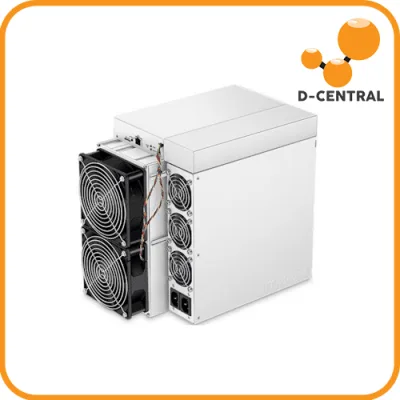
Before you can maintain your miner, you need to understand what you are maintaining. Every ASIC miner — whether it is an Antminer, Whatsminer, or AvalonMiner — shares the same fundamental architecture:
Hashboards
These are the PCBs loaded with ASIC chips that perform the actual SHA-256 hashing. A typical Antminer S19-series unit has three hashboards, each containing dozens of BM1397 or BM1398 chips. Hashboards are the most expensive component and the most sensitive to thermal abuse. When chips overheat repeatedly, solder joints crack, and individual chips fail — degrading the entire board’s performance.
Control Board
The brain of the operation. The control board manages communication between hashboards, handles network connectivity, runs the firmware, and reports status data. Control board failures are less common but can brick the entire unit if firmware gets corrupted.
Power Supply Unit (PSU)
Converts AC mains power to the DC voltages your hashboards and control board require. The PSU handles enormous current loads — an Antminer S19 XP draws over 3,000 watts. PSU failures from dust buildup, capacitor degradation, or loose connections are among the most common repair issues we see at D-Central.
Cooling System
Fans and heatsinks work together to dissipate the massive thermal output of ASIC chips. Most miners use dual axial fans in a push-pull configuration, forcing air across heatsinks bonded to the chip packages. When cooling fails, chip temperatures spike within seconds, triggering thermal throttling or emergency shutdown.
Setting Up Your Mining Environment
Maintenance starts before you even power on the miner. The environment you place your ASIC in determines 80% of its maintenance burden. Get this right, and everything else becomes easier.
Temperature Control
ASIC miners operate best in ambient temperatures between 5 and 35 degrees Celsius. Canadian miners have a natural advantage here — our climate provides free cooling for most of the year. If you are running miners as space heaters, the exhaust heat is a feature, not a bug. But you still need to ensure intake air is cool and unrestricted.
In summer months or warmer climates, additional ventilation is essential. Ducting exhaust air outdoors, using inline fans, or running miners in well-ventilated basements or garages are all effective strategies. The key principle: hot air must have somewhere to go. A miner recirculating its own exhaust in a closed room will overheat regardless of how clean it is.
Airflow and Placement
Never place a miner flat against a wall or in a corner where intake or exhaust is restricted. Maintain at least 30 centimeters of clearance on both the intake and exhaust sides. If you are running multiple miners, arrange them so that one unit’s exhaust does not feed into another’s intake.
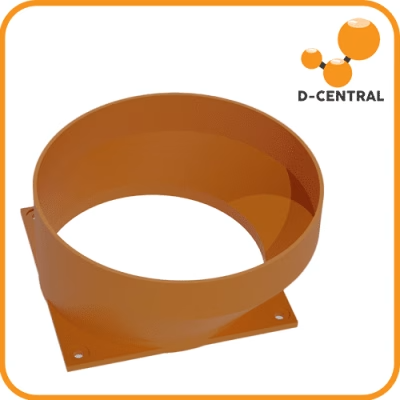
For home mining setups, custom shrouds and duct adapters from our shop can channel noise and heat where you want them — out of the living space and into your heating system.
Dust Management
Dust is the silent killer of ASIC miners. Fine particles coat heatsinks, reducing thermal conductivity. They accumulate on fan blades, reducing airflow and creating imbalance. They settle on PCBs, creating insulating layers that trap heat against components.
If you are running miners in a garage, workshop, or basement, consider:
- Intake air filters (20×20 furnace filters work well for basic setups)
- Sealed enclosures with filtered intake and ducted exhaust
- Regular sweeping and vacuuming of the mining area
- Keeping miners off the floor where dust concentrations are highest
Humidity
Target relative humidity between 30% and 60%. Below 30%, static electricity risk increases. Above 60%, condensation and corrosion become concerns — especially on connector pins and PCB traces. A basic hygrometer costs a few dollars and gives you visibility into a problem most miners ignore until it causes a failure.
Electrical Infrastructure
ASIC miners demand serious power. An Antminer S21 draws around 3,500 watts — that is a dedicated 20-amp 240V circuit for a single unit. Before plugging anything in:
- Verify your electrical panel can handle the load
- Use appropriately rated circuits, breakers, and wiring
- Never use extension cords or power strips for ASIC miners
- Consider a surge protector rated for the wattage
- If running 240V, have a licensed electrician install the outlet
Routine Maintenance Schedule
Consistency beats intensity. A simple recurring maintenance schedule prevents 90% of the problems we repair at D-Central. Here is what we recommend based on thousands of repair cases:
Weekly (5 Minutes)
- Check miner dashboard: hashrate, chip temperatures, fan speeds, error rates
- Verify all hashboards are reporting and hashing at expected rates
- Listen for unusual fan noises (grinding, clicking, rattling)
- Check ambient temperature and ensure exhaust path is clear
Monthly (30 Minutes)
- Power down and inspect exterior for dust accumulation
- Clean intake and exhaust grilles with compressed air
- Check all power connections for tightness and signs of heat damage (discoloration, melting)
- Inspect Ethernet cable and connection
- Review miner logs for recurring errors or warnings
- Check fan speeds against baseline — declining RPM indicates bearing wear
Quarterly (1-2 Hours)
- Full internal cleaning: open the case, blow out all dust with compressed air (60+ PSI recommended)
- Inspect heatsinks for dust buildup between fins
- Check fan blades for dust accumulation and clean individually if needed
- Inspect all internal cable connections and reseat if loose
- Check PSU fan and vents — PSU overheating is a common failure point
- Test with a thermal camera or infrared thermometer if available — look for hot spots indicating failing chips or poor thermal contact
- Check for firmware updates from the manufacturer
Annually (Half Day)
- Deep clean with isopropyl alcohol (99% IPA) on PCB surfaces if needed
- Consider replacing thermal paste/pads on hashboard heatsinks (use quality thermal compound, not generic paste)
- Replace fans showing signs of wear (reduced RPM, noise, vibration)
- Full electrical inspection of all cables, connectors, and the PSU
- Benchmark hashrate against manufacturer specifications — significant deviation indicates developing issues
Cleaning Your ASIC Miner: The Right Way
We see more miners damaged by improper cleaning than by neglect. Here is how to do it correctly:
What You Need
- Compressed air (canned air or an electric air duster — we recommend the electric type for ongoing use)
- Anti-static wrist strap
- Soft-bristle brush (anti-static)
- 99% isopropyl alcohol and lint-free cloths (for deep cleaning)
- Screwdriver set appropriate for your miner model
Step-by-Step Process
- Power down completely. Shut down via the web interface, then disconnect the power cable. Wait 30 seconds for capacitors to discharge.
- Ground yourself. Wear an anti-static wrist strap connected to a grounded surface. ASIC chips are sensitive to electrostatic discharge.
- External cleaning first. Blow compressed air through the intake and exhaust grilles without opening the case. This handles 70% of dust in most environments.
- Open the case. Remove the fan shrouds and top cover. Document screw locations if this is your first time — take photos.
- Blow out the interior. Direct compressed air along the heatsink fins, parallel to the normal airflow direction. Work from intake side to exhaust side. Short bursts prevent moisture condensation from rapid air expansion.
- Clean fan blades. Hold each fan still while cleaning to prevent the motor from spinning freely (this can generate voltage that damages the control board). Wipe blades individually with a dry cloth if heavily soiled.
- Inspect while open. Look for discolored components, bulging capacitors, cracked solder joints, or signs of liquid damage. These warrant professional attention.
- Reassemble carefully. Ensure all connections are reseated firmly. Replace all screws. Power on and verify all hashboards come online.
What NOT to Do
- Never use a household vacuum directly on PCBs — they generate static
- Never use water or household cleaners
- Never blow compressed air directly at ASIC chips from close range — excessive force can dislodge surface-mount components
- Never clean a miner that is still powered on or warm
Thermal Management and Monitoring
Heat is the primary enemy of ASIC longevity. Every 10-degree Celsius increase in chip junction temperature roughly halves the expected lifespan of the silicon. This is not marketing — it is semiconductor physics.
Temperature Targets
Most modern ASIC miners are designed to operate with chip temperatures between 60 and 80 degrees Celsius. The miner’s web interface reports chip temperatures in real time. Know your baselines:
- Under 70 degrees Celsius: Ideal. Your cooling is working well.
- 70-80 degrees Celsius: Normal under load, but monitor closely. Investigate if temperatures are rising over time.
- 80-90 degrees Celsius: Getting hot. Check fans, clean heatsinks, improve ventilation. Sustained operation here accelerates wear.
- Above 90 degrees Celsius: Danger zone. The miner will begin thermal throttling, reducing hashrate to protect chips. Shut down and address the cooling issue before permanent damage occurs.
Thermal Paste and Pads
The thermal interface material (TIM) between ASIC chips and heatsinks degrades over time. After 12-18 months of continuous operation, thermal paste dries out and thermal pads compress, reducing heat transfer efficiency. If your chip temperatures are creeping up despite clean heatsinks and functioning fans, degraded TIM is the likely cause.
Replacing thermal paste on ASIC hashboards requires care — you are working with dozens of chips per board, and each needs proper coverage without excess paste shorting adjacent components. If you are not confident doing this yourself, our ASIC repair team handles thermal maintenance as part of our service offerings.
Firmware and Software Management
Firmware is the operating system of your ASIC miner. Keeping it current is not optional — it is a security and performance imperative.
Why Firmware Updates Matter
- Security patches: Outdated firmware can expose your miner to exploits that redirect hashrate or brick the device
- Efficiency improvements: Manufacturers regularly release firmware that improves hash-per-watt ratios
- Bug fixes: Stability improvements reduce crashes, resets, and hashboard detection failures
- Protocol compatibility: As Bitcoin’s network evolves, firmware updates ensure your miner communicates correctly with pools and nodes
Firmware Best Practices
- Only download firmware from the manufacturer’s official website or verified sources
- Read the release notes before updating — some updates are not backward-compatible
- Never update firmware during a power outage risk (thunderstorm, unstable grid)
- Keep a copy of the previous working firmware as a rollback option
- After updating, monitor the miner for 24-48 hours to confirm stability
Third-Party Firmware
Custom firmware options like Braiins OS and VNish offer features beyond stock firmware: better autotuning, improved efficiency, and advanced monitoring. These can meaningfully improve your hash-per-watt ratio. However, installing third-party firmware may void manufacturer warranties. Weigh the trade-offs based on your situation and the age of your hardware.
Overclocking, Underclocking, and Autotuning
Modern ASIC firmware allows you to adjust chip frequency and voltage, trading between hashrate and power consumption. Understanding these trade-offs is essential for home miners optimizing for specific goals.
Underclocking (Undervolting)
Reducing chip frequency and voltage decreases hashrate but disproportionately reduces power consumption. A 20% reduction in hashrate might yield a 35% reduction in power draw. For home miners paying residential electricity rates, underclocking often improves profitability by cutting your biggest expense — power.
Underclocking also reduces heat output, extends component life, and lowers noise. If you are using a miner as a Bitcoin space heater, underclocking lets you dial the heat output to match your room’s needs.
Overclocking
Increasing frequency pushes more hashrate from the same hardware, but at the cost of disproportionately higher power consumption and heat. Overclocking makes sense only when electricity is very cheap and your cooling infrastructure can handle the additional thermal load. It accelerates component wear and should be approached with caution.
Autotuning
Modern firmware (both stock and third-party) offers autotuning features that automatically find the optimal frequency and voltage for each individual chip. This is the best approach for most miners — it extracts maximum efficiency without the risk of manual misconfiguration.
Electrical Safety and Power Management
ASIC miners are among the highest-power devices in a typical home. Electrical safety is not something to learn from experience.
Critical Safety Rules
- Always use the manufacturer-specified PSU or a verified compatible replacement
- Inspect power cables regularly for heat damage, fraying, or loose connections
- Never daisy-chain power strips or use undersized wiring
- Install a dedicated circuit with appropriate breaker rating for your miners
- Consider a whole-house surge protector if running multiple miners
- Keep a fire extinguisher rated for electrical fires (Class C) accessible near your mining setup
Power Connection Maintenance
Loose power connections are the cause of more miner failures than most operators realize. The high current flowing through these connections generates heat at any point of resistance. A slightly loose connector can melt, arc, or cause intermittent power delivery that stresses the PSU and hashboards.
Every month, check that all power connectors are firmly seated. Look for discoloration on connector housings — any browning or melting means the connection was failing and needs replacement.
When to Call in Professional Repair
There is a line between maintenance you should handle yourself and repairs that require professional equipment and expertise. Crossing that line without the right tools and knowledge usually makes the problem worse.
DIY-Appropriate Issues
- Dust cleaning and thermal paste replacement
- Fan replacement (straightforward on most models)
- Firmware updates and configuration changes
- Cable and connector replacement
- Basic diagnostic checks using the miner’s web interface
Call a Professional When
- A hashboard is not detected or shows persistent chip errors after reseating and cleaning
- The PSU produces unusual smells, sounds, or voltage irregularities
- You see burned or damaged components on PCBs
- The control board fails to boot or gets stuck in a boot loop
- Firmware update fails and the miner will not recover
- Chip temperatures are abnormally high on specific regions of a hashboard despite good cooling
D-Central has been Canada’s leading ASIC repair service since 2016. We have repaired thousands of Antminers, Whatsminers, AvalonMiners, and other hardware across every failure mode you can imagine — from lightning-struck hashboards to mice-chewed cables. Our ASIC repair service covers diagnostics, chip-level repair, hashboard refurbishment, PSU repair, and full-unit restoration. If your miner needs more than maintenance, we are the team to call.
Maintenance Tips for Specific Use Cases
Home Miners and Space Heaters
If you are running an ASIC miner as a home heater — and you should be, because every watt of electricity consumed by an ASIC miner is converted to heat — your maintenance priorities shift slightly. The miner is not in a data center with filtered air and climate control. It is in your living space, pulling in pet hair, cooking grease particles, and household dust.
Clean your heater-miners monthly instead of quarterly. Use intake filters and clean them weekly. Monitor chip temperatures more frequently during seasonal transitions when ambient temperature changes significantly.
Bitaxe and Open-Source Miners
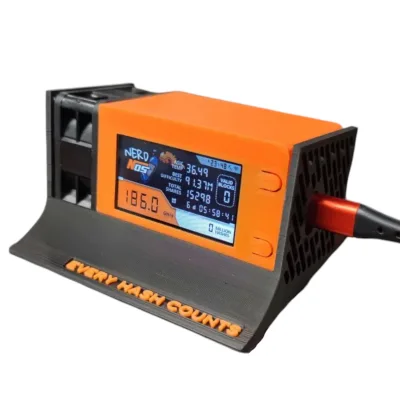
Small-form-factor miners like the Bitaxe generate less heat and collect less dust than full-size ASICs, but they are not maintenance-free. Keep the heatsink clean, ensure the fan is spinning freely, and keep firmware updated via the AxeOS web interface. The Bitaxe’s compact design means even a small amount of dust on the heatsink can meaningfully impact chip temperature.
Hosted Miners
If your miners are at a hosting facility, the facility handles physical maintenance. Your responsibility is firmware management, monitoring dashboard metrics remotely, and maintaining communication with your hosting provider about performance anomalies. Review your hosting agreement to understand what maintenance is included and what requires separate service requests.
FAQ
How often should I clean my ASIC miner?
In a typical home environment, perform external cleaning monthly and full internal cleaning quarterly. In dusty environments like garages or workshops, increase to monthly internal cleanings. If you use intake air filters, clean those weekly and internal cleaning can stay quarterly.
What is the ideal operating temperature for an ASIC miner?
Chip temperatures should stay between 60 and 80 degrees Celsius under normal operation. Ambient room temperature between 5 and 35 degrees Celsius is ideal. If chip temps consistently exceed 80 degrees, investigate your cooling — clean heatsinks, check fans, improve ventilation, or consider underclocking.
Can I use a leaf blower or shop vacuum to clean my miner?
A leaf blower can work for external dust removal, but be cautious of static and debris. Never use a household vacuum directly on circuit boards — vacuums generate static electricity that can damage sensitive components. An electric air duster or canned compressed air is the safest option for internal cleaning.
How do I know when thermal paste needs replacing?
If chip temperatures are gradually increasing over months despite clean heatsinks and functioning fans, degraded thermal paste is likely the cause. As a general rule, replace thermal paste after 12-18 months of continuous operation. Use quality thermal compound rated for high-temperature applications.
Should I underclock or overclock my ASIC miner?
For most home miners paying residential electricity rates, underclocking improves profitability by disproportionately reducing power consumption relative to hashrate loss. Overclocking makes sense only with very cheap electricity and robust cooling. Use autotuning features in modern firmware for the best balance.
What are the signs that my ASIC miner needs professional repair?
Missing hashboards in the dashboard, persistent chip errors after cleaning and reseating, burnt smell from the PSU, abnormal temperature hot spots on specific board regions, boot failures, or firmware corruption all warrant professional diagnosis. D-Central’s ASIC repair team handles all of these at our Montreal, Quebec facility.
Is it worth maintaining older miners like the Antminer S9?
Absolutely — especially for home heating applications. A well-maintained S9 can run for years as a Bitcoin space heater, converting electricity to both heat and sats. The S9’s lower hashrate makes it less profitable as a pure miner, but as a heater that also mines, it is one of the best deals in Bitcoin. Keep it clean, replace fans as needed, and it will serve you well.
How can I reduce noise from my ASIC miner at home?
Underclocking reduces fan speed and noise significantly. Custom shrouds and duct adapters direct noise away from living spaces. Some operators replace stock fans with quieter aftermarket alternatives at the cost of slightly reduced airflow. Enclosures with sound-dampening material work well but require careful thermal management to avoid trapping heat.