Your ASIC miner is not a decoration. It is a machine performing trillions of SHA-256 computations every second, converting electricity into proof-of-work security for the Bitcoin network. In 2026, with network hashrate surging past 800 EH/s and difficulty hovering above 110 trillion, every watt of efficiency matters. The miners that survive are the miners that get maintained.
But here is the part that most guides gloss over: maintenance is not just about keeping your machine alive. It is about keeping your warranty alive. A dead warranty on a $2,000+ ASIC is not an inconvenience — it is a financial blow that could have been avoided with a compressed air can and thirty minutes of attention.
At D-Central Technologies, we have been repairing, modifying, and optimizing ASIC miners since 2016. We have seen thousands of machines come through our ASIC repair workshop — and a significant percentage of them had warranties voided by entirely preventable maintenance mistakes. This guide is built from that hands-on experience. No theory. No fluff. Just what actually works to keep your hardware hashing and your warranty intact.
ASIC Hardware Warranties: What You Are Actually Agreeing To
When you purchase a new ASIC miner from Bitmain, MicroBT, Canaan, or any other manufacturer, the warranty is a formal commitment: if the hardware fails due to manufacturing defects within a defined window, the manufacturer will repair or replace it. That sounds straightforward. It is not.
Warranties are designed to protect the manufacturer as much as they protect you. The fine print contains a minefield of conditions that, if violated, transform your warranty certificate into expensive recycling paper. Before you even power on a new machine, you need to understand exactly what you signed up for.
Standard Warranty Terms Across Major Manufacturers
| Manufacturer | Typical Coverage Period | Key Exclusions |
|---|---|---|
| Bitmain (Antminer) | 180 days | Unauthorized firmware, physical damage, improper power supply |
| MicroBT (Whatsminer) | 365 days | Environmental damage, unauthorized opening, overclocking |
| Canaan (Avalon) | 180 days | Third-party modifications, voltage irregularities, dust damage |
| Innosilicon | 180 days | Liquid exposure, unauthorized repair attempts, power surges |
Notice the pattern: coverage windows are short (6-12 months), and the exclusion lists are long. Every manufacturer gives themselves an exit if you have done anything they deem “unauthorized.” The practical implication is clear — your maintenance routine is either your warranty’s best friend or its executioner.
The Void Conditions That Actually Bite
In our repair shop, we see the same warranty-voiding mistakes on repeat:
- Unauthorized firmware: Flashing third-party firmware like Braiins OS+ or VNish without understanding the warranty implications. Some manufacturers will refuse warranty service the moment they detect non-stock firmware, even if the firmware had nothing to do with the failure.
- Opening the enclosure improperly: Cracking the case to clean dust or swap a fan — sounds reasonable, but many warranties explicitly state that breaking the manufacturer’s seal voids coverage.
- Improper power delivery: Running an Antminer S21 on a power supply that does not meet the required voltage and amperage specifications. Underpowered or overpowered PSUs cause subtle damage that manufacturers can detect during inspection.
- Environmental neglect: Operating in conditions outside the manufacturer’s specified range — excessive humidity, extreme temperatures, or corrosive air quality. In Canada, this is especially relevant during summer months when humidity spikes.
The Maintenance Schedule That Preserves Warranties
Here is the maintenance framework we use at D-Central for machines under warranty. Every step is designed to be manufacturer-compliant while actually keeping the hardware in optimal condition.
Weekly: Monitoring and Observation
You do not need to touch the machine every week. You need to watch it.
- Check hashrate consistency: A new-generation miner like the Antminer S21 should hold its rated hashrate within 5% variance. Consistent drops signal thermal issues, failing ASIC chips, or power delivery problems — all of which are easier to address under warranty if caught early.
- Monitor temperature readings: Both inlet and outlet air temperatures, plus individual chip temperatures if your firmware reports them. ASIC chips operating above 85°C are degrading faster than they should.
- Review error logs: Hardware errors (HW errors) in the mining dashboard are early warning signs. A machine throwing 0.1% HW errors is fine. A machine throwing 2%+ needs attention before it becomes a warranty claim.
- Listen: Changes in fan noise indicate bearing wear, blade damage, or obstruction. Your ears are a diagnostic tool.
Monthly: External Cleaning and Inspection
Monthly maintenance is about the outside of the machine and the environment it lives in.
- Power down properly: Shut down through the web interface or firmware dashboard. Never yank the power cable — abrupt shutdowns can corrupt control board firmware and cause issues that manufacturers may not cover.
- Compressed air cleaning: Use a can of compressed air or an electric air duster to blow dust from the intake and exhaust sides. Keep the nozzle at least 15cm from the machine to avoid moisture discharge from compressed air cans. Work from intake to exhaust — push the dust out the way it came in, not deeper into the machine.
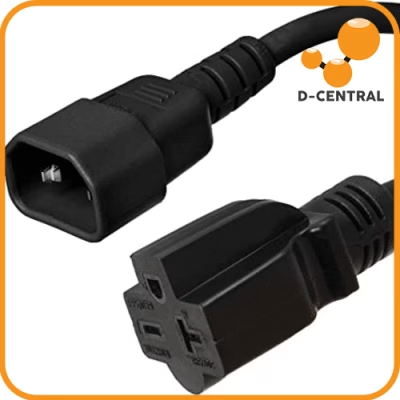
- Inspect power connections: Check the PSU cable connections, the C13/C14 power connectors, and the hashboard power connectors visible from outside. Look for discoloration, melting, or loose fits. Loose power connectors cause arcing, which causes fires.
- Check your environment: Temperature and humidity in the room where the miner operates. Ideal range is 5°C to 35°C with 10% to 70% relative humidity. If you are running miners in a Canadian basement, winter humidity can drop below 10% — add a humidifier to prevent static discharge damage.
Quarterly: Deep Cleaning (Warranty-Safe Method)
This is where most people make warranty-voiding mistakes. The key principle: if the manufacturer’s documentation does not explicitly authorize you to open the machine, do not open it while under warranty.
For external-only deep cleaning:
- Power down and disconnect all cables.
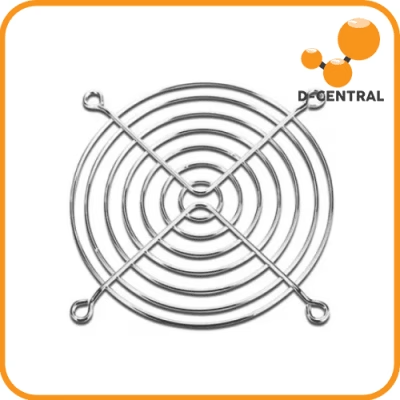
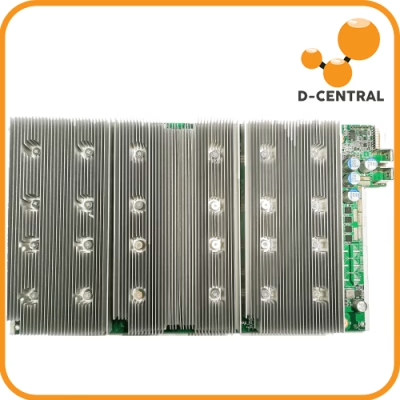
- Use an electric air duster (not compressed gas) at moderate pressure to thoroughly clean all ventilation openings, fan grilles, and heatsink fins visible from outside.
- Use a soft-bristle anti-static brush to dislodge compacted dust in grille openings.
- Inspect fan blades through the grille for dust accumulation, cracks, or deformation.
- Clean the control board’s Ethernet port and any exposed connectors with compressed air.
- Photograph the machine from all angles as a maintenance record.
If the machine genuinely needs internal cleaning while still under warranty, contact the manufacturer or an authorized service provider. At D-Central, our ASIC repair service handles warranty-compliant deep cleaning — we document every step and use manufacturer-approved procedures.
Bi-Annually: Firmware and Environmental Audit
- Firmware updates: Apply only official manufacturer firmware updates. Check the manufacturer’s website directly — not forums, not Telegram groups. Verify file checksums before flashing. A corrupted firmware flash can brick a control board, and that may or may not be covered depending on how the manufacturer interprets the situation.
- Electrical infrastructure audit: Have an electrician verify that your circuits, breakers, and grounding meet the miner’s requirements. A 240V circuit with a loose neutral can deliver voltage spikes that kill PSUs and hashboards. Documenting this audit strengthens any future warranty claims.
- Environmental trend review: Review your temperature and humidity logs for the past six months. Look for trends — seasonal changes in Canadian climates can shift operating conditions significantly between summer and winter.
Maintenance Actions Ranked by Warranty Risk
Not all maintenance actions carry the same warranty risk. Here is a realistic assessment based on what we see in repair intake:
| Action | Warranty Risk | Notes |
|---|---|---|
| External compressed air cleaning | None | Always safe, always recommended |
| Monitoring hashrate and temps | None | Use built-in web interface |
| Applying official firmware updates | Low | Follow manufacturer instructions exactly |
| Replacing a fan (external access) | Medium | Some models allow it; check your specific warranty terms |
| Opening the enclosure for internal cleaning | High | Breaks seal on most manufacturers’ warranties |
| Flashing third-party firmware | High | Almost universally voids warranty |
| Overclocking or underclocking | High | Manufacturers can detect non-stock frequency profiles |
| Replacing thermal paste | Very High | Requires full disassembly; always voids warranty |
| Hashboard-level repair | Very High | Component-level work; warranty fully void |
The takeaway: while a machine is under warranty, stick to non-invasive maintenance. Once the warranty expires, that is when you unleash the full toolkit — and that is exactly where D-Central’s expertise as Bitcoin Mining Hackers comes in.
After the Warranty Expires: This Is Where It Gets Interesting
Here is the truth that manufacturers do not want to be the headline: most ASIC miner warranties are short. Six months. Maybe twelve. After that, you are on your own — and that is actually where the real maintenance strategy begins.
Once the warranty seal is irrelevant, the full spectrum of maintenance and modification options opens up — enough to extend a machine’s productive life by years:
- Deep internal cleaning: Full disassembly, compressed air cleaning of every heatsink fin and ASIC chip, removal of compacted dust that external cleaning cannot reach.
- Thermal paste replacement: Factory thermal paste degrades over 12-18 months of continuous operation. Fresh, high-quality thermal compound can drop chip temperatures by 5-15°C, reducing error rates and extending chip life.
- Fan replacement: Mining fans are consumables. Bearings wear out, blades crack, and airflow drops. Replacing fans with quality aftermarket units restores cooling performance.
- Third-party firmware: Firmware like Braiins OS+ or VNish unlocks underclocking for efficiency, autotuning for optimal performance, and features like per-chip frequency control that stock firmware does not offer.
- Custom modifications: This is the Mining Hacker territory. Shroud modifications for space heater conversions, voltage tuning for efficiency optimization, immersion cooling setups, noise reduction modifications — the possibilities open up completely.
At D-Central, post-warranty maintenance and modification is our specialty. We have built an entire ecosystem around extending the life of mining hardware through our custom editions — the Antminer Slim Edition, Pivotal Edition, and Loki Edition are all products born from post-warranty hardware optimization. Our shop carries the parts, tools, and accessories that make post-warranty maintenance possible for home miners who want to do it themselves.
Environmental Setup: The Silent Warranty Killer
We need to talk about environment, because in Canada, this is where we have a unique advantage — and a unique set of challenges.
Temperature
ASIC miners generate enormous heat. An Antminer S21 pulls approximately 3,500 watts and converts virtually all of it to heat. In a Canadian winter, that heat is an asset — it is why Bitcoin space heaters work so well. But in summer, that same heat output in an unventilated space will push chip temperatures into the danger zone.
For warranty compliance, keep ambient intake air temperature between 5°C and 35°C. Below 5°C, you risk condensation on cold components when the machine heats up. Above 35°C, the machine cannot dissipate heat fast enough and will throttle or fail.
Humidity
Canadian winters bring dry indoor air — sometimes below 15% relative humidity. Low humidity increases static electricity risk. A static discharge to a hashboard connector can kill ASIC chips instantly, and that damage does not look like a manufacturing defect to the warranty inspector.
Conversely, spring and summer can bring humidity above 70% in basements and garages. High humidity promotes corrosion on PCB traces and connectors. Keep humidity between 20% and 65%.
Air Quality
Dust, pet hair, construction debris, and cooking grease particulate are all enemies of ASIC longevity. If your miner runs in a space that is not reasonably clean, add intake filtration. A basic furnace filter (MERV 8+) on the intake side can dramatically reduce internal dust accumulation.
Document your environmental controls. Photographs of your setup, records from a temperature/humidity logger, and receipts for air filtration equipment all strengthen warranty claims if they arise.
Documentation: Your Warranty’s Insurance Policy
If you take one thing from this guide, let it be this: document everything.
Manufacturers dispute warranty claims. It happens. When it does, the miner with a folder of maintenance records, photographs, environmental logs, and purchase receipts wins. The miner with nothing loses.
Here is what to keep:
- Purchase documentation: Invoice, order confirmation, payment receipt. Screenshot if it is a digital-only record.
- Warranty certificate: Save the full warranty terms and conditions as they were at the time of purchase. Manufacturers sometimes update terms retroactively on their websites.
- Maintenance log: Date, action performed, who performed it. A simple spreadsheet works. Include photos of the machine before and after cleaning.
- Environmental records: If you use a temperature/humidity logger (and you should), export the data regularly.
- Communication records: Save every email, ticket, and chat with the manufacturer’s support team. If you ever need to escalate a claim, a paper trail is invaluable.
- Performance records: Regular screenshots or exports of your mining dashboard showing hashrate, temperatures, and error rates. These prove the machine was operating normally before the failure occurred.
When to File a Warranty Claim vs. When to Repair
Not every hardware failure should be a warranty claim, and not every issue is worth the weeks of downtime that warranty processing often involves.
| Scenario | Recommended Action | Rationale |
|---|---|---|
| Dead hashboard within warranty period | File warranty claim | Hashboard replacement is expensive; let the manufacturer cover it |
| Single failed fan | Replace it yourself | Fans are cheap, shipping the machine to the manufacturer costs more in downtime than the fan is worth |
| PSU failure within warranty | File warranty claim | PSUs are expensive components; worth the processing time |
| Intermittent chip errors, under warranty | Document thoroughly, then file claim | Intermittent issues are harder to prove; documentation is critical |
| Post-warranty hashboard failure | Professional repair | D-Central’s ASIC repair service handles component-level hashboard repair |
| Control board failure, any period | Warranty if available; otherwise professional repair | Control boards require specialized diagnostic equipment |
The goal is to be strategic. Use the warranty for expensive component failures. Handle simple maintenance items yourself. And for anything post-warranty or complex, work with a professional repair service that has the diagnostic tools and parts inventory to get your machine back online fast.
Diagnostic Tools Every Home Miner Should Have
You do not need a full repair bench to maintain your miners effectively. But a few basic tools make a significant difference in catching problems early:
- Electric air duster: Reusable, no moisture risk from compressed gas cans. Essential for monthly cleaning.
- Multimeter: A basic digital multimeter lets you verify PSU output voltage and check power cable continuity. A $30 tool that can save you from a $300 problem.
- Temperature/humidity logger: A small data-logging device placed near your miners. Costs under $50 and provides environmental documentation that can support warranty claims.
- Thermal camera or infrared thermometer: Lets you identify hotspots on the machine’s exterior without opening it. Useful for detecting failing fans or blocked heatsinks.
- Anti-static wrist strap: Costs $5, prevents electrostatic discharge damage that can kill ASIC chips. Wear it whenever you handle mining hardware.
- Torx and hex driver set: For post-warranty work when you need to open enclosures. Most ASIC miners use T10 or T15 Torx screws.
The D-Central Approach: Maintenance as a Mining Strategy
At D-Central, we do not view maintenance as a chore. We view it as a core component of mining strategy. A well-maintained miner runs more efficiently, lasts longer, and holds better resale value. In a post-halving era where the block reward is 3.125 BTC and every satoshi of efficiency matters, the miners who maintain their hardware outperform the miners who run machines until they die.
Our ASIC repair service has processed thousands of machines since 2016. We have seen what kills miners and what keeps them alive. The patterns are consistent: the machines that come in for catastrophic repair were neglected. The machines that run for years with minimal intervention were properly maintained from day one.
Whether you are running a single Bitaxe as a solo mining lottery ticket, a fleet of S21s in your garage, or a Bitcoin space heater warming your living room — the maintenance principles are the same. Clean air in, hot air out, stable power, and regular attention.
Every hash counts. Make sure your maintenance strategy counts too.
FAQ
What voids an ASIC miner’s warranty?
The most common warranty-voiding actions are flashing third-party firmware, opening the machine’s enclosure (breaking the manufacturer’s seal), using a non-compliant power supply, operating in environmental conditions outside the specified range, and attempting component-level repairs without authorization. Always read your specific manufacturer’s warranty terms before performing any maintenance beyond basic external cleaning.
How often should I clean my ASIC miner?
Perform external compressed air cleaning monthly. Conduct a more thorough external inspection quarterly. For internal cleaning, wait until the warranty expires or use an authorized service provider. The exact frequency depends on your environment — dusty garages and basements with pets may need bi-weekly external cleaning.
Can I flash custom firmware without voiding my warranty?
In almost all cases, no. Bitmain, MicroBT, and other major manufacturers consider third-party firmware an unauthorized modification that voids warranty coverage. Even if you flash back to stock firmware before submitting a warranty claim, manufacturers can sometimes detect that the firmware was changed. Wait until the warranty expires, then custom firmware like Braiins OS+ or VNish can unlock significant efficiency and performance gains.
What temperature range should I maintain for my ASIC miners?
Keep ambient intake air temperature between 5°C and 35°C (41°F to 95°F). Individual ASIC chip temperatures should stay below 85°C for optimal longevity. In Canadian climates, winter cold is generally beneficial for cooling, but avoid operating below 5°C ambient to prevent condensation when the machine generates heat.
Is it worth filing a warranty claim for a single dead fan?
Usually not. Warranty claims involve shipping the entire machine to the manufacturer, which means weeks of downtime and shipping costs. A replacement fan costs $15-$30 and takes minutes to install on most models. Save your warranty claims for expensive failures like dead hashboards, failed PSUs, or control board malfunctions.
How long do ASIC miner warranties typically last?
Most major manufacturers offer 180-day (6-month) warranties. MicroBT (Whatsminer) is an exception, typically offering 365-day coverage. Some resellers offer extended warranty options. Always verify the warranty terms at the time of purchase, as manufacturers occasionally change their policies.
What should I do when my ASIC miner’s warranty expires?
This is when the real optimization begins. Once the warranty expires, you can safely perform internal deep cleaning, replace thermal paste, flash custom firmware for efficiency tuning, and make hardware modifications. For complex work like hashboard repair or component-level diagnostics, D-Central’s ASIC repair service handles post-warranty repairs on all major manufacturer models.
Does D-Central offer warranty-compliant maintenance services?
Yes. D-Central provides both warranty-compliant maintenance (external cleaning, diagnostics, firmware updates using manufacturer-approved procedures) and post-warranty services (deep cleaning, thermal paste replacement, hashboard repair, custom modifications). We have been servicing ASIC miners since 2016 and handle all major manufacturers including Bitmain, MicroBT, Canaan, and Innosilicon. Visit our ASIC repair page for details.