Bitcoin mining used to happen on whatever computer you had lying around. Then ASICs arrived, and within a few years mining became an arms race fought by warehouses full of capital. Application-Specific Integrated Circuits made mining brutally efficient and brutally centralized at the same time. That is the problem Bitaxe was built to push back against.
Bitaxe is the open-source answer: a fully transparent, single-board solo Bitcoin miner anyone can inspect, modify, build, and run on a desk. No black-box firmware, no proprietary hardware, no minimum order of a hundred units. Just one chip, one board, and a real shot at a block. This is Mining Hacker territory — institutional silicon, hacked down to something a pleb can actually own.
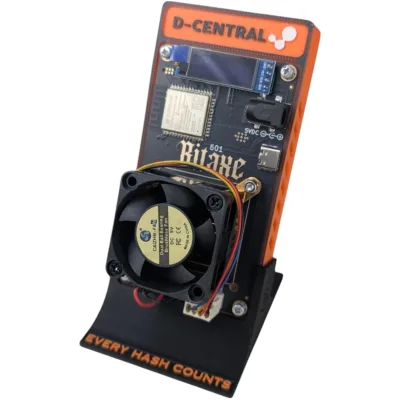
The Bitaxe project spans several board generations. The lineage runs Bitaxe Max → Bitaxe Ultra → Bitaxe Supra → Bitaxe Gamma, with the dual-chip Bitaxe GT sitting at the top of the stack. Each single-chip generation runs one ASIC chip — a BM1397, BM1366, BM1368, or BM1370 pulled from Bitmain’s industrial Antminer line — while the Bitaxe Hex bolts six chips onto one board for raw aggregate hashrate. One important clarification up front: “Hex” describes a six-chip board layout, not one universal chip specification. D-Central’s current Hex listing offers Ultra and Supra variants; check the selected model and board revision before comparing specs or ordering accessories.
D-Central has been in the Bitaxe ecosystem since the beginning. We manufactured the original Bitaxe Mesh Stand, we engineer heatsinks and cases for the whole lineup, and we stock every generation plus Minibit compact builds and DIY kits. As open-source hardware, anyone can build a Bitaxe — we compete on expertise, quality, and the fact that we have been hacking on these boards longer than almost anyone.
Choosing Your Bitaxe Model
Before you buy, weigh four things. Hashrate is your raw shot at solving a block — more is better, but on a solo miner it is still a lottery ticket. Efficiency (measured in joules per terahash) decides what the machine costs you to run 24/7. Form factor and noise matter because most Bitaxe miners live on a desk or a shelf, not in a data center. And budget ties it together — match the initial cost against what you actually want out of the machine. Every Bitaxe mines coins on the SHA-256 algorithm, so BTC, BCH, and BSV are all on the table, though solo BTC mining is the point.
The Bitaxe Series at a Glance
| Bitaxe Board Generation | ASIC Chip | Chip Source | Expected Hashrate | Ideal For |
|---|---|---|---|---|
| Bitaxe Max | 1 x BM1397 | Antminer 17 series | ~400 GH/s (up to ~450 GH/s) | Beginners and tight spaces — solid hashrate, modest power draw. |
| Bitaxe Ultra | 1 x BM1366 | Antminer S19 XP / S19k Pro | ~500 GH/s (up to ~550 GH/s) | The popular all-rounder — balances efficiency with a higher hashrate. |
| Bitaxe Hex | 6 x BM1366 | Antminer S19 XP / S19k Pro | ~2.7-3.3 TH/s | Six-chip alternative to the single-chip boards in this comparison. |
| Bitaxe Supra | 1 x BM1368 | Antminer S21 | ~600 GH/s (up to ~700 GH/s) | Best-value single-chip board for serious solo miners. |
| Bitaxe Gamma | 1 x BM1370 | Antminer S21 generation | ~1.1-1.2 TH/s | The most efficient single-chip Bitaxe — best J/TH in the lineup. |
| Bitaxe GT | 2 x BM1370 | Antminer S21 Pro generation | ~2.15 TH/s | Dual-chip BM1370 option in a compact board format. |
Bitaxe Max (BM1397)
The Max is where the lineage started. It is built around the BM1397 chip pulled from Antminer 17-series machines and runs on roughly 15W. The hashrate is modest by today’s standards — around 400 GH/s — but that is not the point. The Max is the cheapest, simplest entry into open-source mining: a clean board to learn on, low power draw, and the full AxeOS experience.
Bitaxe Ultra (BM1366)
The Ultra moved to the BM1366 chip from the Antminer S19 XP and S19k Pro, pushing single-chip hashrate to roughly 500 GH/s while staying in the same low-power, silent envelope. For a long stretch it was the most popular board in the series and a reasonable benchmark for what a “standard” Bitaxe looks like.
Bitaxe Hex (6x BM1366)
The Hex is the odd one out — and deliberately so. Instead of one chip, it carries six BM1366 ASICs on a single board, sourced from the same S19 XP-class silicon as the Ultra. That puts aggregate hashrate in the ~2.7-3.3 TH/s range, a higher aggregate hashrate than the single-chip boards listed here. It draws correspondingly more power and runs louder, so it is the choice for miners who want maximum solo odds from one unit and have somewhere to put it. Pair it with a Hex-specific heatsink — its thermal load is in a different class from the single-chip boards.
Bitaxe Supra (BM1368)
The Supra brought the BM1368 chip from the Antminer S21 generation onto the Bitaxe platform, landing around 600-700 GH/s from a single chip at roughly 15W. It is the best-value single-chip board in the series: a meaningful efficiency and hashrate step over the Ultra without the cost or noise of a Hex. D-Central’s BitSupra build packages it ready to run.
Bitaxe Gamma (BM1370)
The Gamma is the efficiency king of the single-chip boards. It runs the BM1370 — the same chip generation Bitmain uses in its most efficient industrial miners — and delivers roughly 1.1-1.2 TH/s from one chip, with the option to push higher with good cooling and tuning. Power draw varies with settings and cooling. The Gamma needs a regulated 5V DC supply through its center-positive 5.5×2.1mm barrel input; USB-C is for programming, not mining power. If you want the most hashrate-per-watt in a desk-friendly package, this is it. D-Central’s Modern Minibit Gamma wraps the board in a compact enclosure for plug-and-play deployment straight out of the box.
Bitaxe GT (2x BM1370)
The GT — Gamma Turbo — is the flagship, and it breaks the single-chip pattern. Designed by Skot, the original creator of the Bitaxe, the GT places two BM1370 chips (the same silicon found in the Antminer S21 Pro) on one compact 120mm x 60mm six-layer PCB. The result is roughly 2.15 TH/s at 35-43W — about double the Gamma’s hashrate in nearly the same footprint, at an efficiency of around 18 J/TH that rivals industrial machines costing thousands.
Because it runs two chips, the GT uses a 12V XT30 power connector rather than the 5V barrel jack on the single-chip boards — plan your power accordingly. The 6-layer board with 1oz copper traces is serious engineering, not a hobbyist layout. Choose the GT when you want a dual-chip BM1370 board; compare its power input, measured performance and bundle contents with the other models. For the full breakdown, see our Bitaxe GT review.
Setting Up Your Bitaxe Miner
Getting a Bitaxe running is genuinely simple — but improper setup, the wrong power source, or careless modifications can permanently kill the board. Follow the steps.
Unboxing and Safety
- Unbox carefully. Bitaxe boards are precision hardware. Ease the miner out of its packaging — no yanking, no static-heavy surfaces.
- Set up dry and clean. Moisture is the enemy of exposed electronics. Pick a clean, dry spot with nothing flammable nearby before you plug anything in.
Physical Setup
- Position for airflow. Mining hardware makes heat. Give the board a well-ventilated spot — a shelf, a desk, a basement bench — not a sealed cabinet where heat pools.
- Match the power supply. Single-chip boards (Max, Ultra, Supra, Gamma) run on a 5V barrel-jack supply — the Bitaxe Power Supply is sized for the job. The dual-chip GT needs a 12V XT30 supply instead. Use the right one.
- Mind the cooling. The stock heatsink and fan handle most rooms. In a warm space, or if you plan to overclock, step up to a premium aluminum heatsink or an Ice Cooler tower. Watch your chip temperature either way.
Installing and Using AxeOS
AxeOS is the open-source firmware that powers every Bitaxe. It is what makes these boards usable without a command line: a web dashboard for setting your pool, watching hashrate and temperature, tuning performance, and pushing firmware updates. It is developed in the open and updated regularly by the community.
Flashing the Firmware
- Download AxeOS. Grab the latest release from the Bitaxe ESP-Miner GitHub repository. Match the firmware build to your specific board.
- Connect the board. Link the Bitaxe to your computer with a USB cable so you can transfer the firmware.
- Flash it. Follow the repository’s flashing documentation — typically the Web Flasher or bitaxetool writing the board-specific factory image; later updates go through the dashboard’s OTA upload of
esp-miner.bin(on releases before v2.15.0 the web interface shipped as a separatewww.bin; from v2.15.0 it is embedded inesp-miner.bin). Read the instructions; do not improvise. Our Bitaxe firmware update guide covers every method step by step.
Configuring the Network
Bitaxe boards connect over 2.4 GHz Wi-Fi only. After flashing, browse to the miner’s IP address to reach the AxeOS dashboard, open the Wi-Fi settings, and enter your SSID and password — exactly, because a typo is the most common reason a board never comes online. Save, apply, and the board joins your network. For a full walkthrough of every AxeOS setting, see our AxeOS firmware guide.
Solo vs. Pool Mining
Once your Bitaxe is online, you choose how it mines. This is the decision that defines the whole experience.
Solo mining means your board hunts blocks on its own. Find one and you keep the entire reward — currently 3.125 BTC plus fees. The catch is variance: a single Bitaxe might run for years without a hit. It is lottery mining, and that is exactly the appeal for a lot of plebs.
Pool mining combines your hashrate with thousands of others and splits rewards by contribution. Payouts are small but steady. Lower variance, lower drama.
Solo pool mining is the hybrid most Bitaxe owners actually want. You connect to a stratum service that hands out block templates, but you still keep 100% of any block you solve (minus a nominal operator fee). You get clean infrastructure without giving up the full reward. Solid options:
- CKPool —
stratum+tcp://solo.ckpool.org:3333 - Public Pool —
stratum+tcp://public-pool.io:21496 - D-Central Solo Pool —
stratum+tcp://solo.d-central.tech:3333
D-Central’s solo pool is a passion project for Bitaxe enthusiasts — we run it for the community, not for profit, and make no uptime guarantees. To set a pool, open the AxeOS web interface, drop the stratum address and your payout details into the pool configuration section, save, and apply. Want to understand your real odds first? Run the numbers through our solo mining calculator, and read the full solo Bitcoin mining guide before you commit.
Overclocking Your Bitaxe
Every Bitaxe generation can be tuned past its stock settings through AxeOS. With adequate cooling — a quality heatsink and fan, or an aftermarket tower cooler — you can raise frequency and core voltage to pull more hashrate out of the same silicon. How much more depends on chip quality and ambient temperature, so monitor chip temps every time you adjust. Overclocking without proper cooling risks thermal throttling at best and a dead board at worst, and it can void your warranty. For model-by-model instructions, see our Definitive Bitaxe Overclocking Manual.
Which Bitaxe Should You Buy?
With six board generations available, here is the quick decision guide:
- First Bitaxe / learning: Bitaxe Max or Ultra — lowest cost, simplest, perfect to learn on.
- Best value single-chip: Bitaxe Supra — strong hashrate at a competitive price.
- Maximum efficiency: Bitaxe Gamma — best J/TH of any single-chip board.
- Dual-chip BM1370 option: Bitaxe GT — dual BM1370 chips, ~2.15 TH/s in a compact footprint.
- Maximum aggregate hashrate: Bitaxe Hex — six BM1366 chips, ~2.7-3.3 TH/s for the BM1366 configuration shown here; compare the selected Hex variant.
For a deeper head-to-head with pricing guidance, read the Bitaxe Buying Guide and our model comparison, Bitaxe Supra vs Gamma vs Hex vs GT.
Why Open Source Matters
Bitaxe is not just hardware — it is a statement. The design files are public, the firmware is public, and that means no single company gates access to solo mining. Anyone can audit the board, improve it, fork it, or build their own. That transparency mirrors Bitcoin’s own open-source ethos and it does real work for decentralization: every Bitaxe running in a basement is hashrate that did not go to an industrial farm.
If you have built something — an optimized config, a custom accessory, a firmware tweak — push it back to the community through GitHub, forums, or tutorials. D-Central has been part of this movement since the start, from manufacturing the original Mesh Stand to engineering the heatsinks and cases that keep these boards cool. We carry the whole lineup because we believe in it, not just because we sell it. For the complete resource center, start at the Bitaxe Hub.
Frequently Asked Questions
What is Bitaxe and why does it matter for Bitcoin mining?
Bitaxe is the world’s first open-source Bitcoin miner series. It matters because it democratizes mining — anyone can inspect the hardware design, modify it, and build their own. This transparency aligns with Bitcoin’s own open-source ethos and contributes to network decentralization by putting mining power in the hands of individuals rather than corporations.
What are all the Bitaxe board generations?
The Bitaxe lineage includes: Bitaxe Max (BM1397), Bitaxe Ultra (BM1366), Bitaxe Hex (6x BM1366), Bitaxe Supra (BM1368), Bitaxe Gamma (BM1370), and Bitaxe GT (2x BM1370). “Hex” refers to the six-chip board layout — there is one Hex, not a Hex variant of every model. D-Central stocks every generation plus Minibit compact builds and DIY kits.
Which Bitaxe model should I buy for solo mining?
For the best value, the Bitaxe Supra offers strong hashrate (~600-700 GH/s) at a competitive price. For the most efficient single-chip board, choose the Bitaxe Gamma (~1.1-1.2 TH/s). The dual-chip Bitaxe GT (~2.15 TH/s) is the most powerful single board, and the Bitaxe Hex (~2.7-3.3 TH/s) delivers the highest aggregate hashrate of any open-source Bitaxe. All are designed for solo mining.
How do I set up a Bitaxe miner?
Connect power (5V barrel jack for single-chip boards, 12V XT30 for the dual-chip GT), join the Bitaxe’s Wi-Fi access point, then enter your home 2.4 GHz Wi-Fi credentials and mining pool details through the AxeOS web interface. The whole process takes under 10 minutes. For step-by-step instructions, see our Supra setup guide and Hex setup guide.
What is AxeOS?
AxeOS is the open-source firmware that powers all Bitaxe miners. It provides a web-based interface for configuring mining pools, monitoring hashrate and temperature, adjusting performance settings, and updating firmware. AxeOS is available on GitHub and receives regular community-driven updates.
Can a Bitaxe really find a Bitcoin block?
Yes. Multiple Bitaxe solo miners have found full Bitcoin blocks, earning their owners the entire 3.125 BTC block reward. The odds are low for any individual miner — it is essentially lottery mining — but the more hashrate you run and the longer you run it, the higher your cumulative probability. Pools like public-pool.io and D-Central’s solo pool are purpose-built for Bitaxe solo mining.
Where can I buy Bitaxe miners in Canada?
D-Central Technologies is the leading Canadian source for Bitaxe miners. As a pioneer manufacturer in the Bitaxe ecosystem — creator of the original Mesh Stand, custom heatsinks, and accessories — D-Central stocks every generation, Minibit builds, and DIY kits. Shipping from Canada means no customs delays for Canadian buyers.
What is the difference between the Bitaxe Gamma and Bitaxe GT?
The Bitaxe Gamma is a single-chip board running one BM1370 ASIC for ~1.1-1.2 TH/s at 15-25W. The Bitaxe GT (Gamma Turbo) places two BM1370 chips on one compact six-layer board, roughly doubling output to ~2.15 TH/s at 35-43W. The GT also uses a 12V XT30 power connector instead of the Gamma’s 5V barrel jack.
Can I contribute to the Bitaxe project?
Absolutely. The Bitaxe hardware design files and AxeOS firmware are fully open-source on GitHub. You can contribute by submitting pull requests, reporting bugs, creating tutorials, sharing optimized configurations, or building custom accessories. D-Central actively supports the open-source mining community through the Bitaxe Hub.
Related Reading
- Bitaxe Hub — the complete resource center
- Bitaxe Buying Guide: Which Model Is Right for You?
- Bitaxe Comparison: Supra vs Gamma vs Hex vs GT
- Definitive Bitaxe Overclocking Manual
- Bitaxe vs NerdAxe Comparison
- The First Pleb-Fu Block Mined by a Bitaxe
What is Bitaxe and why does it matter for Bitcoin mining?
Bitaxe is the world’s first open-source Bitcoin miner series. It matters because it democratizes mining — anyone can inspect the hardware design, modify it, and build their own. This transparency aligns with Bitcoin’s own open-source ethos and contributes to network decentralization by putting mining power in the hands of individuals rather than corporations.
What are all the Bitaxe board generations?
The Bitaxe lineage includes: Bitaxe Max (BM1397), Bitaxe Ultra (BM1366), Bitaxe Hex (6x BM1366), Bitaxe Supra (BM1368), Bitaxe Gamma (BM1370), and Bitaxe GT (2x BM1370). Hex refers to the six-chip board layout — there is one Hex, not a Hex variant of every model. D-Central stocks every generation plus Minibit compact builds and DIY kits.
Which Bitaxe model should I buy for solo mining?
For the best value, the Bitaxe Supra offers strong hashrate (~600-700 GH/s) at a competitive price. For the most efficient single-chip board, choose the Bitaxe Gamma (~1.1-1.2 TH/s). The dual-chip Bitaxe GT (~2.15 TH/s) is the most powerful single board, and the Bitaxe Hex (~2.7-3.3 TH/s) delivers the highest aggregate hashrate of any open-source Bitaxe. All are designed for solo mining.
How do I set up a Bitaxe miner?
Connect power (5V barrel jack for single-chip boards, 12V XT30 for the dual-chip GT), join the Bitaxe’s Wi-Fi access point, then enter your home 2.4 GHz Wi-Fi credentials and mining pool details through the AxeOS web interface. The whole process takes under 10 minutes. See our Supra setup guide and Hex setup guide for step-by-step instructions.
What is AxeOS?
AxeOS is the open-source firmware that powers all Bitaxe miners. It provides a web-based interface for configuring mining pools, monitoring hashrate and temperature, adjusting performance settings, and updating firmware. AxeOS is available on GitHub and receives regular community-driven updates.
Can a Bitaxe really find a Bitcoin block?
Yes. Multiple Bitaxe solo miners have found full Bitcoin blocks, earning their owners the entire 3.125 BTC block reward. The odds are low for any individual miner — it is essentially lottery mining — but the more hashrate you run and the longer you run it, the higher your cumulative probability. Pools like public-pool.io and D-Central’s solo pool are purpose-built for Bitaxe solo mining.
Where can I buy Bitaxe miners in Canada?
D-Central Technologies is the leading Canadian source for Bitaxe miners. As a pioneer manufacturer in the Bitaxe ecosystem — creator of the original Mesh Stand, custom heatsinks, and accessories — D-Central stocks every generation, Minibit builds, and DIY kits. Shipping from Canada means no customs delays for Canadian buyers.
What is the difference between the Bitaxe Gamma and Bitaxe GT?
The Bitaxe Gamma is a single-chip board running one BM1370 ASIC for ~1.1-1.2 TH/s at 15-25W. The Bitaxe GT (Gamma Turbo) places two BM1370 chips on one compact six-layer board, roughly doubling output to ~2.15 TH/s at 35-43W. The GT also uses a 12V XT30 power connector instead of the Gamma’s 5V barrel jack.
Can I contribute to the Bitaxe project?
Absolutely. The Bitaxe hardware design files and AxeOS firmware are fully open-source on GitHub. You can contribute by submitting pull requests, reporting bugs, creating tutorials, sharing optimized configurations, or building custom accessories. D-Central actively supports the open-source mining community through the Bitaxe Hub.