Every Antminer you crack open is a node in the most powerful decentralized computing network on Earth. In 2026, the Bitcoin network surpasses 800 EH/s of cumulative hashrate, with a block reward of 3.125 BTC. The machines producing those hashes are engineering marvels — boards packed with BM1397, BM1398, and BM1370 ASIC chips running at blistering frequencies, pulling hundreds of watts through high-current DC rails. When one of these machines goes down, it does not politely ask for help. It presents you with voltages that can kill, components that a stray static discharge can vaporize, and fumes that will silently damage your lungs if you are not prepared.
This is not a hobby where you wing it. This is ASIC repair — and doing it without proper protective equipment is reckless. Whether you are a home miner diagnosing a dead hashboard on your kitchen table or a technician processing units at scale, the protective gear you use determines whether you walk away with a working miner or a trip to the emergency room and a bricked board.
At D-Central Technologies, we have been repairing ASIC miners since 2016 — thousands of hashboards, control boards, and PSUs across every generation of Bitmain hardware. We are Canada’s largest ASIC repair center, and safety is not an afterthought in our shop. It is the foundation everything else is built on. Here is the complete guide to the protective equipment you need to work on Antminers properly.
Why Safety Is Non-Negotiable in ASIC Repair
There is a dangerous misconception floating around online communities: that Antminer repair is just “electronics repair” and any maker with a soldering iron can handle it. This underestimates the risks by a wide margin.
The Voltage Problem
An Antminer S19 series PSU (APW12) outputs roughly 12V DC at up to 250A. While 12V DC itself will not electrocute you, the AC input side operates at 220-240V — enough to deliver a lethal shock. Even on the DC side, the massive current capacity means a short circuit can instantly arc-weld components, spray molten solder, and start fires. The S21 series pushes this even further with higher power density on newer hash boards.
If you are probing a live board without insulated tools, you are one slip away from a catastrophic short. If you are working on the AC side of a PSU without proper lockout procedures, you are risking your life.
The ESD Problem
ASIC chips are CMOS devices. They are extraordinarily sensitive to electrostatic discharge. A human body can accumulate 25,000 volts of static charge just by walking across a carpet — you will not feel it until about 3,500V, but ASIC chips can be damaged or degraded by discharges as low as 100V. That means you can destroy a chip without ever feeling the spark.
ESD damage is insidious. It does not always kill a chip outright. Latent ESD damage weakens gate oxide layers, creating time bombs that fail weeks or months later under thermal stress. You think you did a successful repair, ship the board back, and it dies in the field. The root cause? You touched a chip without grounding yourself.
The Chemical Exposure Problem
Soldering produces flux fumes containing rosin (colophony), which is a recognized occupational sensitizer. Chronic exposure causes occupational asthma. Lead-free solder alloys release additional metallic particulates. Board cleaning with isopropyl alcohol, flux remover, and other solvents adds volatile organic compounds to the mix. Without proper ventilation and respiratory protection, you are slowly damaging your respiratory system with every repair session.
Understanding What You Are Working On: Antminer Component Architecture
Before you suit up, you need to understand what you are protecting — both yourself and the hardware. Every component in an Antminer has specific vulnerabilities that dictate the protective measures required.
Hash Boards
The hash board is the core of the miner. A typical S19-series hash board carries 76+ BM1398 ASIC chips arranged in series voltage domains, along with dozens of precision resistors, capacitors, LDO regulators, and temperature sensors. These boards are the most common repair target and the most ESD-sensitive. A single damaged chip can take down an entire voltage domain, dropping hashrate or causing the board to fail entirely.
Hash boards run at elevated temperatures (65-85C junction temperature under normal operation), which means thermal cycling stress is constant. Solder joints fatigue, BGA connections crack, and capacitors degrade. When you handle a hash board for repair, you are working with components that are already thermally stressed — adding ESD damage on top of that is asking for failure.
Control Boards
The control board is the brains of the operation — running the firmware, managing chip frequency, monitoring temperatures, and communicating with your mining pool. Modern Antminer control boards use ARM-based SoCs with NAND flash storage. They are less ESD-sensitive than hash board ASIC chips but still vulnerable. A damaged control board can produce bizarre symptoms: intermittent connectivity, incorrect chip counts, temperature misreads, and phantom errors that send you chasing ghosts on perfectly good hash boards.
Power Supply Units (PSUs)
Antminer PSUs (APW3++, APW7, APW9+, APW12, APW16) are high-efficiency switch-mode power supplies. They contain large electrolytic capacitors that retain lethal charge even after the unit is unplugged. This is the single most dangerous component in the entire system. A fully charged capacitor in an APW12 can deliver enough energy to cause serious burns or cardiac arrest. Never assume a PSU is safe because it is unplugged — always verify with a multimeter and discharge capacitors properly before working inside.
Cooling Systems and Fans
Antminer fans spin at 5,000-6,000 RPM and can cause injury if your fingers or tools contact the blades during operation. Fan connectors carry 12V and can spark if connected or disconnected while the unit is powered. Heat sinks, while passive, can reach temperatures above 80C during operation and cause contact burns.
Connectors and Cabling
The ribbon cables and power connectors between hash boards and the control board carry both data signals and power. These connectors are mechanically delicate — excessive force during insertion or removal can damage pins, crack connector housings, and create intermittent faults that are maddening to diagnose. Proper handling technique is as important as any piece of protective equipment.
Essential Protective Equipment: The Complete Kit
Here is every piece of protective equipment you should have before you touch an Antminer. No shortcuts. No substitutions.
Electrostatic Discharge (ESD) Protection
This is the single most critical category. Without ESD protection, every repair you perform is a gamble.
- ESD Wrist Strap: A wrist strap connected to a known earth ground creates a continuous discharge path, keeping your body at the same potential as the board you are working on. Use a strap with a 1-megohm resistor in the ground path — this limits current flow if you accidentally contact a live circuit while grounded. Test your strap with a wrist strap tester before every session. A broken strap is worse than no strap because it gives you false confidence.
- ESD Mat: A dissipative mat covers your entire work surface and provides a controlled surface for placing boards and components. The mat should be connected to the same ground point as your wrist strap. Do not use a conductive mat — dissipative (10^6 to 10^9 ohms surface resistance) is correct. A conductive mat can actually cause shorts on live boards.
- ESD-Safe Tool Set: Every screwdriver, tweezer, probe, and pair of pliers that contacts board components must be ESD-safe. Standard tools accumulate triboelectric charge and transfer it to components on contact. ESD-safe tools are constructed with dissipative materials or coatings that bleed charge harmlessly.
- ESD Bags and Storage: When hash boards or control boards are removed from the miner, they must be stored in pink poly (anti-static) or shielded (metallic) ESD bags. Never place bare boards on cardboard, plastic wrap, or foam packing materials — these are triboelectric generators that will charge the board.
Electrical Insulation and High-Voltage Safety
This category protects you from the machine, rather than protecting the machine from you.
- Insulated Screwdrivers (VDE-rated): When working on PSUs or any AC-connected components, use screwdrivers rated to IEC 60900 (VDE certification). These are tested to withstand 10,000V and rated for continuous use at 1,000V AC. The insulation is your last line of defense against accidental contact with live conductors.
- Insulation Mat (High-Voltage): A dielectric rubber mat placed under your feet or on the floor in front of your workstation isolates you from earth ground when working on energized equipment. This is separate from your ESD mat — the ESD mat grounds you to prevent static, while the insulation mat isolates you from ground to prevent shock. You use them in different scenarios, never simultaneously.
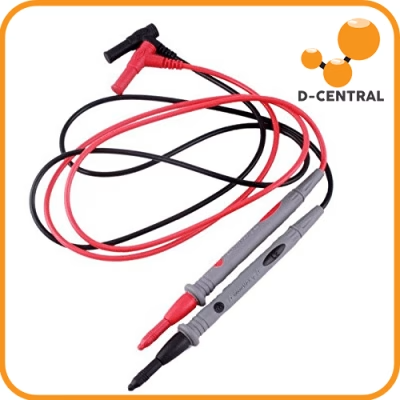
- Multimeter with CAT III Rating: Before touching any PSU internals, verify zero voltage across all capacitors using a properly rated multimeter. A CAT III-rated meter is designed for measurements on equipment connected to building mains. Cheap meters can fail violently when exposed to high-energy circuits.
- Capacitor Discharge Tool: A resistor-based discharge tool safely bleeds stored energy from PSU capacitors. Never short capacitors with a screwdriver — the instantaneous current can weld the screwdriver tip to the terminals, spray molten metal, and damage the capacitor.
Personal Protective Equipment (PPE)
Your body is not expendable. Protect it.
- Safety Glasses (ANSI Z87.1): Solder splashes, flux spray, clipped component leads, and debris from compressed air cleaning are all projectile hazards. Impact-rated safety glasses are mandatory whenever you are soldering, desoldering, or cleaning boards. If you wear prescription glasses, get safety glasses that fit over them or invest in prescription safety lenses.
- Nitrile Gloves: For handling boards during cleaning (solvents), applying thermal paste, or working with flux remover. Nitrile provides chemical resistance without compromising dexterity. Do not wear gloves while soldering — melted glove material adheres to skin and worsens burns. For soldering, bare hands with proper technique and ESD grounding are safer.
- Heat-Resistant Gloves: When handling boards immediately after reflow, preheating, or working near hot air stations, use heat-resistant gloves rated for at least 200C. Brief contact with a board fresh from a preheater or reflow station will cause second-degree burns.
- Respiratory Protection: At minimum, a half-face respirator with organic vapor/particulate combination cartridges (NIOSH P100/OV). This protects against flux fumes, solder particulates, and solvent vapors. Disposable dust masks (N95) are inadequate for soldering fumes — the particles and gases pass right through them. If you are running a production repair operation, invest in a fume extraction system with activated carbon filtration at the point of origin.
Ventilation and Fume Extraction
PPE is your last line of defense. Engineering controls are your first.
- Bench-Top Fume Extractor: A fume extractor with an activated carbon filter and HEPA pre-filter positioned 2-4 inches from your soldering point captures fumes at the source before they reach your breathing zone. This is far more effective than relying on room ventilation alone.
- Room Ventilation: The repair space should have mechanical ventilation providing at least 4-6 air changes per hour. In cold climates (like Canada, where we operate), it is tempting to seal up the shop in winter to retain heat — do not compromise ventilation for comfort. A heat recovery ventilator (HRV) can maintain air exchange without wasting heat.
Workstation Organization
Your workstation layout is protective equipment in a broader sense — it prevents accidents through organization.
- Anti-Fatigue Mat: Standing on concrete for hours leads to fatigue, which leads to mistakes. An anti-fatigue mat reduces strain and keeps you alert.
- Proper Lighting: Minimum 500 lux at the work surface, with adjustable task lighting for detail work. You cannot protect what you cannot see. Shadows on a hash board can hide bridged solder joints, cracked traces, and damaged components.
- Organized Tool Storage: Every tool has a designated place. Loose tools on the bench increase the risk of accidental shorts, drops onto boards, and ESD events. A tool shadow board or foam insert organizer keeps your workspace clean and safe.
How D-Central Approaches Repair Safety
We do not just recommend this equipment — we use all of it, every day, on every repair. Our shop in Montreal, Quebec is built around a safety-first workflow that has been refined over eight years of operation.
Our Repair Environment
Every workstation in our facility is equipped with a calibrated ESD mat, grounded wrist strap system with daily testing, bench-top fume extraction, and a full complement of VDE-rated insulated tools. Our technicians undergo formal ESD awareness training and high-voltage safety certification. We maintain repair logs that track not just what was fixed, but what protective equipment was used and verified during each job.
This discipline is why we can confidently handle everything from an S9 hashboard swap to a component-level BGA rework on an S21 board. The equipment and procedures are the same regardless of the job — because the risks are the same.
Innovations Born from the Repair Bench
Years of hands-on repair work have driven us to build products that address real problems we see every day.
- Bitcoin Space Heaters: Every Antminer dumps massive thermal energy into its environment. Instead of fighting the heat with additional cooling infrastructure (and the safety risks that come with it), we engineered Space Heater editions that channel that thermal output into usable home heating. The S9, S17, and S19 Space Heater Editions turn a safety liability — excess heat in confined spaces — into a dual-purpose feature. Heat your home. Mine bitcoin. One machine, two jobs.
- Antminer Slim Edition: Standard Antminers require 240V circuits, which most home miners do not have readily available. The Slim Edition is modified for 120V compatibility, eliminating the need for home miners to deal with high-voltage electrical modifications — a significant safety improvement for the home mining use case.
Setting Up Your Home Repair Station: A Practical Checklist
If you are a home miner who wants to do basic diagnostics and maintenance on your own machines, here is the minimum viable setup. This is not a professional repair bench — it is a safe foundation for the most common tasks: fan replacement, control board swaps, visual inspection, and basic multimeter diagnostics.
Minimum Viable Safety Kit
- ESD wrist strap with ground cord — $5-15. Non-negotiable.
- ESD mat (at least 24″ x 36″) — $20-40. Covers your work area.
- ANSI Z87.1 safety glasses — $10-20. Wear them every time.
- Multimeter (CAT III rated) — $50-100. Fluke or equivalent. No cheap Amazon specials.
- Insulated screwdriver set — $30-50. VDE-rated Phillips and flat head.
- Nitrile gloves (box of 100) — $15. For chemical handling.
- Bench-top fume extractor — $40-80. If you are soldering at all.
- Half-face respirator with OV/P100 cartridges — $30-50. For soldering sessions.
Total investment: approximately $200-350. For context, a single new S21 hashboard costs over $500. The equipment pays for itself the first time it prevents a damaged board.
What to Leave to the Professionals
Some repairs are beyond the scope of a home setup, not because of skill, but because of the equipment and environment required to do them safely.
- BGA rework (ASIC chip replacement) — requires preheating stations, reflow equipment, microscope inspection, and extensive ESD-controlled environments.
- PSU internal repairs — high-voltage capacitors, switch-mode transformer work, and the need for isolation transformers make this a professional-only job.
- Hashboard trace repair — micro-soldering on multi-layer PCBs requires specialized microscopes, micro-soldering stations, and years of practice.
For these jobs, send the board to a qualified repair center. The cost of professional repair is always less than the cost of a board you destroy attempting a repair you are not equipped for.
Common Safety Mistakes and How to Avoid Them
After thousands of repairs, we have seen every mistake in the book. Here are the ones that cause the most damage.
Mistake 1: Skipping the Wrist Strap “Just This Once”
This is how most ESD damage happens. You tell yourself the repair will only take 30 seconds. You reach for the board. You transfer a 5,000V static discharge you never felt. The chip works fine on the bench but dies two weeks later in the field. Always strap in. Every single time. No exceptions.
Mistake 2: Working on a “Dead” PSU Without Verification
A PSU that is unplugged is not necessarily a PSU that is safe. Capacitors retain charge for extended periods, especially if the discharge circuit has failed. Always measure voltage across the main capacitors before touching anything inside a PSU. Use a proper discharge tool. Wait. Measure again. Then proceed.
Mistake 3: Using Compressed Air Without Eye Protection
Antminers accumulate impressive amounts of dust, debris, and even insect remains in their heatsinks and fans. When you hit that with compressed air, it becomes a high-velocity projectile stream aimed at your face. Safety glasses. Every time.
Mistake 4: Soldering in an Unventilated Space
It smells fine. You have been doing it for years. You feel fine. This is exactly how chronic occupational asthma develops — slowly, without obvious acute symptoms, until irreversible lung damage has occurred. Use fume extraction. Use respiratory protection. Your lungs do not regenerate.
Mistake 5: Placing Boards on Random Surfaces
Cardboard, bubble wrap, plastic bags, wooden desks, metal shelves — all of these are inappropriate surfaces for bare PCBs. Cardboard and bubble wrap generate static. Metal can short exposed traces. Wood can contain moisture. Always use an ESD mat or ESD bags. This is basic discipline that prevents expensive mistakes.
The Bigger Picture: Why Repair Skills Serve Decentralization
There is a reason we are passionate about making ASIC repair knowledge accessible. It is the same reason we exist as a company: decentralization does not stop at the protocol layer.
When a home miner’s S19 goes down, they have two choices. They can send it to a manufacturer’s authorized service center (if one exists in their country, if the warranty has not expired, if the wait time is acceptable) — or they can develop the skills and equipment to diagnose and fix common issues themselves. The first option centralizes repair expertise in the hands of manufacturers. The second option distributes it across the network of miners who actually operate the hardware.
Every miner who can safely swap a fan, diagnose a dead hashboard, or replace a control board is a node in a more resilient mining ecosystem. Every repair shop that operates independently from manufacturer control is a decentralized alternative. This is what it means to be Bitcoin Mining Hackers — taking institutional-grade technology and making it accessible, repairable, and hackable for the individuals who actually secure the network.
But decentralized repair only works if it is done safely. A home miner who destroys a hashboard through ESD negligence or gets shocked working on a PSU without proper equipment is not helping decentralization — they are just creating expensive paperweights and hospital bills. The equipment listed in this guide is what separates productive self-repair from destructive guesswork.
Frequently Asked Questions
What is the most dangerous component in an Antminer to repair?
The power supply unit (PSU) is the most dangerous component. PSUs contain large electrolytic capacitors that retain lethal voltage even after the unit is unplugged. The AC input side operates at 220-240V. Never open a PSU without verifying zero voltage across all capacitors with a CAT III-rated multimeter, and always use a proper capacitor discharge tool before handling internal components.
Can I use regular tools for Antminer repair instead of ESD-safe tools?
No. Regular tools accumulate triboelectric charge through friction and contact with different materials. When a charged tool contacts an ASIC chip or sensitive component, it transfers that charge, potentially causing immediate failure or latent damage that manifests later. ESD-safe tools are constructed with dissipative materials that prevent charge accumulation. The cost difference between regular and ESD-safe tools is minimal compared to the cost of a damaged hashboard.
Is an N95 mask sufficient protection for soldering fumes?
No. N95 masks filter particulates but do not filter organic vapors and gases, which are a major component of soldering fumes (rosin/colophony flux produces volatile organic compounds). Use a half-face respirator with combination OV/P100 cartridges, which filter both organic vapors and particulates. Better yet, use a bench-top fume extractor at the source in addition to respiratory protection.
How much does a basic home repair safety setup cost?
A minimum viable safety kit costs approximately $200-350 and includes an ESD wrist strap, ESD mat, safety glasses, a CAT III-rated multimeter, insulated screwdrivers, nitrile gloves, a bench-top fume extractor, and a half-face respirator. This equipment pays for itself the first time it prevents damage to a hashboard worth $500+.
What repairs should I never attempt at home?
BGA rework (ASIC chip replacement), PSU internal repairs, and hashboard trace repair require specialized equipment — preheating stations, reflow tools, microscopes, isolation transformers, and micro-soldering stations — that are impractical for a home setup. These jobs should be sent to a qualified repair center like D-Central Technologies where proper equipment and trained technicians are available.
Why does ESD damage sometimes not show up immediately?
ESD can cause latent damage by weakening the gate oxide layers in CMOS-based ASIC chips without destroying them outright. The weakened oxide degrades over time, especially under thermal cycling stress during normal mining operation. This means a chip that tests fine on the bench can fail weeks or months later in the field. This is why ESD prevention is critical even when damage is not immediately apparent — the real cost shows up later as premature component failure.
Do I need different protective equipment for different Antminer models?
The core protective equipment is the same across all models — ESD protection, insulated tools, safety glasses, respiratory protection, and proper ventilation. However, newer models (S19, S21 series) have higher power density and more sensitive components, making strict ESD discipline even more critical. Older models like the S9 are more forgiving but still require the same baseline safety practices.
How does D-Central Technologies handle ASIC repair safety?
D-Central operates Canada’s largest ASIC repair center with ESD-controlled workstations, calibrated grounding systems with daily verification, bench-top fume extraction at every station, VDE-rated insulated tools, and technicians with formal ESD awareness and high-voltage safety training. Every repair follows documented safety procedures regardless of the complexity of the job. We have been operating this way since 2016.