Running ASIC miners at home is not a hobby — it is an act of sovereignty. Every hash you produce strengthens the Bitcoin network, decentralizes mining power away from industrial hashcenters, and puts you in direct control of your financial future. But sovereignty demands discipline. You cannot just plug a miner into the wall and hope for the best. Your space, your machine placement, your duct routing, and your noise strategy all need to be engineered with intent.
This guide is about layout — where the miner goes, where the air comes from, where the heat leaves, and how the ductwork threads through a real house full of joists, closets, and family members. We have been building, repairing, and hacking mining hardware since 2016 from Montreal, Quebec, and the D-Central Shroud System we ship today exists precisely because of the layout problems described below. Every part in it is open source under CC BY-SA 4.0 — a fact we are proud of, not shy about.
Why Your Mining Layout Matters More Than You Think
Most home miners make the same mistake: they obsess over hashrate and treat the room as an afterthought. But your physical environment directly impacts uptime, hardware longevity, and your electricity bill. A poorly laid-out mining space leads to thermal throttling, premature fan failure, dust accumulation, and noise complaints from everyone in the house.
The difference between a 95% uptime operation and a 99.5% uptime operation often comes down to layout. Whether you are running a single Bitaxe for solo mining or a rack of S19s heating your basement, the principles are the same: separate intake from exhaust, route the ducts deliberately, and put the noise where nobody has to live with it.
Start at the Electrical Panel, Not the Room
Layout starts with electricity, because the circuits decide which rooms are even candidates. Most serious ASIC miners — the Antminer S19 series, S21 series, Whatsminer M30/M50 series — draw between 3,000W and 5,000W each and need dedicated 240V circuits. Running them on standard 120V 15A household circuits is a recipe for tripped breakers and fire hazards.
| Circuit Type | Voltage | Max Continuous Load (80%) | Best For |
|---|---|---|---|
| 15A / 120V | 120V | 1,440W | Bitaxe, NerdAxe, NerdQAxe (small open-source miners only) |
| 20A / 240V | 240V | 3,840W | Single S19/S21, single Whatsminer |
| 30A / 240V | 240V | 5,760W | Single high-wattage miner or two mid-range units |
| 50A / 240V | 240V | 9,600W | Multi-miner setups, small racks |
Critical note: The 80% rule is not a suggestion — it is code. The National Electrical Code (NEC) and Canadian Electrical Code (CEC) require that continuous loads (anything running 3+ hours, which mining absolutely is) not exceed 80% of the circuit’s rated capacity. Hire a licensed electrician. Full stop.
The layout consequence: the cheapest room to wire is usually the one closest to the panel. In most houses that is the basement or the garage — which, conveniently, are also the two best rooms for mining.
Choosing the Room
Basement Setups
Basements are the gold standard for home mining. They are naturally cooler (in Canada, below-grade temperatures stay between roughly 10–15°C year-round), they are structurally isolated for noise, and they typically sit next to the electrical panel. Draw intake from the cool side of the basement and route exhaust either outside through a window or up into living space during winter for supplemental heat.
Garage Setups
Garages work well in moderate climates but need thought at the extremes. In a Canadian winter, an uninsulated garage means very cold intake air and condensation risk on boards during shutdown-restart cycles; in summer, a closed garage becomes an oven. Ducted intake and exhaust let you control the thermal envelope instead of gambling on it.
Dedicated Closet or Room
For 1–3 miners, a converted closet works surprisingly well — but only as a miniature hot-aisle/cold-aisle build: intake on one side, exhaust out the other, never letting the two mix. Shrouds are mandatory in enclosed spaces. Without them, a closet becomes a heat trap within minutes.
The First Law of Layout: Separate Intake from Exhaust
An ASIC miner without a shroud is a jet engine screaming into open air. The hot exhaust disperses chaotically, mixes with intake air, and the miner ends up partially breathing its own heat. That recirculation drives up chip temperatures, triggers throttling, spins the fans harder, and shortens component life. (We cover the thermal side in depth in our companion guide on keeping your miner cool.)
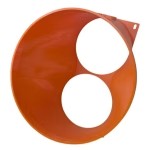
A shroud captures the exhaust and commits it to ductwork. That ductwork can route to:
- Outside — vent the heat out of your space entirely, typically through a window vent port (our full walkthrough: venting a miner through a window)
- Another room — use the waste heat to warm living space (the Bitcoin Space Heater philosophy)
- A heat exchanger — recover thermal energy for hot water or radiant floors
- An attic or chimney chase — leverage existing vertical paths through the house
For maximum control, duct both sides: cool air in through one duct, hot air out through another. A sealed pathway means no recirculation, no ambient room heating you did not ask for, and a machine that behaves the same in July as in January.
Routing Ducts Through a Real House
Houses are not hashcenters. Ducts have to dodge joists, squeeze past shelving, and exit through windows that were never designed for them. Three rules keep a residential duct run honest:
- Shortest path wins. Every extra foot of duct adds resistance. Place the miner as close to its exit point as the electrical layout allows.
- Budget your bends. Every turn costs airflow. Where you must turn, two 45-degree elbows in series are the cheap, low-loss way to make a 90; where space forces a single hard turn, use a long-radius fitting like our 8-inch long-radius airflow elbow — its lower bend loss comes from published duct-loss relationships for long-radius bends, not from marketing.
- Pick a duct size and commit. 6-inch suits short single-miner runs; 8-inch suits long runs and trunks. The full sizing logic lives in our 6-inch vs 8-inch duct guide, so we will not repeat it here.
Mount Styles: Solving Tight-Spot Problems
Layout problems are exactly why the Shroud System ships the same dual-120 shroud in multiple mount styles instead of one take-it-or-leave-it shape:
| Mount Style | Layout Problem It Solves |
|---|---|
| Standard collar (6″) / standard collar (8″) | The baseline: flex duct slips over the collar. Right answer for most straight runs. |
| Offset side-exit | A centred duct would foul a shelf, a wall, or the machine beside it. The collar moves off the fan centreline so the duct clears the obstruction. |
| Bayonet quick-release | Machines you service often. Twist-lock the duct off for maintenance or hashboard swaps instead of unclamping — note it mates with its matching receiver, not bare duct. |
| Threaded screw-on | Seasonal reconfiguration. Screw the duct interface on and off, and cap the port with the threaded blank-off cap when a machine is down, so the duct run cannot backfeed cold or dirty air into an idle miner. |
One honest caveat that applies to everything above: printed parts interface with mass-produced miners and HVAC duct that vary between production runs. We publish our interface dimensions and we do not make guaranteed-fit claims — measure your machine and your duct before you order.
Multi-Miner Layouts: Trunks and Branches
Once you run two or more machines, stop thinking in individual ducts and start thinking in trunks. The backbone fitting is the 8-inch to dual 6-inch wye: two miners each exhaust into a 6-inch branch, the branches merge into one 8-inch trunk, and the trunk makes a single exit through the wall or window. One penetration instead of two, and one place to seal.
The same wye works in reverse for distribution — an 8-inch supply feeding two 6-inch drops. Typical small-rack patterns:
- Two miners, one window: two 6″ shrouds → wye → 8″ trunk → single exit. The cleanest two-machine layout there is.
- Mixed fleet: an S9 on its housing-wrap shroud can share a trunk with a bigger machine — the wrap slides over the whole fan-housing end, so it does not depend on fan screws.
- Row of machines: offset shrouds keep each duct takeoff clear of the neighbouring miner, then branches feed a common trunk along the wall.
Noise Placement Strategy
Noise is a layout problem before it is a hardware problem. The cheapest noise reduction is distance and mass: put the miner in the basement or garage, behind a closed door, with the duct doing the travelling instead of the sound. Flex duct absorbs vibration better than rigid; anti-vibration pads under the machine stop the shelving from becoming a soundboard; and custom firmware underclocking trades hashrate for a dramatically gentler fan curve.
When placement alone is not enough, an in-line muffler helps — we build a tuned-notch silencer for exactly this, and we are deliberately honest about it: its acoustics are modelled, not bench-measured, so you will not find a decibel promise on the listing. The full physics, and what silencers can and cannot do, is in our dedicated ASIC miner silencer guide.
Maintenance: Layout That Protects the Investment
A well-laid-out space is also easier to maintain. Leave working clearance on the service side of every machine — this is where the bayonet and threaded mounts earn their keep. Then hold the routine:
- Monthly: power down, disconnect, and blow dust out of fan assemblies and heatsink fins with compressed air. Inspect duct connections for looseness and shrouds for dust buildup.
- Listen: a failing fan loses much of its airflow before it fully dies. Bearing noise is your early warning.
- Baseline: compare hashrate against your original benchmarks. A gradual decline usually signals thermal issues before they become critical.
- Quarterly: deep-clean heatsinks with 99% isopropyl alcohol. If disassembly is not your thing, our ASIC Repair team does this daily — we have serviced thousands of miners since 2016.
The Dual-Purpose Payoff
If you are heating your home anyway, why not mine Bitcoin while you do it? A 3,000W miner converts effectively all of its electrical input into heat — that is thermodynamics, not marketing. Shrouds and ducts are the link that turns that heat from a basement-ceiling nuisance into a precision heating appliance: with 6–7 months of heating season and low hydro rates, dual-purpose mining is one of the most economically sound ways to run a home operation anywhere on earth. Layout decides whether you capture that value or waste it.
And when you outgrow the house entirely, D-Central offers mining hosting in Quebec. But a well-designed home space with proper shrouds, ducting, and electrical infrastructure comfortably supports 2–6 miners.
One last thing, because it is core to how we work: every shroud, elbow, wye, and port referenced above is published as a free STL under CC BY-SA 4.0 in our 3D models library. Print your own layout solutions, remix them for your house, or order them printed from us in Montreal, Quebec. Either way, the design knowledge stays open.
Frequently Asked Questions
What circuit rating do I need for home Bitcoin mining?
For full-size ASIC miners (Antminer S19/S21, Whatsminer M30/M50), you need a dedicated 240V circuit rated at 20A or 30A, depending on the miner’s power draw. Always apply the 80% continuous load rule — a 20A circuit supports a maximum continuous load of 3,840W. For smaller open-source miners like the Bitaxe or NerdAxe, a standard 120V 15A outlet is sufficient. Always consult a licensed electrician before adding circuits.
What is the best room for home mining?
A basement is ideal — naturally cool, noise-isolated, and close to the electrical panel. Garages work in moderate climates but need climate management. Spare bedrooms or closets can work for 1–3 miners if you install proper intake and exhaust ducting with shrouds. The key principle regardless of location: never let hot exhaust mix with cold intake air.
How do I route mining exhaust through a house?
Keep the run as short as possible, budget your bends (two 45-degree elbows beat one sharp 90 where space allows), and exit through a purpose-made window or wall port. Size the duct to the run: 6-inch for short single-miner runs, 8-inch for long runs and multi-miner trunks. Seal every joint — leaks waste airflow and leak noise.
What is an offset shroud for?
An offset shroud moves the duct collar off the fan centreline. It exists for tight layouts where a centred duct would hit a shelf, a wall, or the machine next door — common in basement racks and closet builds. Same fan capture as a standard shroud, different exit position.
How do I duct two miners to one exit?
Give each miner its own 6-inch shroud and duct, then merge the two branches into a single 8-inch trunk with a wye fitting. The trunk makes one sealed exit through the window or wall. This halves your building penetrations and gives you one place to seal and one place to inspect.
Do I need shrouds on both the intake and exhaust side?
For maximum control, yes. Dual-sided ducting creates a sealed thermal pathway — cool air in through one duct, hot air out through another. This prevents recirculation entirely and gives you precise control over where the heat goes. At minimum, always duct the exhaust side.
Will D-Central shrouds fit my exact miner and duct?
We publish our interface dimensions openly and design against the common fan patterns (dual 120mm for S19/S21-class, 140mm for Whatsminer, housing wraps for S9 and S17/S19), but miners and HVAC duct vary between production runs, so we do not make guaranteed-fit claims. Measure your fan spacing and your duct before you order — and since every design is open source, you can even check the model against your machine first.