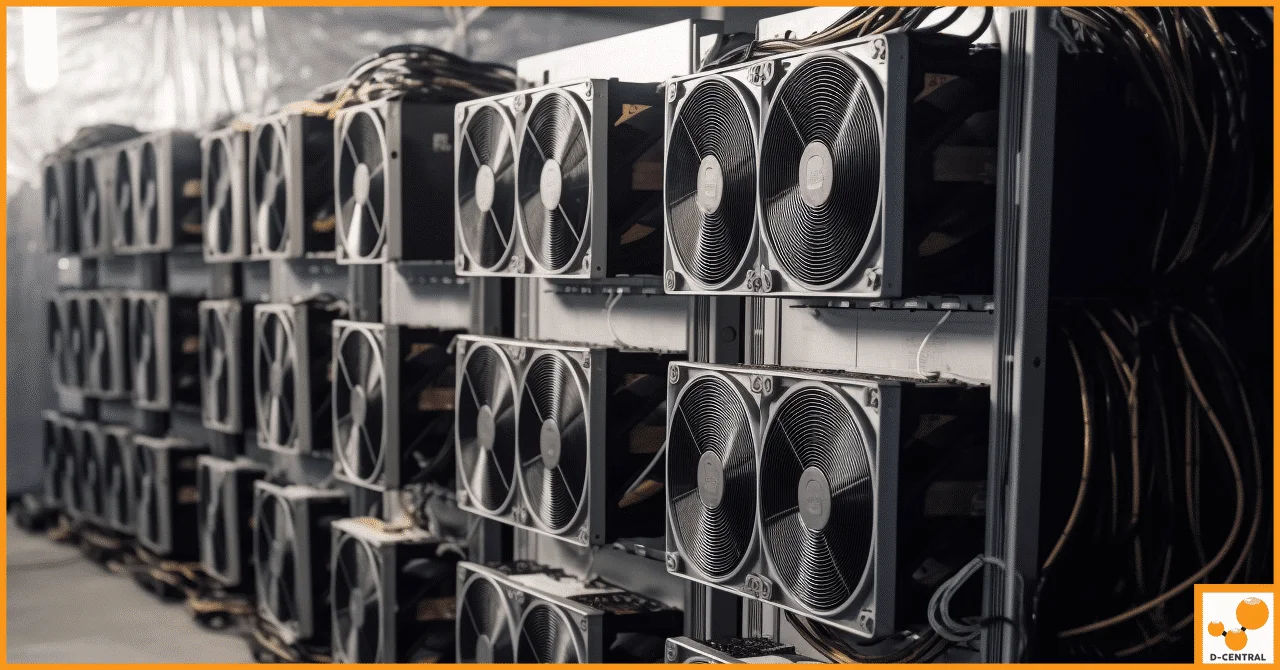
Every watt your home consumes should be doing double duty. That is the philosophy behind the Antminer Loki Edition — a custom Bitcoin miner built by D-Central Technologies to run on the same 110V outlet that powers your kitchen appliances, while simultaneously heating your living space and contributing hashrate to the Bitcoin network.
Stock Antminers are industrial machines. They draw 3,000+ watts, scream at 75+ decibels, and demand 240V circuits with dedicated breakers. They were never designed for your basement, your garage, or your spare bedroom. The Loki Edition exists because we refused to accept that home miners should be locked out of serious SHA-256 hashrate.
This guide breaks down the Antminer Loki Edition and the APW3 PSU that powers it — the specs, the modifications, the setup process, and the strategy behind running a real ASIC miner in a residential environment.
What Is the Antminer Loki Edition?
The Antminer Loki Edition is a D-Central custom build — not a stock Bitmain product. We take proven S19-series Antminer hardware and re-engineer it for residential operation through a series of deliberate modifications:
- Two-hashboard configuration: One hashboard is removed and replaced with an air deflector. This is not a compromise — it is the core engineering decision that makes 110V operation possible. Three hashboards at full power would exceed the capacity of any standard household circuit.
- Silent fan swap: Industrial blower fans are replaced with Arctic P12 Max or Noctua iPPC 3000 fans. The noise reduction is dramatic — from datacenter-level roar to a level that is manageable in a living space.
- Custom firmware: Each unit ships with BraiinsOS+ or VNish firmware, enabling precise underclocking, frequency tuning, and power limiting that stock Bitmain firmware cannot achieve.
- APW3 PSU integration: The residential configuration pairs the miner with a modified APW3++ power supply using the Pivotal Pleb Tech Loki Kit, purpose-built for 110V input.
The result: a Bitcoin miner that produces 42-56 TH/s of SHA-256 hashrate at only 1,100-1,200 watts, running on a standard North American household outlet. No electrician. No 240V upgrade. No industrial infrastructure.
Loki Edition Variants: Specs Compared
D-Central offers three Loki Edition variants, each based on a different S19-series board. All share the same silent fans, two-hashboard design, and 110V compatibility. The difference is raw hashrate and efficiency.
| Specification | S19 Loki | S19j Pro Loki | S19k Pro Loki |
|---|---|---|---|
| Hashrate | ~42 TH/s | ~48 TH/s | ~56 TH/s |
| Power Draw | 1,100-1,200W | 1,100-1,200W | ~1,200W |
| Efficiency | ~27.6 J/TH | ~24.0 J/TH | ~21.4 J/TH |
| Hashboards | 2 | 2 | 2 |
| Voltage Input | 110-240V | 110-240V | 110-240V |
| Firmware | BraiinsOS+ / VNish | BraiinsOS+ / VNish | BraiinsOS+ / VNish |
| Cooling | Arctic P12 Max / Noctua iPPC 3000 | Arctic P12 Max / Noctua iPPC 3000 | Arctic P12 Max / Noctua iPPC 3000 |
| PSU Config | APW3 + Loki Kit | APW3 + Loki Kit | APW3 + Loki Kit |
| Heat Output | ~3,750-4,100 BTU/h | ~3,750-4,100 BTU/h | ~4,100 BTU/h |
| Dimensions | 400 x 195.5 x 290mm (~13.2 kg) | ||
The S19k Pro Loki is the most efficient variant — it squeezes the most terahashes out of every watt. If your electricity rate is your primary concern, that is the model to target. If you want maximum value, the S19 Loki delivers solid hashrate at the most accessible price point.
The APW3 PSU: The Power Behind the Loki
No miner is better than its power supply. The Loki Edition’s residential configuration uses the Bitmain APW3++ PSU, modified by D-Central for home mining duty.
Here is what matters about the APW3++:
| APW3++ Specification | Value |
|---|---|
| Input Voltage | 100-240V AC |
| Output Voltage | 12.15-12.50V DC (adjustable up to 13.6V) |
| Power at 110-120V | 1,200W |
| Power at 200-240V | 1,600W |
| Efficiency | >93% at full load |
| Protection | Low-voltage input, output short circuit, overheat |
| Cooling | Forced-air fan (upgradeable to silent fan) |
Stock vs. Loki-Modded APW3
D-Central offers the APW3++ in two configurations:
- Industrial (Stock): Standard 12V output with 6PIN connectors. Suitable for datacenter or 240V deployments.
- Loki (Modded): The 6PIN connectors are replaced with heavy-duty battery connectors with adjustable voltage selection. This is the configuration designed for the Loki Edition — D-Central pre-mods the unit so you do not have to. Critical safety note: Never manipulate the battery connectors while the unit is powered on.
The modded APW3 also pairs with the APW3 Side Hodler — a D-Central-designed PSU mount that secures the power supply directly to the miner chassis for a clean, compact installation.
The Loki DIY Kit: Build Your Own
For miners who want to perform the modification themselves, D-Central offers the Loki DIY Kit — the same circuit boards and components we use in our production Loki Editions, packaged for self-installation.
Three variants are available depending on your control board and firmware:
| Kit | Compatible Firmware | Control Board | Components |
|---|---|---|---|
| Loki-Duo | BraiinsOS, VNish | Xilinx | LOKI-PSS + LOKI-HBS boards, 2-pin header, jumper, 2.54mm jumper wire |
| Loki-Lite | Bitmain, LuxOS, HiveOS | Xilinx, Beagle Bone | LOKI-PSS board, 2-pin header, jumper, 2mm-2.54mm jumper wire |
| Loki-AmLite | Bitmain (not NoPic at 120V) | Amlogic | LOKI-PSS board, 2x 2-pin headers, jumper, single wire jumper |
The DIY route is for miners who enjoy the build process and want full control over their configuration. If you prefer a ready-to-mine machine, the pre-built Antminer Loki Edition ships fully assembled and tested.
Setting Up Your Loki Edition: Step by Step
The Loki Edition is not a plug-and-play appliance for absolute beginners — but the setup is straightforward for anyone comfortable with basic networking and a web browser. Here is the process:
Step 1: Choose your location. You need a spot with adequate ventilation, an Ethernet connection (or strong Wi-Fi), and a standard 110V/120V grounded outlet on its own 15A circuit. Basements, garages, utility rooms, and spare bedrooms all work well. During winter, position the miner where its heat output is useful.
Step 2: Inspect the hardware. Unbox the Loki Edition and APW3 PSU. Check all connections, fans, and the air deflector plate. D-Central tests every unit before shipping, but verify nothing shifted during transit.
Step 3: Connect the APW3 PSU. Attach the power cables from the modded APW3 to the miner’s hashboards. If using the APW3 Side Hodler mount, secure the PSU to the chassis first. Ensure all connections are tight and properly seated.
Step 4: Connect to your network. Use an Ethernet cable for the most reliable connection. Plug it into your router or a network switch. The miner will obtain an IP address via DHCP.
Step 5: Power on. Plug the APW3 into your grounded 110V outlet. The miner will boot and the fans will spin up. Give it 2-3 minutes to fully initialize.
Step 6: Access the web interface. Find the miner’s IP address on your router’s connected devices list. Open it in a browser. You will see the BraiinsOS+ or VNish dashboard.
Step 7: Configure your pool. Enter your mining pool URL, your worker name, and your Bitcoin wallet address. For home miners, we recommend pools that support smaller hashrate contributors. Solo mining is also an option — with the current block reward at 3.125 BTC, every hash genuinely counts.
Step 8: Monitor and tune. Check your hashrate, temperatures, and power consumption through the firmware dashboard. The custom firmware allows you to fine-tune frequencies and voltages to find the optimal balance for your electrical setup and ambient temperature.
Noise Management for Home Use
Let us be direct: even a Loki Edition is not silent. It is dramatically quieter than a stock Antminer, but it is still a computer with fans pushing air through heatsinks. Here is how to manage it:
- Fan selection matters: The Arctic P12 Max fans are the louder but higher-airflow option. The Noctua iPPC 3000 fans are quieter but move slightly less air. In cooler environments (basements, Canadian winters), the Noctua option works beautifully.
- Location is everything: A basement utility room or garage with a closed door reduces perceived noise to near zero from the rest of the house. If you are placing it in a living space, expect a steady hum comparable to a loud refrigerator.
- Ambient temperature helps: Cooler intake air means fans do not need to spin as hard. This is where Canadian miners have a natural advantage — our winters are free cooling for ASIC hardware.
- Firmware tuning: BraiinsOS+ and VNish both allow manual fan curve adjustments. If your miner is running cool, you can reduce fan speed for quieter operation at the cost of slightly higher chip temperatures.
- Enclosures: D-Central’s Bitcoin Space Heater enclosures and cases like the BitChimney and Antminer Slim Case can further dampen noise while channeling heat output into usable room heating.
The Dual-Purpose Advantage: Mining + Heating
Here is a fact that changes the economics of home mining: every single watt your miner consumes becomes heat. There is no waste — 1,200W of electrical input produces 1,200W of thermal output, or approximately 4,100 BTU/h.
During Canadian winters — which, let us be honest, last about six months — that heat is not a byproduct. It is the product. Your Loki Edition replaces a space heater that would have consumed the same electricity without producing any Bitcoin.
The math is straightforward: if you were going to spend $X on electric heating anyway, the marginal cost of mining is only the electricity consumed during months when you do not need the heat. For many Canadian homes, that means mining is essentially subsidized by your heating bill for half the year or more.
This dual-purpose philosophy is central to D-Central’s Bitcoin Space Heater product line, which includes purpose-built enclosures that transform Antminers into residential heating units with integrated noise dampening and directional airflow.
Why the Loki Edition Over a Bitaxe or Stock ASIC?
The home mining landscape offers a spectrum from open-source solo miners like the Bitaxe to full-scale industrial ASICs. The Loki Edition occupies a specific niche:
| Factor | Bitaxe | Loki Edition | Stock S19 (3 boards) |
|---|---|---|---|
| Hashrate | 0.5-1.2 TH/s | 42-56 TH/s | 90-110 TH/s |
| Power Draw | 12-25W | 1,100-1,200W | 3,000-3,250W |
| Voltage Required | 5V DC (barrel jack) | 110V household | 240V dedicated circuit |
| Noise Level | Silent | Quiet (with silent fans) | Loud (75+ dB) |
| Heat Output | Negligible | ~4,100 BTU/h | ~10,900 BTU/h |
| Best For | Solo lottery mining, learning, decentralization | Serious home mining, dual-purpose heating | Dedicated mining rooms, hosted facilities |
The Bitaxe is a philosophical statement and an educational tool — D-Central is a pioneer in the Bitaxe ecosystem and we carry the full lineup. But if you want meaningful hashrate that contributes real SHA-256 security to the Bitcoin network while heating your home, the Loki Edition is where residential mining gets serious.
If your infrastructure can handle a full stock ASIC (240V circuit, dedicated ventilation, noise isolation), that is the maximum hashrate path. But most homes cannot — and that is exactly the gap the Loki Edition was built to fill.
Maintenance and Long-Term Operation
ASIC miners are not set-and-forget appliances. Here is the maintenance cadence we recommend:
- Monthly: Compressed air blowout to clear dust from heatsinks and fans. Dust accumulation is the number one killer of mining hardware longevity.
- Quarterly: Check all power connections for tightness. Thermal cycling can loosen connectors over time.
- Firmware updates: BraiinsOS+ and VNish release periodic updates with efficiency improvements and bug fixes. Check for updates every few months.
- Temperature monitoring: Keep chip temperatures below 80C. If temps are climbing, check fan operation and dust levels first.
- Hashrate tracking: A sudden drop in hashrate usually indicates a failing ASIC chip or loose connection. Address it quickly to prevent cascade failures.
If your Loki Edition ever needs professional service, D-Central operates Canada’s most comprehensive ASIC repair center with deep expertise across the entire S19 family. Since we build the Loki Edition in-house, our repair team knows every modification intimately.
The Bigger Picture: Why Home Mining Matters
In 2026, Bitcoin’s network hashrate exceeds 800 EH/s and difficulty has pushed past 110 trillion. It is easy to look at those numbers and conclude that home mining is pointless. That conclusion is wrong.
Every home miner running a Loki Edition is a node of decentralization. You are not just earning sats — you are contributing to the geographic and jurisdictional distribution of hashrate that makes Bitcoin censorship-resistant. When hashrate is concentrated in a handful of industrial facilities, it becomes a target. When it is distributed across thousands of basements, garages, and spare bedrooms in dozens of countries, it becomes unstoppable.
This is the mission D-Central was founded on in 2016: the decentralization of every layer of Bitcoin mining. The Loki Edition is how we put that mission into the hands of individual Bitcoiners.
Where to Go From Here
- Ready to mine: Browse the Antminer Loki Edition and Loki DIY Kit in our shop.
- Need guidance: Our mining consulting team can help you determine the right configuration for your home, electrical setup, and goals.
- Explore open-source mining: Visit the Bitaxe Hub for the complete guide to solo mining with open-source hardware.
- Dual-purpose heating: See our full Bitcoin Space Heater lineup for purpose-built mining heater solutions.
- Need repairs: Our ASIC repair center services the full Antminer S19 family — including Loki Editions we built.
- Hosting alternative: If your home setup is not feasible, explore Bitcoin mining hosting in Canada at our Quebec facility.
Every hash counts. Every watt does double duty. That is the Loki way.
Frequently Asked Questions
What is the Antminer Loki Edition?
The Antminer Loki Edition is a custom-built Bitcoin miner engineered by D-Central Technologies for residential use. It uses a modified two-hashboard configuration with silent fans and custom firmware tuned for quiet, undervolted operation to run on standard 110V/120V household power while producing 42-56 TH/s at only 1,100-1,200W.
Can the Antminer Loki Edition run on a regular 110V/120V outlet?
Yes. The Loki Edition is specifically engineered for standard North American 110-120V household outlets. The two-hashboard modification and APW3 PSU configuration keep total draw under 1,200W, well within the capacity of a standard 15A circuit. No electrician or 240V upgrade required.
What PSU does the Loki Edition use?
The residential APW3 configuration uses a Bitmain APW3++ PSU modified by D-Central with the Pivotal Pleb Tech Loki Kit. On 110-120V input, it delivers up to 1,200W at 12V DC output with over 93% efficiency. D-Central also offers pre-modded APW3 units with heavy-duty battery connectors and adjustable voltage selection.
How loud is the Antminer Loki Edition?
Significantly quieter than a stock Antminer. The Loki Edition replaces the industrial blower fans with Arctic P12 Max or Noctua iPPC 3000 silent fans. With lower power draw and optimized airflow, noise levels are reduced to the point where the miner can operate in a residential living space without being disruptive.
Can the Loki Edition heat my home while mining?
Absolutely. At 1,100-1,200W, the Loki Edition produces roughly 3,750-4,100 BTU/h of heat — equivalent to a small space heater. During Canadian winters or colder climates, this heat output directly offsets your heating bill while simultaneously mining Bitcoin. Every watt consumed becomes both hashrate and heat.
What is the difference between the S19, S19j Pro, and S19k Pro Loki Editions?
All three variants share the same form factor, silent fans, and 110V compatibility. The difference is in hashrate and efficiency: the S19 Loki delivers ~42 TH/s, the S19j Pro Loki delivers ~48 TH/s, and the S19k Pro Loki delivers ~56 TH/s — all at approximately 1,100-1,200W. The S19k Pro offers the best efficiency (joules per terahash) of the three.
Is this a plug-and-play miner for beginners?
The Loki Edition is designed for Bitcoiners who have some familiarity with mining. While D-Central provides setup guides and support, this is modded hardware — not a stock machine. You should be comfortable configuring firmware, setting pool credentials, and managing a miner via its web interface. That said, the setup process is straightforward for anyone willing to learn.
Does D-Central repair Loki Edition miners?
Yes. D-Central Technologies is Canada’s leading ASIC repair center with expertise across the full S19 family. Since we build the Loki Edition in-house, we have complete knowledge of every modification. If your Loki rig ever needs service, our repair team knows the hardware inside and out.