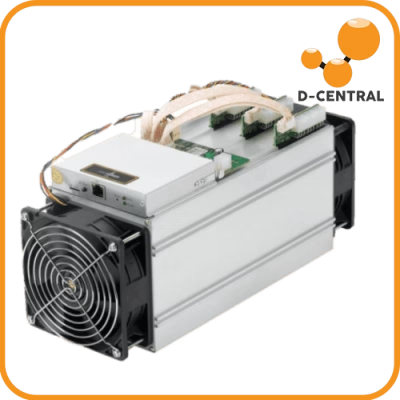
An Antminer S21 at full tilt pushes 200 TH/s of SHA-256 computation through its ASIC chips — and dumps roughly 3,500 watts of heat into whatever room it occupies, screaming at 75+ decibels while it does it. That is the fundamental engineering problem every home Bitcoin miner must solve: how do you harness that raw hashing power without melting your hardware or enraging your household?
At D-Central Technologies, we have been cracking open, modifying, and repairing ASIC miners since 2016. We have shipped thousands of custom builds — from Bitcoin Space Heaters that turn waste heat into home warmth, to silent fan-swap configurations that let you run a miner in your living room. This guide distills everything we know about noise reduction and thermal management for Bitcoin ASIC miners into a single, no-nonsense reference.
Why Noise and Heat Are the Same Problem
Most people treat noise and heat as two separate challenges. They are not. They are the same challenge viewed from different angles.
ASIC miners generate heat because they are converting electricity into SHA-256 computations at extraordinary density. A single BM1397 chip on an Antminer S17 hashboard draws several watts and produces heat proportional to that draw. Multiply that across dozens of chips per hashboard, three hashboards per machine, and you have a device that rivals a space heater in thermal output — because it is a space heater that also mines Bitcoin.
The noise comes from the cooling system fighting that heat. Stock ASIC fans are industrial-grade blowers designed for data center environments where nobody lives. They spin at 5,000-6,000+ RPM and move massive volumes of air across heatsinks and out through narrow exhaust channels. The turbulence, motor hum, and air velocity combine to produce sound levels between 70 dB and 85 dB — comparable to a vacuum cleaner running non-stop, 24 hours a day, 7 days a week.
This means any real solution must address both simultaneously. Reduce heat generation and you need less aggressive cooling, which means less noise. Improve cooling efficiency and the fans can spin slower, which also means less noise. Every strategy in this guide works on that shared axis.
Understanding the Heat Budget
Before you touch a single fan, you need to understand your heat budget. Every watt your miner draws from the wall becomes heat. A 3,500 W miner produces 3,500 watts of heat — roughly 12,000 BTU/h. That is the thermal equivalent of a large portable space heater.
Your cooling system must remove that heat from the ASIC chips and transport it somewhere else. The “somewhere else” part is what most home miners get wrong. If you are dumping 12,000 BTU/h into a sealed room, the ambient temperature will climb until the miner thermal-throttles, hash rate drops, and eventually the machine shuts down to protect itself — or worse, components start failing.
Key thermal numbers to know:
- ASIC chip junction temperature: Most chips are rated for 85-105 C maximum. Sustained operation above 80 C accelerates electromigration and shortens chip life.
- Inlet air temperature: Stock firmware on most Antminers targets inlet air below 35-40 C. Above that, fans ramp to maximum and the machine begins throttling.
- Exhaust delta: A healthy miner typically shows a 15-25 C temperature rise from inlet to exhaust. If your delta is higher, airflow is restricted.
Understanding these numbers lets you make informed decisions rather than guessing. If you need professional diagnostics on a miner that is running too hot, D-Central’s ASIC repair service includes full thermal analysis with every unit we receive.
Noise Reduction Strategies That Actually Work
1. Fan Replacement: The Single Biggest Improvement
Swapping stock fans for aftermarket low-noise alternatives is the most impactful modification you can make. Stock Antminer fans are built for raw airflow in controlled environments — they are not designed for livability.
Noctua NF-A12x25: The gold standard for ASIC fan swaps. These 120mm fans deliver excellent static pressure at a fraction of the noise — typically 20-25 dB versus 75+ dB from stock fans. The tradeoff is reduced airflow volume, which means you may need to undervolt or underclock the miner to keep temperatures in check.
Arctic P12 PWM PST: A budget-friendly alternative that still delivers meaningful noise reduction. These fans can be daisy-chained via the PST connector, simplifying wiring in multi-fan setups.
The critical detail most guides skip: you cannot just bolt quiet fans onto a stock miner running at full power and expect good results. Noctua fans move roughly 55 CFM versus 200+ CFM from stock blowers. You must either reduce power draw (underclocking/undervolting) or add more fans in a custom shroud configuration to maintain adequate airflow at lower RPMs.
D-Central’s custom Antminer builds — including the Slim Edition, Pivotal Edition, and Loki Edition — come with fan configurations already optimized for home use. We have tested hundreds of combinations so you do not have to.
2. Duct and Shroud Systems
A well-designed duct system does two things: it directs hot exhaust air out of your living space, and it contains noise within an enclosed path. The concept is simple — attach a shroud to the miner’s exhaust, run ductwork to a window or exterior vent, and let the hot air exit the building.
D-Central manufactures universal ASIC shrouds that fit most Antminer and Whatsminer models. Combined with standard 6-inch flexible ductwork from any hardware store, you can route exhaust outside while keeping the miner indoors.
For noise reduction, insulated ductwork (the kind used for HVAC systems) adds significant sound dampening. The longer the duct run and the more bends it includes, the more sound energy is absorbed — though this comes at the cost of increased back-pressure that your fans must overcome.
3. Soundproofing Enclosures
Enclosures range from simple DIY boxes lined with acoustic foam to purpose-built mining cabinets with integrated ventilation.
DIY approach: Build a box from MDF or plywood, line the interior with mass-loaded vinyl (MLV) and acoustic foam. Include baffled inlet and exhaust ports — these are chambers where air can pass through but sound waves are absorbed by foam before escaping. A well-built DIY enclosure can reduce noise by 20-30 dB.
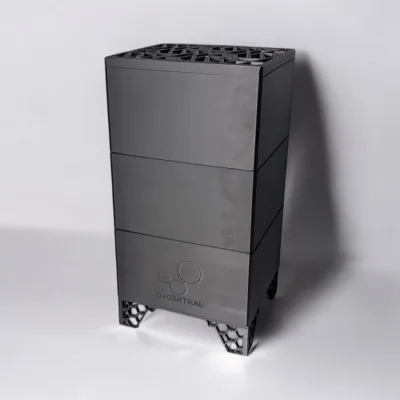
Commercial options: Products like the Black Box and various mining enclosures on the market provide ready-made solutions. These typically include integrated fan mounts, filter systems, and pre-built baffles.
Critical warning: Any enclosure that restricts airflow without providing adequate ventilation will cause your miner to overheat. The enclosure must move at least as much air as the miner requires. If your miner needs 200 CFM of airflow, your enclosure ventilation system must deliver that — or you must reduce the miner’s power draw accordingly.
4. Vibration Isolation
A often-overlooked noise source is structural vibration. Miners sitting on hard surfaces transmit low-frequency vibration through floors and walls, creating a resonant hum that can be heard rooms away.
Solutions are straightforward: anti-vibration rubber pads, silicone feet, or even a thick rubber mat under the miner. Noctua includes anti-vibration mounts with many of their fans. For miners sitting on shelving units, decoupling the shelf from the wall with rubber washers on the mounting hardware can make a surprising difference.
Cooling Solutions: From Basic to Advanced
Air Cooling — Getting It Right
Air cooling is what 99% of home miners use, and there is nothing wrong with that — if you do it properly. The key principles:
- Ensure adequate room ventilation. The miner pulls in room air, heats it, and exhausts it. If that hot air recirculates back to the intake, temperatures spiral upward. Separate your intake air source from your exhaust destination.
- Maintain clean airflow paths. Dust accumulation on heatsinks and fan blades is the number one cause of gradual temperature increases. Clean your miners every 2-3 months with compressed air — or more often in dusty environments.
- Monitor inlet temperature. A simple thermometer near the miner’s intake tells you if your room is getting too warm. If inlet air exceeds 35 C consistently, you need better room ventilation before adding more cooling hardware.
- Use PWM fan control. If your fan replacement supports PWM, you can dynamically adjust fan speed based on temperature. Custom firmware like Braiins OS+ and VNish provide granular fan curve control.
Immersion Cooling — The Nuclear Option
Immersion cooling submerges the entire miner in a non-conductive dielectric fluid (typically engineered mineral oil or synthetic coolant). The liquid absorbs heat directly from the chips and circulates it to a radiator or heat exchanger.
Advantages: Virtually silent operation. Superior thermal contact means chips run cooler at the same power draw. Eliminates dust as a failure mode entirely. Enables overclocking that would be impossible with air cooling.
Disadvantages: High upfront cost (tanks, fluid, pumps, radiators). Maintenance is messy — pulling a hashboard out of oil for inspection is not a quick task. The fluid must be compatible with every material in the miner (gaskets, connectors, PCB coatings). Not all fluids are equal, and using the wrong one can degrade components over time.
Immersion makes sense for dedicated operations with multiple machines and a commitment to the infrastructure. For a single-miner home setup, the cost and complexity rarely justify the benefits over a well-executed air cooling system with aftermarket fans.
Heat Recycling — The Mining Hacker’s Secret Weapon
Here is where home mining gets genuinely brilliant. That 3,500 watts of heat your miner produces? In a cold climate like Canada, that is not waste — that is free heating.
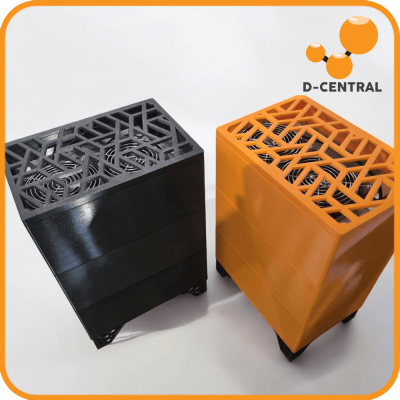
D-Central’s Bitcoin Space Heaters are purpose-built for exactly this. We take proven mining hardware — S9s, S17s, S19s — and engineer them into enclosures designed to distribute heat efficiently throughout a room while mining Bitcoin. You are not paying for electricity twice (once for heating, once for mining). You are paying once and getting both.
In Canada, where heating season runs 6-8 months and electricity costs vary by province, heat recycling can fundamentally change the economics of home mining. A miner that would be unprofitable in a data center becomes a net-positive investment when it replaces an electric space heater that would have consumed the same wattage producing zero Bitcoin.
Even without a purpose-built space heater unit, you can implement basic heat recycling by ducting your miner’s exhaust into the room you want heated during winter months, then switching to outdoor exhaust in summer. This dual-mode approach means your miner subsidizes your heating bill from October to April.
Firmware and Software: The Underrated Lever
Before you spend a dollar on hardware modifications, explore what software can do. Custom mining firmware unlocks thermal management capabilities that stock firmware deliberately locks away.
Undervolting/Underclocking: Running your miner at reduced power — say 2,000 W instead of 3,500 W — dramatically reduces heat output and allows quieter fans to keep up. You sacrifice some hash rate, but the efficiency (joules per terahash) often improves. In many electricity markets, the sweet spot for profitability is not maximum hash rate but maximum efficiency.
Custom fan curves: Stock firmware often runs fans at a fixed aggressive speed regardless of actual chip temperature. Custom firmware like Braiins OS+ lets you define temperature-triggered fan curves that ramp speed only when needed, keeping noise low during cooler ambient conditions.
Temperature monitoring dashboards: Real-time visibility into chip temperatures, fan speeds, and hash rate lets you catch problems before they become failures. A chip running 5 C hotter than its neighbors on the same hashboard could indicate a failing thermal pad — catching it early means a simple repair rather than a dead chip.
Maintenance: Keeping Your System Dialed In
A cooling system is only as good as its maintenance. Here is the maintenance schedule we recommend at D-Central, based on thousands of machines repaired and serviced:
Monthly:
- Check all fan operation — listen for bearing noise, vibration changes, or speed fluctuations
- Verify temperature readings are within normal ranges
- Inspect dust filters if using an enclosure
Every 3 months:
- Clean heatsinks and fan blades with compressed air
- Check ductwork connections for gaps or disconnections
- Verify exhaust venting is not blocked (leaves, snow, debris)
- Review firmware for available updates
Every 12 months:
- Replace thermal paste on hashboard chips (especially on units running at high ambient temperatures)
- Inspect and replace thermal pads if compression has degraded
- Test replacement fans — even quality fans degrade after 30,000+ hours of continuous operation
- Full interior cleaning including PSU intake and board-level dust removal
If a maintenance task is beyond your comfort level, send the unit to D-Central. We provide full preventive maintenance services including thermal paste replacement, thermal pad upgrades, fan replacements, and complete diagnostic testing.
The Canadian Advantage
Canada’s climate is a structural advantage for Bitcoin miners that most of the world does not have. When your ambient air is -20 C for four months of the year, cooling is essentially free — you are pulling Arctic air across your heatsinks. The challenge flips from “how do I cool this thing” to “how do I use the heat it produces.”
This is why D-Central’s mining hosting facility in Quebec leverages Canada’s cold climate and hydroelectric power — some of the cheapest and cleanest electricity on the planet. For home miners across the country, the same principles apply at smaller scale: cold air intake from outside during winter, heat recovery into your living space, and a net energy cost that makes Canadian home mining uniquely viable.
With the Bitcoin network hashrate now exceeding 800 EH/s and difficulty above 110 trillion, efficiency matters more than ever. Every watt you save on cooling is a watt that goes toward hash rate. Every degree you reduce ambient temperature is hash rate preserved. In the post-halving era with the block reward at 3.125 BTC, operational efficiency is not optional — it is survival.
Choosing the Right Approach for Your Setup
There is no single “best” solution. The right approach depends on your specific situation:
Single miner in an apartment: Fan swap to Noctua + undervolt via custom firmware + vibration isolation pads. This gets you to livable noise levels (~30-35 dB) with modest hash rate sacrifice. Duct exhaust out a window if possible.
1-3 miners in a house with a garage or basement: Dedicated room with proper ventilation, aftermarket fans, and duct system exhausting outside. Use heat recovery in winter. This is the sweet spot for home mining — enough hash rate to matter, manageable noise and thermal challenges.
Small farm (5-20 miners): Dedicated space with engineered airflow (intake wall, exhaust wall), commercial-grade ventilation, and monitoring systems. Consider immersion for density and noise benefits. At this scale, hosted mining in Quebec may be more economical than home operation.
Want zero noise and zero hassle: A Bitaxe solo miner runs at under 15 watts, is completely silent, fits on your desk, and gives you a shot at a full 3.125 BTC block reward. It is not about the hash rate — it is about participating in the network and rolling the dice. Every hash counts.
DIY vs. Professional Solutions
The DIY path rewards hands-on miners who enjoy the building process and have the technical confidence to modify expensive hardware. You will learn your machines inside and out, and you will save money on labor. The risk is getting something wrong — an improperly mounted fan, a thermal paste application that leaves air gaps, or an enclosure design that inadvertently restricts airflow.
Professional solutions — pre-built enclosures, custom miner configurations from D-Central, or repair services — cost more upfront but come with tested designs and warranty coverage. For miners who value their time or lack confidence in hardware modification, professional solutions eliminate the guesswork.
The Mining Hacker approach? Start with software (firmware, undervolting), move to simple hardware mods (fan swap, vibration pads), then graduate to more complex projects (enclosures, ductwork, heat recovery) as your confidence grows. Each step teaches you something about your machine that makes you a better miner.
What is the typical noise level of a stock Bitcoin ASIC miner?
Stock ASIC miners typically produce between 70 dB and 85 dB — comparable to a vacuum cleaner or loud hair dryer running continuously. Models like the Antminer S21 and S19 series sit at the higher end of this range. This level of noise is not livable in residential spaces without modification. Fan swaps, undervolting, and enclosures can reduce this to 30-40 dB, which is comparable to a quiet office environment.
Can I run an ASIC miner in my apartment without disturbing neighbors?
Yes, but only with modifications. A stock miner is far too loud for apartment living. You need at minimum a fan swap to Noctua or equivalent low-noise fans, combined with undervolting via custom firmware to reduce heat output. Add vibration isolation pads to prevent structural noise transmission through floors and walls. With these modifications, a single miner can operate at 30-35 dB — roughly the volume of a whispered conversation. If your apartment allows window exhaust, ducting the hot air out eliminates the ambient temperature problem.
How often should I clean my ASIC miner for optimal cooling performance?
D-Central recommends compressed air cleaning every 3 months for miners in normal environments, and monthly for dusty or workshop environments. Dust accumulation on heatsinks and fan blades is the single most common cause of gradual temperature increases and eventual thermal throttling. Annual maintenance should include thermal paste replacement and thermal pad inspection, especially on machines that have been running continuously for 12+ months.
What is immersion cooling and is it worth it for home miners?
Immersion cooling submerges your miner in a non-conductive dielectric fluid that absorbs heat directly from the chips. It eliminates fan noise entirely, provides superior cooling, and removes dust as a failure factor. However, the upfront cost (tank, fluid, pump, radiator) typically runs $1,000-3,000+ for a single-miner setup. For most home miners running 1-3 machines, a well-executed air cooling setup with aftermarket fans and proper ventilation delivers 90% of the benefit at 10% of the cost. Immersion becomes compelling at 5+ machines or in environments where absolute silence is required.
Can I use my Bitcoin miner to heat my home?
Absolutely — this is one of the smartest strategies for home miners, especially in cold climates like Canada. Every watt your miner consumes becomes heat. A 3,500 W miner produces roughly 12,000 BTU/h of heat — equivalent to a large portable space heater. D-Central’s Bitcoin Space Heaters are specifically engineered for this dual-purpose operation, turning mining heat into usable home warmth. During heating season, your miner effectively costs nothing extra to run because you would have spent that electricity on heating anyway — except now you are also earning Bitcoin.
What is the best custom firmware for managing noise and temperature?
Braiins OS+ is the most widely used custom firmware for Antminer devices and offers excellent undervolting, custom fan curves, and detailed temperature monitoring. VNish is another strong option with similar capabilities. Both allow you to reduce power draw to find the sweet spot between hash rate and efficiency, which directly reduces heat output and allows quieter fans to maintain safe temperatures. Always use firmware from verified, reputable sources — malicious firmware that redirects hash rate exists in the wild.
Do I need to worry about cooling with a Bitaxe or other open-source solo miner?
No. Devices like the Bitaxe Supra, Bitaxe Ultra, and NerdAxe consume 5-15 watts — less than a LED lightbulb. They generate negligible heat and produce no meaningful noise. The small heatsink and fan included with these devices are more than sufficient. These miners are designed specifically for desk-top, home-friendly operation. Visit the Bitaxe Hub for complete specifications on every model D-Central carries.
When should I send my miner to a professional repair service instead of fixing it myself?
If you are comfortable replacing fans and applying thermal paste, those are safe DIY tasks. However, anything involving hashboard-level repair — replacing ASIC chips, reballing BGA connections, diagnosing voltage regulator failures, or repairing damaged PCB traces — requires specialized equipment (hot air rework stations, BGA reballing jigs, oscilloscopes) and training. Attempting hashboard repair without proper tools risks destroying expensive boards. D-Central’s ASIC repair service has handled thousands of repairs across all major manufacturers since 2016. If in doubt, ship it to us.