PiAxe is an open design for a small, single-chip Bitcoin miner controlled by a Raspberry Pi. It can be useful for learning about mining hardware and software, but it is not an equal vote in Bitcoin, not a complete node-to-miner stack by itself and not a predictable income device.
What the audited upstream PiAxe is—and is not
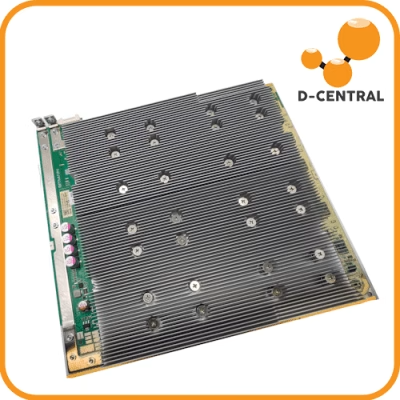
The canonical upstream hardware describes one BM1366 hashing chip on a Raspberry Pi GPIO add-on board. The project calls the board a HAT. Raspberry Pi’s formal HAT rules include electrical, mechanical and identification-EEPROM requirements; the audited project documentation does not establish that formal conformance. “GPIO add-on board” is therefore the safer description unless the seller supplies compliance evidence.
The hardware repository was checked at commit 0dab3f7e2fc937e56c1c78d93e007fb8731a1efa, dated January 30, 2024. The main schematic title block says revision 202 and is dated October 10, 2023. The repository did not provide a tagged PiAxe release. Its other development branches and differently named multi-chip designs are not proof of additional PiAxe retail variants.
The host-miner repository was checked at commit 01d2c224e3ac78cbf9866ff21627f52d7b246598, dated December 23, 2024, and likewise had no tagged release. It is host-side Python software, not embedded microcontroller firmware. A seller must identify both commits or the exact successor versions actually tested.
The audited hardware and host repositories carry GPL-3.0 licences, and the hardware repository includes design, board, manufacturing and bill-of-materials files. That does not make the ASIC die, Raspberry Pi, power supplies or every retail modification open source. A truthful openness claim names the repository, commit, artefacts and licence and identifies seller modifications.
Revision evidence to obtain before buying
- Clear photographs of both sides, including the PCB silkscreen and revision marking.
- The exact design-file, Gerber and bill-of-materials commit, plus all substitutions.
- Whether the hashing chip is new, reclaimed or otherwise sourced, and what incoming tests were performed.
- The Raspberry Pi models, operating-system image and host-software commit actually validated.
- The heatsink, interface material, fan, standoffs and enclosure included in the sale.
- Every required power supply, output rating, connector, polarity, lead rating and connection sequence.
- Applicable finished-unit and power-supply approval markings, warranty, return window and support procedure.
A derivative can change the connector or combine power rails. Its instructions cannot be transferred to the audited upstream board, and upstream specifications cannot be transferred to the derivative.
Power and cooling are a go/no-go gate
The upstream README says the board is powered by 12 V. In its audited root schematic, a barrel jack and fuse lead to the 12 V input of the ASIC core buck converter. A separate +5 V net runs between the Raspberry Pi header and the ASIC/fan sheet. There is no documented 12-to-5 V supply for the Raspberry Pi in that design. This dual-rail architecture directly contradicts the former article’s claim that one official 5 V Raspberry Pi supply powers everything.
The board files show a barrel-jack footprint, protection parts and a fuse, but those details do not by themselves establish a complete external-supply specification or regulatory approval. The seller’s validated manual must state exact voltage tolerance, centre polarity, plug dimensions, continuous and transient current, cable gauge, approved power supplies, whether both inputs must be connected, and safe connect/disconnect order.
- Power off and unplug every rail before installing or removing the board, fan, heatsink or storage.
- Never apply 12 V to a 5 V or 3.3 V GPIO pin, the Raspberry Pi USB power connector or an unverified derivative connector.
- Use only intact, appropriately rated, country-suitable listed supplies and insulated leads. Do not improvise polarity adapters.
- Mount the PCB on correct standoffs. Prevent conductive debris, loose hardware and cable strain from reaching the board.
- Confirm full heatsink contact and continuous fan airflow before enabling hashing. Do not obstruct an enclosure’s intake or exhaust.
- Place the unit on a stable, non-combustible surface or in a ventilation-appropriate enclosure. Keep it away from fabric, liquids, heavy dust, children and pets.
- Monitor the first burn-in. Stop immediately for fan failure, sensor error, unexpected heat, odour, discoloration, arcing or abnormal electrical noise.
The audited temperature sensor is under the heatsink. It is not a direct ASIC-junction, connector, regulator or power-supply measurement. The host software’s over-temperature shutdown depends on the daemon, GPIO and sensor continuing to work; it is not an independent safety device. Do not operate unattended until the complete unit’s thermal and shutdown behaviour has been validated.
Treat hashrate, power and noise as measurements—not nameplate promises
The audited upstream documentation does not establish a guaranteed 500 GH/s rate, a 550 GH/s peak, total wall power, acoustic level or compatibility with every recent Raspberry Pi. Its example configuration sets a clock value, but clock frequency is not accepted effective hashrate. The master hardware uses a fixed core voltage and omits a voltage-control DAC and current measurement.
A credible performance table must disclose:
- board revision, design and miner commits, component substitutions, chip condition and sample count;
- Raspberry Pi model, operating system, clock configuration, cooling assembly and ambient temperature;
- both supplies and whether watts are measured per rail or at the wall for the whole stack;
- warm-up, test duration, pool or local test method, accepted effective hashrate, rejected and stale shares, and restarts;
- noise meter, weighting, background level, one-metre distance and orientation; and
- median, range and failures rather than a brief peak from one sample.
A sustained test of at least 24 hours is more informative than a dashboard instant, but it still does not guarantee another unit or future conditions. Higher clock settings can increase heat, errors and component stress. Do not publish static profit, payback or reward claims.
One ASIC is not one vote: understand each role
The Bitcoin whitepaper’s phrase “one-CPU-one-vote” describes proof-of-work weight in choosing the chain with the most accumulated work. It does not assign one equal governance ballot to each physical chip. A faster device contributes more hashes than a slower one, and independently validating nodes reject blocks that violate the rules they enforce.
Hashing for a pool-supplied job is not the same as independently validating transactions or choosing a block template. The roles are separate:
| Role | What it does | What it does not prove |
|---|---|---|
| Full node | Validates transactions and blocks against its rules and maintains local chain state. | Running it does not automatically feed work to the PiAxe. |
| Template producer or gateway | Selects candidate transactions and coinbase outputs, obtains work through getblocktemplate, and submits a solved block. |
It is not built into the audited PiAxe host client. |
| Stratum server or proxy | Distributes jobs and difficulty and receives shares or block candidates. | A proxy does not necessarily give the end device template choice. |
| Raspberry Pi host client | Connects to a server and sends work to the hashing board through GPIO UART; it also uses I2C and PWM for board functions. | The audited PiAxe control path is not a USB mining interface. |
| ASIC | Tests header candidates and returns results. | It neither validates the full chain nor casts an equal protocol vote. |
| Pool accounting service | Measures accepted shares and applies its payout terms. | Shares are not blocks, and payout depends on fees, minimums, method and operator performance. |
The audited host code uses legacy Stratum-style messages such as mining.subscribe, mining.authorize, mining.notify, mining.set_difficulty and mining.submit over a stratum+tcp endpoint. That supports only the behaviour actually implemented and tested; “works with any Stratum pool” is not justified.
Stratum V2 is a distinct protocol suite. Some deployments use mining, job-declaration, template-distribution and translation-proxy roles. Template choice is not automatic merely because a service mentions Stratum V2, and the audited PiAxe host client is not shown to implement it directly.
Pool, third-party solo and direct solo are different trust models
Pooled mining
A pool usually chooses or distributes jobs, measures shares and pays under a stated method. It lowers payout variance relative to direct solo mining, but adds fees, minimum payout thresholds, availability, account, custody and counterparty risks. Test the exact protocol, minimum difficulty and payout configuration with a small deployment.
Third-party solo service
A solo-labelled service can forward a full block reward if the worker finds a valid block, but it remains a third party. Its server commonly supplies the job or template and controls connection, submission and payout mechanics. It is not equivalent to building work from a node you operate.
Direct solo through your own node
Bitcoin Core provides block-template and block-submission RPCs, not the Stratum endpoint expected by the audited host software. Direct solo therefore needs a compatible local gateway or mining application that obtains templates, constructs jobs, receives a result and submits a complete candidate block. Installing Core and the PiAxe client on the same Raspberry Pi does not connect them.
Solo-mining expected value and variance
Use effective accepted hashrate, not a brief device-reported peak. Let h be the miner’s accepted hashes per second, H a contemporaneous estimate of network hashes per second, and t the operating period. Under stable-condition and independent-trial approximations:
expected blocks (lambda) ≈ (h / H) × expected network blocks during t
probability of at least one block ≈ 1 − exp(−lambda)
mean waiting time ≈ 600 seconds / (h / H)
The 600-second figure is Bitcoin’s target spacing, not a schedule. Network rate is estimated from observed blocks and difficulty, conditions change, downtime and stale or rejected work reduce effective participation, and actual block intervals vary widely. The mean is not a deadline. A long run of failures does not make the next hash “due,” and a device may never find a block.
A valid solo block’s gross on-chain reward is the subsidy then in force plus the fees actually included in that block. Propagation, validity and coinbase-maturity rules still matter. Pool receipts depend on the pool’s method and terms. Electricity, both host and board supplies, equipment, cooling, repairs, fees, taxes and Bitcoin price are separate inputs. Nothing in this guide promises a block, revenue or profit.
Can the same Raspberry Pi also run a full node?
It can be possible on a sufficiently tested host, but the services remain logically separate. Bitcoin Core, the miner, storage, monitoring, an indexer and a web interface compete for CPU, RAM, I/O, network bandwidth and cooling. A failure or update in one can affect the others.
A full validating node may be pruned after validating old blocks; an archival node retains historical block data. Transaction indexes, wallet rescans, explorer software and Electrum-style servers have additional and sometimes incompatible storage requirements. Do not promise that a fixed card and drive size will remain sufficient. Use the current Core release’s requirements, allow substantial free space and endurance headroom, back up configuration, and keep valuable wallet keys off an experimental miner host.
Pin the software and harden the host
Do not install an unversioned branch and assume it is firmware. Record the exact operating-system image, hardware and miner commits, dependency versions, configuration and checksums. Stage updates, keep a known-good image and document rollback. Review repository changes and security advisories before updating.
The audited example enables telemetry and includes a placeholder token. Its optional web API is disabled and bound to loopback by default, but its code exposes unauthenticated clock and fan-changing routes and starts a development server in debug mode. Keep the API, dashboards, telemetry database, Bitcoin RPC and SSH off the public internet. Bind to loopback or a controlled private network, firewall the host, replace every token, use unique credentials, disable unused services and run with only the permissions needed for GPIO, UART and I2C.
The upstream installation command that breaks system package protections is not a complete production deployment plan. Prefer an isolated, reproducible environment with pinned packages and tested recovery. Do not store wallet seeds, private keys or reused passwords in miner configuration. The Raspberry Pi supplies Ethernet or Wi-Fi; the PiAxe board itself is controlled through the header, not as a self-contained network appliance.
Pre-purchase, arrival and burn-in checklist
Before payment
- Resolve every revision, source, power, cooling, approval, included-parts and software question in writing.
- Obtain the measured-performance method and complete result set, not only a peak number.
- Read warranty exclusions for reclaimed chips, overclocking, fan failure, power supplies, self-assembly and modified software.
- Confirm return timing, return shipping, support channel and whether a dead-on-arrival test is required.
- Do not pay based on projected earnings or a claim that a single chip has equal influence in Bitcoin.
Before first power
- Photograph the unopened package and all board markings; compare the delivered revision and accessories with the order.
- Inspect for bent headers, cracked solder joints, loose heatsink hardware, conductive debris, damaged insulation, reversed connectors and shipping damage.
- With all power disconnected, install correct standoffs, heatsink and fan and verify clearances and airflow.
- Match each supply label, plug and polarity to the exact manual. If anything differs, stop and contact the seller.
First boot and monitored burn-in
- Start with the validated stock configuration and a non-valuable worker credential.
- Confirm the fan, sensor, power-good state and software logs before sustained hashing.
- Monitor both power paths, temperatures, accepted effective hashrate, rejects, stale work and restarts.
- Run a supervised sustained test and save the logs, configuration, wall-power readings and photos for warranty evidence.
- Stop for any safety warning, unexpected reset, thermal rise, error trend or disagreement with the seller’s test envelope.
Bottom line
PiAxe can be an educational open-design project when the exact board, power architecture, cooling and software are understood. Its value as a learning tool does not make each chip an equal Bitcoin voter, connect it automatically to a local node, guarantee a hashrate or make solo rewards predictable. The safe buying decision begins with versioned evidence and a build-specific power manual.
Primary sources and version ledger
- PiAxe hardware README at audited commit, including 12 V power and board changes.
- PiAxe root schematic at audited commit and Raspberry Pi header sheet.
- PiAxe hardware repository licence and host-miner repository licence.
- PiAxe host-miner README at audited commit, Stratum client implementation, example configuration, GPIO, UART, PWM and sensor control, and optional web API implementation.
- Bitcoin: A Peer-to-Peer Electronic Cash System, proof-of-work and the most-work chain.
- BIP 22: getblocktemplate fundamentals and Bitcoin Core mining RPC implementation.
- Bitcoin Core consensus parameters, including mainnet target spacing.
- Stratum V2 protocol specification, including mining, job-declaration and template-distribution roles.
- Bitcoin Core 31.0 pruning RPC documentation.
- Raspberry Pi model power requirements and Raspberry Pi add-on board and HAT design guide.
Reviewed: August 29, 2026 by D-Central’s content-review team. Recheck the pinned repositories, current Bitcoin Core documentation, Raspberry Pi requirements and the exact seller manual before any material revision or purchase.
Frequently asked questions
What exactly is the upstream PiAxe?
The audited upstream PiAxe is a Raspberry Pi GPIO add-on board with one BM1366 hashing chip. A retail build may use different board files, components, cooling or power wiring, so match its silkscreen and bill of materials to a named repository commit before relying on a specification.
Can a Raspberry Pi power supply power the PiAxe by itself?
Do not assume so. The audited upstream design documents a 12 V barrel input for the ASIC core and a separate 5 V rail from the Raspberry Pi header. Use only the voltage, polarity, connector, current rating and connection sequence documented for the exact unit sold; never connect 12 V to Raspberry Pi GPIO or USB power.
Does one ASIC receive one vote in Bitcoin?
No. Bitcoin does not give each physical ASIC an equal governance vote. Mining influence follows valid proof of work, while independently validating nodes enforce the rules they accept. A miner using a pool-supplied job also does not necessarily choose its own block template.
Does running Bitcoin Core on the same Pi make mining direct or solo?
No. Bitcoin Core supplies block templates and accepts candidate blocks through RPC, while the audited PiAxe host software connects to a Stratum server. Direct solo mining requires a compatible local template and submission gateway; installing both programs on one computer does not connect them automatically.
How should I estimate the chance of finding a solo block?
Use effective accepted hashrate, current network conditions and uptime to calculate an expected block count for a stated period. A Poisson approximation can convert that expectation into a probability, but the mean waiting time is not a deadline, past failures do not improve the next attempt, and no block or reward is guaranteed.
What should I verify before buying or powering a PiAxe?
Verify the exact hardware and software commits, board revision, chip condition, included Raspberry Pi and power supplies, 12 V connector and polarity, current rating, cooling, enclosure, measured performance method, electrical approvals, warranty, returns and support. If the seller cannot resolve any power or revision mismatch in writing, do not power the unit.