The Antminer S19 series remains one of the most widely deployed SHA-256 ASIC miners on the planet. Millions of these units are hashing away in garages, basements, and small facilities worldwide. But every S19 operator knows the fundamental constraint: heat. The stock air-cooling system works, but it works loudly, inefficiently, and with a hard ceiling on what you can extract from the silicon.
Liquid cooling breaks that ceiling. By replacing the stock heatsinks with a hydro heatsink kit, you transform the thermal dynamics of the entire machine. Lower chip temperatures, quieter operation, higher overclock headroom, and a longer operational lifespan. This is what Bitcoin Mining Hackers do — take institutional-grade technology and hack it into something that works for the home miner.
This guide covers everything you need to know about retrofitting your Antminer S19 series with a hydro heatsink kit: what is in the kit, how the conversion works, what performance gains to expect, and the honest trade-offs you should consider before cracking open your miner.
Why Heat Is the Enemy of Hashrate
Every watt consumed by an ASIC chip becomes heat. The S19 series draws between 2,800W and 3,250W depending on the model, and every single watt eventually needs to leave the chassis as thermal energy. When chip junction temperatures climb, the firmware throttles frequency to prevent damage. Higher ambient temperatures mean lower hashrates, higher error rates, and accelerated silicon degradation.
This is especially critical for home miners dealing with limited cooling infrastructure. You cannot just blast 80 dB of fan noise through a residential environment without consequences. The stock cooling solution on the S19 uses dual high-RPM fans pushing air across aluminum heatsinks — effective, but loud and thermally limited.
Liquid cooling changes the equation fundamentally. Water has roughly 4,000 times the volumetric heat capacity of air. A liquid-cooled loop can remove the same thermal load at a fraction of the airflow, which means dramatically lower noise and significantly lower chip temperatures.
What Is in the Hydro Heatsink Upgrade Kit
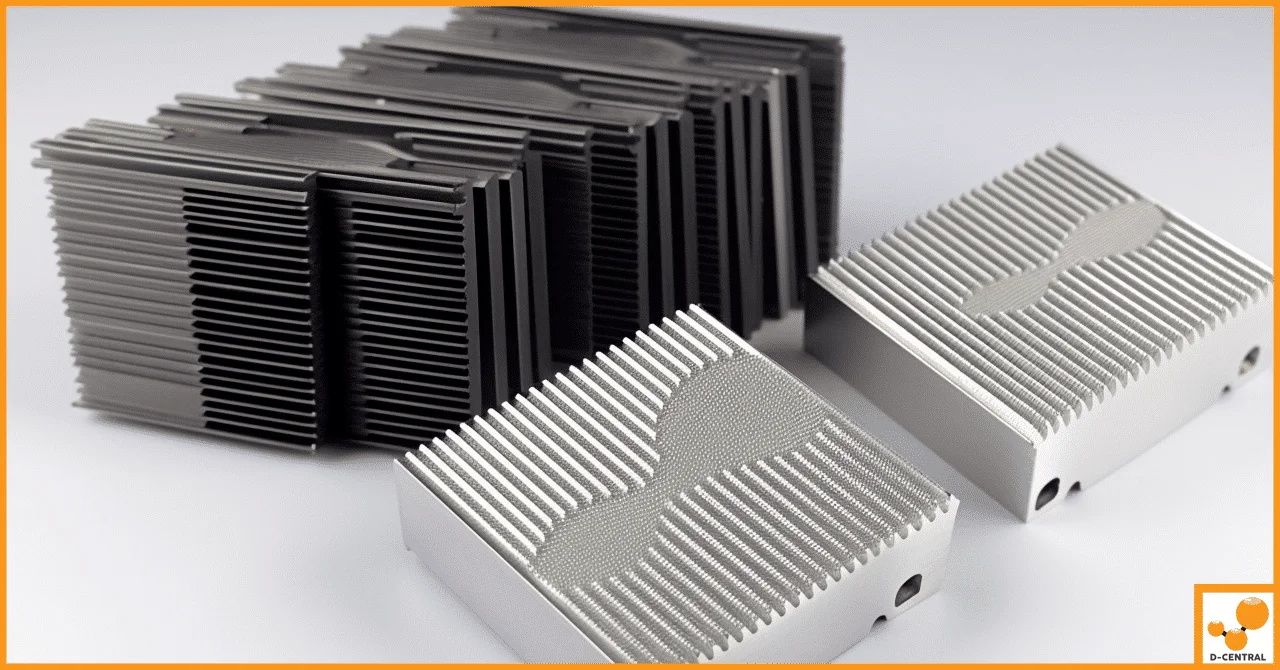
The hydro heatsink upgrade kit replaces the stock air-cooled heatsinks on your S19 hashboards with water blocks designed for direct liquid contact. A complete kit typically includes:
| Component | Function |
|---|---|
| Hydro Heatsink (Water Block) | Replaces stock aluminum heatsinks. Allows liquid coolant to flow directly over ASIC chips via internal channels. |
| Circulation Pump | Drives coolant through the closed loop. Typically a DC pump rated for 24/7 operation. |
| Radiator | Heat exchanger that dissipates thermal energy from the coolant into ambient air. Usually 240mm or 360mm. |
| Tubing & Fittings | Connects all components into a sealed loop. Compression fittings prevent leaks under pressure. |
| Radiator Fans | Low-RPM fans mounted on the radiator. Run far quieter than stock ASIC fans (typically 30-40 dB vs 75-80 dB). |
| Coolant | Non-conductive, anti-corrosion liquid (typically propylene glycol mix). Prevents galvanic corrosion between dissimilar metals. |
| Thermal Paste / Pads | Applied between ASIC chips and the water block for optimal thermal transfer. |
The critical component is the water block itself. Unlike the stock heatsinks which rely on convective air transfer, the water block uses conductive transfer to liquid flowing through micro-channels machined into copper or aluminum. The thermal interface between chip and coolant is dramatically more efficient.
How the Conversion Works
Converting an S19 from air to liquid cooling is a real hardware modification. This is not a plug-and-play accessory. Here is the process at a high level:
Step 1 — Disassembly. Power down the unit completely. Remove the stock fans and fan shrouds. Carefully remove the hashboards from the chassis. Remove the stock heatsinks from each hashboard — this requires care, as the thermal compound bonding the heatsinks to the chips can be stubborn.
Step 2 — Surface Preparation. Clean all residual thermal compound from the ASIC chip surfaces using isopropyl alcohol. Inspect the chips for any damage. This is a good opportunity to check for dead chips or obvious board defects before investing in the conversion.
Step 3 — Water Block Installation. Apply fresh thermal paste to each ASIC chip. Position the hydro heatsink over the hashboard and secure it with the provided mounting hardware. Ensure even pressure across all chips — uneven contact will create hot spots.
Step 4 — Loop Assembly. Mount the radiator in a location with good airflow. Connect the pump, water block, and radiator with tubing and compression fittings. Fill the loop with coolant and bleed all air bubbles. Air pockets are the enemy of liquid cooling — they create hot spots and reduce pump efficiency.
Step 5 — Testing. Power on with the cooling loop running. Monitor chip temperatures closely during the first hours of operation. Check all fittings for leaks. Verify that coolant is flowing properly and that temperatures stabilize within expected ranges.
If you are not comfortable performing this modification yourself, D-Central’s ASIC repair team has extensive experience with hardware modifications on the S19 series and can handle the conversion professionally.
Performance Gains: What to Expect
The performance improvements from liquid cooling are not marginal — they are substantial and measurable.
| Metric | Stock Air Cooling | Hydro Heatsink Upgrade |
|---|---|---|
| Chip Temperature | 70-85°C typical | 45-60°C typical |
| Noise Level | 75-80 dB (jet engine territory) | 30-45 dB (quiet conversation) |
| Overclock Headroom | Limited (thermal throttling) | Significant (15-30% frequency gains achievable) |
| Hashrate Stability | Fluctuates with ambient temp | Extremely stable |
| Hardware Error Rate | Increases at high ambient temps | Near-zero at normal operation |
| Expected Lifespan Impact | Standard degradation curve | Significantly extended (lower thermal stress) |
The noise reduction alone makes liquid cooling worthwhile for home miners. An S19 at stock settings is unbearable in a residential environment. With hydro heatsinks, you can run the machine in an adjacent room without ear protection. Combined with custom firmware that allows frequency tuning, you gain precise control over the performance-efficiency-noise triangle.
The overclock headroom is where things get interesting for miners chasing maximum hashrate. With chip temperatures 20-30°C lower than air cooling, you can push frequency significantly higher before hitting thermal limits. On an S19j Pro, for example, miners have reported pushing from the stock ~104 TH/s to 120+ TH/s with adequate liquid cooling. That is free hashrate for the cost of better thermal management.
Liquid Cooling vs. Air Cooling vs. Immersion: Choosing Your Path
Liquid cooling via hydro heatsink is not the only alternative to stock air cooling. Here is how the three main approaches compare:
| Factor | Stock Air | Hydro Heatsink | Full Immersion |
|---|---|---|---|
| Upfront Cost | $0 (included) | $200-$600 | $1,500-$5,000+ |
| Cooling Efficiency | Adequate | Excellent | Best possible |
| Noise Reduction | None | Major (40-50 dB reduction) | Nearly silent |
| Installation Difficulty | None | Moderate (hardware modification) | High (tank, fluid, plumbing) |
| Space Required | Miner footprint only | Miner + radiator + pump | Tank + heat exchanger |
| Maintenance | Fan replacement, dust cleaning | Coolant checks, leak inspection | Fluid testing, filtration |
| Best For | Dedicated mining rooms | Home miners, small operations | Serious operators, high-density setups |
For most home miners running one to five S19 units, the hydro heatsink upgrade hits the sweet spot. It delivers the majority of the thermal benefits of immersion cooling at a fraction of the cost and complexity. If you want to go deeper down the immersion path, check out our complete guide to immersion cooling for ASIC miners.
Upgrade vs. Buy New: The Cost Calculation
Should you retrofit your existing S19, or buy a factory hydro-cooled unit like the S19 Hydro or the newer S21 XP Hyd? The answer depends on your specific situation.
Retrofit makes sense when:
- You already own one or more S19 units in good condition
- You want to extend the useful life of existing hardware rather than buying new
- You have the technical skills (or access to a qualified repair service) for the conversion
- Your budget favors a $200-$600 upgrade over a $5,000-$15,000 new machine
- You value the sovereignty of maintaining and modifying your own equipment
Buying new makes sense when:
- You are scaling up and need factory-supported warranty coverage
- You want the latest generation silicon (S21 XP Hyd at 473 TH/s dwarfs the S19 series)
- You do not want to handle hardware modification
- You need a turnkey solution that works out of the box
From a pure Bitcoin Mining Hacker perspective, retrofitting is the more sovereign choice. You are taking what you already have and making it better with your own hands. That is the ethos. The S19 series is a proven platform with a massive install base, and squeezing more life and performance from it through a cooling upgrade is exactly the kind of hack that keeps home mining decentralized and accessible.
Practical Considerations and Potential Risks
Liquid cooling is not without its challenges. Be honest with yourself about these factors before committing:
Leak risk. Any system with liquid under pressure near electronics carries leak risk. Quality fittings, proper assembly, and regular inspection mitigate this. Use compression fittings (not barbs), leak-test the loop before powering on the miner, and never run the system unmonitored during the first 24 hours.
Corrosion. Mixing dissimilar metals (copper water blocks with aluminum radiators, for example) in a liquid loop causes galvanic corrosion over time. Use a proper non-conductive coolant with corrosion inhibitors. Distilled water alone is not sufficient for long-term operation.
Maintenance. Coolant should be checked and replaced periodically (every 12-18 months). Pump failure requires immediate shutdown to prevent thermal damage. Monitor your system with temperature alerts.
Warranty implications. Removing stock heatsinks voids the manufacturer warranty. For most home miners running S19 units that are already out of warranty, this is irrelevant. But if you have a unit still under warranty, consider the trade-off.
Weight and size. The radiator, pump, and reservoir add physical bulk. Plan your rack or shelf space accordingly. The total system weight will increase by several kilograms.
Heat Recovery: The Home Mining Multiplier
Here is where liquid cooling gets truly interesting for home miners, especially in Canada. A liquid-cooled loop does not just dissipate heat — it moves heat. And moved heat can be directed somewhere useful.
With a hydro heatsink setup, you can route the hot coolant through a heat exchanger to warm domestic hot water, run hydronic floor heating, or supplement your home heating system. Your S19 becomes a dual-purpose device: a Bitcoin miner AND a space heater. In Canadian winters, where heating costs can exceed $200/month, this effectively subsidizes your mining operation.
D-Central has been pioneering this dual-purpose mining concept with our Antminer S19 Space Heater Edition, which takes the heat recovery principle and packages it into a purpose-built unit. The hydro heatsink upgrade gives you a DIY path to the same concept — mine Bitcoin, heat your home, and stack sats while reducing your heating bill.
This is the Bitcoin Mining Hacker philosophy in action. You are not just running a miner. You are building a system that captures every joule of energy and puts it to work twice.
Who Should Consider This Upgrade
The hydro heatsink upgrade is not for everyone, and that is fine. Here is who benefits most:
- Home miners who need to reduce noise to coexist with family and neighbors
- Overclockers who want to push their S19 hardware beyond stock limits using custom overclocking configurations
- Heat recovery enthusiasts who want to integrate mining into their home heating system
- Long-term holders who plan to run their S19 units for years and want to extend hardware life
- DIY builders who enjoy the hands-on aspect of building and modifying their own mining infrastructure
- Small-scale operators running 1-10 units who need better thermal management without the cost of full immersion
If you fall into any of these categories, the hydro heatsink upgrade deserves serious consideration. And if you need help with the conversion or want to explore other cooling options, reach out to D-Central. We have been hacking miners since 2016, and cooling modifications are one of our specialties.
Frequently Asked Questions
What S19 models are compatible with the hydro heatsink upgrade?
The hydro heatsink kits are designed for the Antminer S19, S19 Pro, S19j, S19j Pro, S19 XP, and S19k Pro. Compatibility depends on the specific kit manufacturer, so verify that your exact model is supported before purchasing. The hashboard layout differs slightly between sub-models.
How much does a complete hydro heatsink upgrade kit cost?
Expect to spend between $200 and $600 for a complete kit including water blocks, pump, radiator, fittings, tubing, and coolant. The price varies based on quality of components, radiator size, and whether the kit includes a reservoir. Budget an additional $20-$50 for quality thermal paste and isopropyl alcohol for surface preparation.
Can I use distilled water instead of specialized coolant?
Distilled water works for short-term testing, but is not recommended for long-term operation. Water promotes bacterial growth, algae, and galvanic corrosion between dissimilar metals. Use a premixed non-conductive coolant with corrosion inhibitors, or mix your own using distilled water with a biocide and corrosion inhibitor concentrate.
How much noise reduction can I expect?
Typically 40-50 dB reduction. The stock S19 runs at 75-80 dB (comparable to a vacuum cleaner or loud traffic). With hydro heatsink cooling and low-RPM radiator fans, expect 30-45 dB — roughly the level of a quiet room or soft conversation. This makes the difference between needing a dedicated mining room and being able to run the miner in a living space.
Does the hydro heatsink upgrade void my warranty?
Yes. Removing the stock heatsinks and modifying the cooling system voids the Bitmain manufacturer warranty. For most home miners, S19 units are already out of the standard warranty period. If your unit is still under warranty, weigh the warranty value against the performance and noise benefits of liquid cooling.
How often does the coolant need to be replaced?
Replace coolant every 12-18 months. Check coolant clarity and color monthly — cloudiness or discoloration indicates contamination or chemical breakdown. Top off coolant levels as needed, since small amounts of evaporation through the tubing are normal over time.
Can D-Central perform the hydro heatsink conversion for me?
Yes. D-Central’s ASIC repair team handles hardware modifications including cooling upgrades on the S19 series. We operate from our facility in Montreal, Quebec, and serve customers across Canada and internationally. Contact us for a quote and turnaround estimate.
Can I use the heat from liquid cooling to warm my home?
Absolutely — this is one of the biggest advantages of liquid cooling for home miners. By routing the hot coolant through a heat exchanger, you can supplement your home heating system. An S19 running at 3,000W produces approximately 10,200 BTU/hr of heat — equivalent to a small space heater. In cold climates like Canada, this dual-purpose approach significantly improves the economics of home mining.