Your ASIC miner is not a set-and-forget appliance. It is a precision instrument — a purpose-built SHA-256 engine generating trillions of hashes per second to secure the most important monetary network ever created. And like any high-performance machine, it demands respect, attention, and regular maintenance.
In 2026, Bitcoin’s network hashrate has surged past 800 EH/s. Difficulty sits above 110 trillion. The block reward after the April 2024 halving is 3.125 BTC. These numbers mean one thing: margins are tighter than ever. Every watt matters. Every degree of excess heat is money evaporating into thin air. The miners who survive — and thrive — are the ones who treat maintenance not as a chore but as a competitive advantage.
At D-Central Technologies, we have been repairing, tuning, and optimizing ASIC miners since 2016. We have opened thousands of machines, diagnosed every failure mode imaginable, and developed maintenance protocols that squeeze maximum efficiency out of every unit. This guide distills that hard-won knowledge into actionable steps any home miner or small-scale operator can implement today.
Why ASIC Maintenance Is a Survival Strategy in 2026
Let us be direct: neglected miners are dead miners. Not immediately — degradation is insidious. A thin layer of dust on a heatsink. A fan bearing wearing down. Thermal paste drying out over months. None of these kill a machine overnight, but they compound. Efficiency drops 5% here, 10% there. Your joules-per-terahash creeps upward. Your electricity bill stays the same while your hashrate quietly declines.
In a post-halving environment where the block reward is 3.125 BTC, that efficiency loss is the difference between profitable operation and subsidizing the electric company.
Here is what proper maintenance actually delivers:
- Lower J/TH (joules per terahash) — A clean, well-cooled miner runs at its rated efficiency. A neglected one can consume 15-25% more power for the same hashrate.
- Extended hardware lifespan — ASIC chips are robust, but the components around them (fans, capacitors, thermal interface materials) degrade. Maintenance catches failures before they cascade.
- Consistent hashrate — Thermal throttling is the silent killer. When chip temperatures exceed safe thresholds, firmware reduces clock speeds to prevent damage. You mine less. You earn less.
- Reduced repair costs — A $5 can of compressed air today prevents a $300 hashboard replacement tomorrow.
If you are running even a single miner at home, maintenance is not optional. If you are running ten, it is existential.
Cleaning: The Foundation of Everything
Dust is the number one enemy of ASIC miners. Period. These machines are essentially industrial fans strapped to processing boards — they pull enormous volumes of air through their chassis every minute. Every particle in that air eventually lands on heatsinks, fan blades, and PCB surfaces.
What Dust Actually Does to Your Miner
Dust acts as thermal insulation. It coats the aluminum fins of your heatsinks, reducing their ability to transfer heat from ASIC chips to the airflow. The result: chip temperatures rise, fans spin faster to compensate (consuming more power), and if temperatures still exceed thresholds, the firmware throttles performance.
On hashboards, dust accumulation can also contribute to corrosion over time, especially in humid environments. We have seen hashboards come into our ASIC repair shop with thick mats of dust and pet hair so dense they had created hot spots that cooked individual ASIC chips.
The Cleaning Protocol
Here is the maintenance procedure we use at D-Central for every machine that comes through our facility:
- Power down completely. Unplug the power supply. Wait 30 seconds for capacitors to discharge. Never clean an energized miner.
- Move the miner to a well-ventilated area. You are about to displace a significant amount of dust. Do this outdoors or in a garage, not next to your other running equipment.
- Use compressed air at 40-60 PSI. An electric air duster or shop compressor with a moisture trap works best. Canned air is adequate for light maintenance but lacks the pressure for deep cleaning. Blow air through the miner in the same direction as normal airflow — intake to exhaust.
- Focus on heatsink fins. These thin aluminum channels are where most thermal transfer happens. Blast dust from between every fin. Use short, targeted bursts.
- Clean fan assemblies. Hold fan blades still while blowing (letting them free-spin from compressed air can damage bearings). Inspect blades for cracks or imbalance.
- Inspect the hashboards. Look for discoloration (signs of overheating), bulging capacitors, corroded solder joints, or physical damage. If you spot anything suspicious, that board needs professional diagnosis.
- Clean the control board. Gently dust the control board and its connectors. Check ribbon cables and power connectors for a secure fit.
- Reassemble, power up, and verify. Monitor temperatures and hashrate for 30 minutes after cleaning. You should see lower temperatures and potentially higher stable hashrate if dust was impacting performance.
Cleaning Frequency
- Home environment (basement, spare room): Every 3 months
- Garage or workshop: Every 6-8 weeks
- Dusty environment (construction area, rural with unpaved roads): Monthly
- If you have pets: Monthly, minimum. Pet hair is remarkably effective at clogging heatsinks.
Thermal Management: The Art of Keeping Cool
ASIC miners convert electricity into heat and hashes. That is their entire job. A modern Antminer S21 generates roughly 3,400 watts of heat — equivalent to a medium-sized space heater running at full blast. Managing that thermal output is the single most important factor in long-term efficiency and reliability.
Ambient Temperature Matters More Than You Think
Every degree Celsius you can lower your ambient intake air temperature translates directly to lower chip temperatures, which means higher sustainable hashrate and longer component life. This is one reason Canada is such an outstanding location for mining — our cold winters are literally a competitive advantage.
If you are mining at home, consider these environmental optimizations:
- Intake air from the coolest source available. A basement floor vent in winter, a north-facing window, or a dedicated cool-air intake duct can drop ambient temperatures 5-15 degrees Celsius compared to a warm living space.
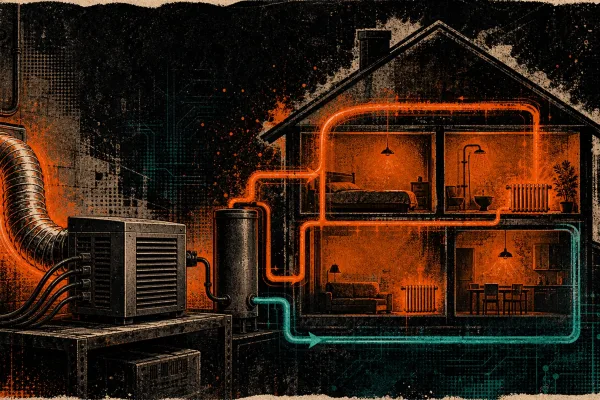
- Exhaust heat where it is useful. This is where the dual-purpose mining concept becomes powerful. That 3,400 watts of heat is not waste — it is a space heater. Our Bitcoin space heaters are specifically designed around this principle, turning mining heat into home heating and cutting your effective energy costs dramatically.
- Ensure proper airflow separation. Intake and exhaust air should never mix. If your exhaust recirculates back to the intake, you are heating your own intake air and creating a thermal feedback loop that degrades performance.
Fan Maintenance and Replacement
Fans are the most mechanically stressed components in any ASIC miner. They spin at thousands of RPM, 24 hours a day, 365 days a year. Fan failure is the most common cause of overheating-related shutdowns.
- Listen for changes. A healthy fan has a consistent sound. Grinding, clicking, or intermittent speed changes indicate bearing wear.
- Monitor RPM in your miner’s dashboard. A fan losing RPM over time is a fan approaching failure.
- Replace proactively. Fans are inexpensive. Replace them at the first sign of degradation rather than waiting for failure. A $15 fan replacement prevents a $500 hashboard replacement caused by thermal damage.
- Stock spares. Keep replacement fans on hand for every miner model you operate. Browse our parts catalog to stock up before you need them. When a fan fails at 2 AM, having a spare on the shelf means minutes of downtime instead of days waiting for shipping.
Thermal Paste and Thermal Pads
Between ASIC chips and heatsinks sits a thin layer of thermal interface material — either thermal paste or thermal pads, depending on the manufacturer and model. This material is critical: it fills microscopic air gaps between the chip surface and the heatsink, enabling efficient heat transfer.
Over time, thermal paste dries out and cracks. Thermal pads compress and lose their thermal conductivity. When this happens, chip temperatures rise even with clean heatsinks and functioning fans.
Re-applying thermal paste is an advanced maintenance task that requires disassembling the heatsink assembly. If you are comfortable with this, use a high-quality non-conductive thermal compound rated for high-temperature applications. If you are not comfortable, this is an excellent reason to use a professional ASIC repair service.
Firmware: The Software Side of Efficiency
Your miner’s firmware controls everything — clock speeds, voltage, fan curves, error handling, pool communication. Running outdated firmware is like driving a car with a detuned engine. You are leaving performance and efficiency on the table.
Stock Firmware vs. Aftermarket Firmware
Stock firmware from manufacturers like Bitmain and MicroBT is designed for general use cases. It is conservative, stable, and aimed at the broadest possible range of operating conditions. This is fine, but it is not optimized for your specific setup.
Aftermarket firmware options like Braiins OS+ and VNish offer:
- Autotuning — The firmware individually tunes each ASIC chip on each hashboard, finding the optimal voltage and frequency for maximum efficiency. This can improve J/TH by 10-25% compared to stock.
- Underclocking and undervolting profiles — Run your miner at reduced power for better efficiency when electricity costs are high or ambient temperatures are elevated.
- Advanced fan control — More granular temperature-based fan curves that balance noise, cooling, and power consumption.
- Better monitoring — Per-chip temperature and performance data that helps you spot degrading components before they fail.
For home miners especially, aftermarket firmware is one of the highest-impact upgrades you can make. A miner running autotuned firmware in a well-maintained setup can achieve efficiency numbers that stock firmware simply cannot match.
Keep Firmware Updated
Whether you run stock or aftermarket firmware, stay current with updates. Firmware developers constantly refine their algorithms and fix bugs. An update that improves efficiency by even 2% translates to real savings over months of 24/7 operation.
Electrical Infrastructure: The Forgotten Maintenance Domain
Miners focus on the machines themselves but often neglect the electrical infrastructure feeding them. This is a mistake.
Power Supply Units (PSUs)
- Check PSU efficiency ratings. A PSU rated at 93% efficiency wastes 7% of input power as heat before it even reaches your miner. Higher-rated PSUs (94-95%) save meaningful energy at scale.
- Inspect power cables and connectors. Loose connections create resistance, which generates heat and wastes energy. A slightly discolored connector is a warning sign — tighten or replace it immediately.
- Clean PSU intake vents. PSUs have their own cooling fans and heatsinks. They need cleaning too.
- Monitor voltage stability. Voltage sags and spikes stress both the PSU and the miner. If you are experiencing electrical instability, invest in proper circuit infrastructure or a line conditioner.
Electrical Safety
ASIC miners draw significant current. A single Antminer S21 pulls approximately 15 amps at 240V. Running multiple miners on inadequate wiring is a fire hazard.
- Use dedicated circuits rated for your total load.
- Install proper breakers sized for your wiring gauge.
- Never use extension cords or power strips for ASIC miners.
- If you are scaling beyond one or two machines, consult a licensed electrician to assess your panel capacity and wiring.
Dual-Purpose Mining: Turning Heat Into Value
One of the most powerful efficiency strategies is not a maintenance task at all — it is an architectural decision. If you can use the heat your miner generates, your effective energy cost plummets.
In Canada, we heat our homes for six to eight months of the year. A Bitcoin miner producing 3,400 watts of heat displaces 3,400 watts of electric baseboard heating. The mining revenue becomes a bonus on top of heat you were already paying for.
D-Central has pioneered this concept with our Bitcoin space heater line — purpose-built enclosures that direct mining heat into living spaces while managing noise and airflow. But even a standard ASIC miner in a basement can serve as a furnace supplement with proper ducting.
This is not a niche idea. It is the future of home mining. In a world where Bitcoin difficulty continues to climb and the block reward halves every four years, the miners who survive will be the ones who find creative ways to offset their energy costs. Dual-purpose mining is the most elegant solution we have seen.
Monitoring: You Cannot Manage What You Do Not Measure
Set up proper monitoring for every miner you operate. At minimum, track:
- Hashrate (real-time and average) — Any sustained drop indicates a problem.
- Chip temperatures — Track maximum and average. Rising trends signal cooling degradation.
- Fan RPM — Declining RPM means fan wear.
- Power consumption (at the wall) — Use a kill-a-watt meter or smart PDU. Compare actual consumption to expected wattage.
- Accepted vs. rejected shares — Rising rejection rates can indicate hardware errors or network issues.
- Board status — All hashboards should be detected and hashing. A missing board is lost revenue.
Many aftermarket firmware options include built-in monitoring dashboards. For larger operations, tools like Foreman or custom Grafana setups can aggregate data across multiple machines. The key is establishing baselines so you can detect degradation early — before it becomes a failure.
When to Call the Professionals
There is a line between maintenance and repair. Cleaning fans, replacing thermal paste, and updating firmware are maintenance tasks most technically inclined people can handle. But some problems require professional diagnosis and equipment:
- Dead hashboards — Could be a failed ASIC chip, a blown voltage regulator, or a damaged PCB trace. Diagnosis requires specialized tools and experience.
- Control board failures — Flashing firmware, replacing NAND chips, or repairing network controllers.
- Intermittent errors — The hardest problems to diagnose. These often require systematic component-level testing.
- Physical damage — Burnt connectors, liquid damage, or impact damage need professional assessment.
D-Central has been providing ASIC repair services since 2016 with dedicated repair pages for over 38 different miner models. We work on Bitmain, MicroBT, Canaan, and Innosilicon hardware. If you are dealing with a problem beyond routine maintenance, we have the diagnostic equipment and the experience to get your machine back online.
Building a Maintenance Routine
Here is a practical maintenance schedule for home miners:
Weekly:
- Check miner dashboards for temperature trends, hashrate, and fan RPM
- Listen for unusual sounds (grinding fans, clicking relays)
- Verify all hashboards are detected and hashing
Monthly:
- Log power consumption at the wall and compare to baseline
- Check firmware for available updates
- Inspect power cables and connections for heat discoloration
Quarterly:
- Full compressed air cleaning (follow the protocol above)
- Inspect fan blades and bearings
- Review ambient temperature data and adjust intake/exhaust if seasonal changes warrant it
Annually:
- Deep inspection of hashboards for corrosion or capacitor degradation
- Consider thermal paste re-application on older machines (2+ years)
- Evaluate whether hardware upgrades or replacements make sense given current difficulty and efficiency benchmarks
- Test electrical infrastructure (breakers, wiring temperature under load)
The Mining Hacker Mindset
Maintaining an ASIC miner is not just about keeping a machine running. It is about sovereignty. Every hash your miner produces strengthens the Bitcoin network, distributes hashrate away from centralized industrial operations, and asserts your participation in the most important decentralized system humanity has ever built.
When you maintain your miner, you are not just protecting your investment — you are protecting the network. A well-maintained home miner contributing to decentralized hashrate is more valuable to Bitcoin than a neglected one sitting in a closet burning watts for nothing.
This is what we mean when we say we are Bitcoin Mining Hackers. We take institutional-grade technology, optimize it for home use, maintain it with professional-grade protocols, and deploy it in service of decentralization. That is the mission. That is why we have been doing this since 2016. And that is why maintenance is not a burden — it is part of the craft.
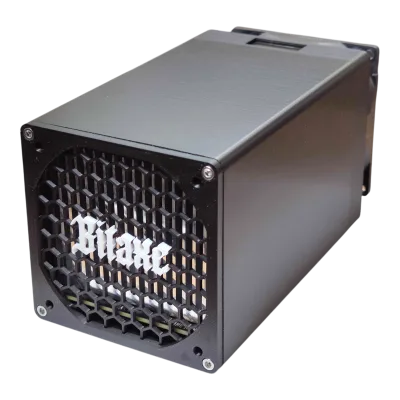
Whether you are running a single Bitaxe as a solo mining lottery ticket or a fleet of S21s heating your home through a Canadian winter, the principles are the same: keep it clean, keep it cool, keep it updated, and keep it hashing.
Every hash counts.
Frequently Asked Questions
How often should I clean my ASIC miner?
In a typical home environment, clean your ASIC miner every 3 months with compressed air. If you have pets, live in a dusty area, or operate in a garage or workshop, increase frequency to monthly. The key indicator is chip temperature — if your temperatures are trending upward without changes to ambient conditions, it is time to clean.
Can aftermarket firmware really improve my miner’s efficiency by 10-25%?
Yes. Aftermarket firmware like Braiins OS+ uses per-chip autotuning to find the optimal voltage and frequency for each individual ASIC chip. Stock firmware applies blanket settings across all chips, which means some chips run less efficiently than they could. The actual improvement depends on your specific hardware, silicon lottery, and operating conditions, but 10-25% J/TH improvement is well-documented across thousands of deployments.
What is the single most impactful maintenance task for improving efficiency?
Cleaning the heatsinks. Dust buildup on heatsink fins is the most common cause of elevated temperatures and reduced efficiency. A thorough cleaning with compressed air at 40-60 PSI, focusing on the heatsink channels, can immediately lower chip temperatures by 5-15 degrees Celsius and restore hashrate lost to thermal throttling.
Is it worth re-applying thermal paste on my ASIC miner?
On machines older than 2 years that show elevated chip temperatures despite clean heatsinks and functioning fans, yes. Thermal paste degrades over time, especially in high-temperature environments. Re-application with quality thermal compound can restore thermal transfer efficiency. However, this requires disassembling the heatsink assembly and is best done by someone comfortable with the process — or by a professional ASIC repair service.
How do I know if my miner needs professional repair versus maintenance?
If the problem is environmental (dust, heat, airflow), it is maintenance. If the problem is component-level (dead hashboard, control board error, burnt connector, intermittent chip failures), it is a repair. As a general rule: if you cannot fix it with compressed air, a fan replacement, or a firmware update, it is time to contact a professional. D-Central offers repair services for over 38 miner models.
Can I really use my ASIC miner as a space heater?
Absolutely. An ASIC miner converts virtually 100% of its electrical input into heat. A 3,400W miner produces 3,400W of heat — equivalent to a large space heater. With proper noise management and airflow ducting, miners can supplement or replace conventional electric heating. D-Central’s Bitcoin space heater line is specifically designed for this dual-purpose use case, and in cold climates like Canada, it effectively subsidizes your mining operation during heating season.
What monitoring tools should I use for my home mining setup?
At minimum, use your miner’s built-in web dashboard to monitor hashrate, temperatures, and fan RPM. A kill-a-watt meter at the wall outlet gives you real power consumption data. For more advanced monitoring, aftermarket firmware includes detailed per-chip dashboards. Larger operations can use Foreman, custom Grafana dashboards, or simple scripts that poll the miner API and alert on anomalies.
Does D-Central offer ASIC repair services?
Yes. D-Central has been providing professional ASIC repair services since 2016, with dedicated diagnostic and repair capabilities for over 38 miner models across Bitmain, MicroBT, Canaan, and Innosilicon hardware. We specialize in retail repairs for home miners and small operators — not just institutional clients. Visit our ASIC repair page for details on supported models and the repair process.