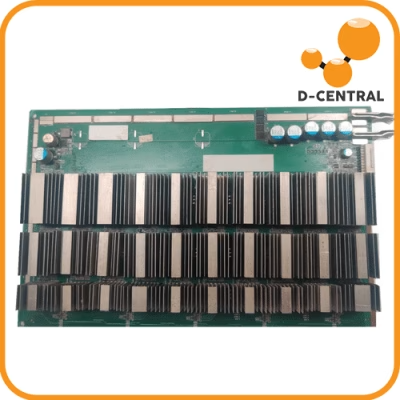
Every ASIC miner is only as strong as its hashboards. These circuit boards — packed with custom silicon, precision voltage regulators, and hundreds of solder joints — are where the actual hashing happens. When a hashboard fails, your miner does not just lose a fraction of its output. It loses an entire third (or half, depending on the model) of its hashrate overnight. For home miners running one or two machines, that is a direct hit to your sovereignty stack.
Hashboard failure is not a question of if — it is a question of when. Temperature cycling, power surges, dust accumulation, and simple age all take their toll. The real question is: when it happens, who do you trust to open up your miner and fix it?
This guide breaks down everything you need to know about hashboard repair — what goes wrong, what to look for in a repair provider, and why settling for the wrong shop can cost you more than the repair itself.
Why Hashboards Fail: The Technical Reality
Before you can evaluate a repair provider, you need to understand what actually breaks. Hashboards are not monolithic — they are complex assemblies with multiple failure modes.
| Failure Mode | Root Cause | Symptoms |
|---|---|---|
| ASIC chip failure | Thermal stress, voltage spikes, silicon defects | Missing chips in cgminer/BMMiner chain, reduced hashrate per board |
| Solder joint cracking | Repeated thermal expansion/contraction cycles | Intermittent detection, board drops offline under load |
| Voltage domain failure | Blown buck converter, shorted capacitor | Entire chip chain dead, abnormal voltage readings in test fixture |
| Temperature sensor fault | Corrosion, physical damage, connector oxidation | Miner reports 0°C or 200°C, auto-shuts down |
| EEPROM / PIC corruption | Power loss during firmware write, bit rot | Board not recognized by control board, serial number missing |
| Physical damage | Drops, improper handling, liquid exposure | Visible cracks, corrosion on traces, bent connectors |
The takeaway: hashboard repair is not one skill — it is a dozen different disciplines. Your repair provider needs to handle BGA rework, SMD soldering, voltage domain diagnosis, firmware reflashing, and functional testing under load. If they cannot do all of these, they are guessing.
What Separates a Real Repair Shop from a Parts Swapper
The Bitcoin mining repair market has a dirty secret: many so-called “repair” operations are just parts swappers. They replace the entire hashboard (at full hashboard cost) instead of diagnosing and fixing the actual fault. Others will replace a few chips, skip the full load test, and ship it back — only for it to fail again two weeks later.
Here is what genuine hashboard repair capability looks like:
1. Diagnostic Equipment That Actually Diagnoses
Real repair starts with real diagnostics. A competent shop uses purpose-built ASIC test fixtures — not just plugging the board into a working miner and hoping for the best. Test fixtures allow technicians to power individual voltage domains, read chip responses on the chain, and isolate faults to specific components. Without this, “diagnosis” is just educated guessing.
2. Component-Level Soldering Capability
Modern ASIC chips use BGA (Ball Grid Array) packaging. Replacing a BGA chip requires a rework station with precise temperature profiling — too hot and you damage adjacent components, too cold and the solder balls do not reflow properly. This is microsurgery-level work. If your repair provider cannot show you their BGA rework station, walk away.
3. Full Load Testing Before Return
A repaired hashboard that passes a bench test at idle may still fail under full mining load. Thermal stress, power draw, and sustained operation reveal issues that a quick power-on test misses entirely. A trustworthy provider runs every repaired board at full hashrate for a minimum burn-in period before declaring it fixed.
4. Model-Specific Expertise
An Antminer S9 hashboard and an Antminer S19 hashboard share almost nothing in common. Different ASIC chips, different voltage architectures, different connector layouts, different firmware protocols. A shop that claims to repair “all miners” without model-specific documentation and tooling is a red flag. You want a provider with deep expertise across specific models — and honest about which models they can and cannot service.
The True Cost of a Bad Repair
Choosing a repair provider on price alone is one of the most expensive mistakes a miner can make. Here is the math:
| Scenario | Cost | Downtime | Outcome |
|---|---|---|---|
| Cheap repair, no load test | $80–$150 | 2–4 weeks + repeat | Fails again within weeks, double shipping costs, extended downtime |
| Overseas mail-in | $50–$100 + customs | 6–12 weeks | Long transit, customs risk, no recourse if repair fails |
| Proper component-level repair | $150–$350 | 1–3 weeks | Root cause fixed, full load tested, warranty backed |
The “cheap” repair ends up costing more when you factor in double shipping, extended downtime, and the risk of cascading damage from an improperly fixed board. Every day your hashboard is out of commission, you are not stacking sats. That lost hashrate is gone forever — no one is refunding you the blocks you missed.
The D-Central Approach: Bitcoin Mining Hackers Who Fix What Others Cannot
At D-Central Technologies, ASIC repair is not a side business — it is a core discipline. Operating out of our facility in Montreal, Quebec, we have been repairing mining hardware since 2016. That is eight-plus years of hands-on experience with every generation of ASIC miner, from the earliest Antminer S7 boards to the latest S21 series.
Here is what that looks like in practice:
60+ model-specific repair capabilities. We do not treat every hashboard the same. We maintain model-specific documentation, tooling, and parts inventory for Bitmain (Antminer S9 through S21), MicroBT (Whatsminer M30/M50/M60 series), Canaan (Avalon), and Innosilicon machines. Each model has its own diagnostic procedure and known failure patterns.
Retail-focused, not institutional. Most large repair operations prioritize bulk institutional orders and treat individual miners as an afterthought. We built our repair service for the home miner — the person running one to ten machines who cannot afford to wait months or get lost in a ticket queue. Your single hashboard gets the same diagnostic attention as a pallet of fifty.
Full lifecycle support. Repair is just one piece. When you work with D-Central, you have access to mining consulting for optimizing your setup, hosting in Quebec if you want professional-grade uptime, replacement parts and hardware if a board is beyond repair, and the technical knowledge base to help you prevent the next failure.
Hashboard Troubleshooting: What You Can Check Before Shipping
Before you pack up a hashboard and ship it out for repair, there are several checks you can perform at home. Some “failures” turn out to be connection issues or firmware glitches that do not require professional repair at all.
Check the ribbon cable and connectors. Hashboards connect to the control board via ribbon cables (flat flex cables). A loose, oxidized, or damaged connector is one of the most common causes of “dead board” symptoms. Reseat the cable firmly, inspect for bent pins, and clean oxidized contacts with isopropyl alcohol.
Verify your power supply. An underpowered or failing PSU can cause hashboard detection failures. If you are running an Antminer, ensure your APW power supply is delivering stable voltage on all rails. A multimeter check at the 6-pin connector should show 12V within a tight tolerance. Voltage sag under load is a PSU problem, not a hashboard problem.
Check firmware and control board. Sometimes the issue is the control board, not the hashboard. Try swapping the suspect hashboard to a different slot. If it works in another position, the problem may be the control board connector or a firmware configuration issue. Flash the latest stable firmware from the manufacturer before assuming hardware failure.
Inspect for physical damage. Look for obvious signs: burned components (discolored or bubbled), cracked solder joints (visible under a magnifying glass), liquid damage residue, or bent heatsink mounting hardware. Document what you find with photos — any competent repair provider will want to see these before you ship.
Read your miner logs. The kernel log and cgminer/BMMiner output contain specific error codes that point to the fault location. Chain detection failures, voltage errors, and temperature anomalies all have specific log signatures. Capture these logs and include them with your repair request — they save diagnostic time and get your board fixed faster.
Choosing the Right Provider: The Checklist
When evaluating hashboard repair providers, cut through the marketing and focus on these concrete factors:
| Factor | What to Look For | Red Flag |
|---|---|---|
| Diagnostic process | Test fixtures, chip-level fault isolation | “We plug it in and see what happens” |
| Soldering capability | BGA rework station, hot air, reflow profiles | Only hand soldering iron, no microscope |
| Testing protocol | Full hashrate burn-in for 24–72 hours | Quick power-on test only |
| Model coverage | Documented per-model procedures and parts | “We fix everything” with no specifics |
| Warranty | Written warranty on parts and labor | No warranty or vague “we will take a look” |
| Communication | Detailed diagnosis report before repair starts | Radio silence after receiving your board |
| Location | Same country (avoids customs delays and risk) | Ship overseas to save $30 |
| Track record | Years in business, verifiable repair volume | New operation with no history |
Why Canadian Miners Have a Repair Advantage
If you are mining in Canada, you already have a natural advantage when it comes to repair logistics. Shipping a hashboard within Canada means no customs declarations, no import duties, no risk of your hardware sitting in a border warehouse for weeks. Transit times from most Canadian cities to a domestic repair facility are measured in days, not weeks.
Canada also has lower ambient temperatures for most of the year, which is excellent for mining — but it means your equipment may experience wider thermal cycling ranges if your setup is not climate-controlled. A Canadian repair provider understands these conditions because they live and work in them. They have seen the specific failure patterns that cold-climate mining produces: condensation damage from temperature swings, thermal paste degradation in unheated garages, and connector corrosion from humidity.
For miners using their ASICs as Bitcoin space heaters — dual-purposing their mining hardware for home heating — maintenance becomes even more critical. These machines run continuously through heating season, often in residential environments that are dustier than a purpose-built mining facility. Regular maintenance and access to fast, competent repair when needed is what keeps your heating-and-mining setup running all winter.
Preventive Maintenance: Extend Your Hashboard Lifespan
The best repair is the one you never need. Here are the maintenance practices that keep hashboards running longer:
Clean your miners regularly. Dust buildup on heatsinks and fans reduces cooling efficiency and causes hotspots. Compressed air every 1-3 months (depending on your environment) makes a measurable difference. For dusty environments, consider intake filters.
Monitor temperatures continuously. Set up monitoring that alerts you when chip temperatures exceed normal operating ranges. Catching an overheating event in minutes instead of hours can be the difference between a minor fix and a dead chip chain.
Use quality power supplies. Cheap or undersized PSUs are a leading cause of hashboard damage. Voltage ripple, sag under load, and inadequate protection circuits all stress hashboard components. Use manufacturer-recommended PSUs or equivalents with proper ratings.
Control your environment. Stable temperature and humidity reduce thermal cycling stress on solder joints. If you are mining in a garage or shed, consider basic insulation and a dehumidifier. The investment pays for itself in extended hardware life.
Keep firmware updated. Manufacturers release firmware updates that improve voltage regulation, fan control algorithms, and chip protection thresholds. Running outdated firmware means missing out on protections that could prevent hashboard damage.
When Repair Is Not Worth It
Honesty matters. Not every hashboard is worth repairing. A trustworthy repair provider will tell you when repair costs approach or exceed replacement cost, when damage is too extensive for reliable repair, or when the miner model is old enough that the economics do not justify the investment.
For older models like the Antminer S9, individual hashboard repair may not make economic sense at current difficulty levels unless you are running them as space heaters where the heat output is the primary value. If you are looking at alternatives, open-source solo miners like the Bitaxe offer a completely different approach — low power, silent operation, and the thrill of solo mining without the maintenance burden of full-scale ASICs. A good provider gives you the diagnosis, the estimated repair cost, and an honest recommendation — even if that recommendation is “do not repair this one.”
The Bottom Line
Your hashboards are the engine of your mining operation. When they fail, the provider you choose to repair them determines whether you are back online in days or stuck in a cycle of failed repairs and lost hashrate.
Do not choose on price alone. Look for component-level diagnostic capability, model-specific expertise, full load testing, and a warranty that backs the work. And if you are in Canada, keep it domestic — the logistics advantage alone is worth it.
D-Central Technologies has been repairing ASIC mining hardware since 2016. With 60+ model-specific repair capabilities, a retail-focused approach that treats every home miner’s single board with full diagnostic attention, and a facility in Montreal, Quebec built for this exact work — we are here when your hashboards need us. Get your repair started or browse replacement parts if you prefer to fix it yourself.
Every hash counts. Keep yours running.
Frequently Asked Questions
How do I know if my hashboard needs professional repair or if it is a simpler issue?
Start by checking the basics: reseat ribbon cables, verify PSU voltage with a multimeter, try the board in a different slot, and read your miner logs for specific error codes. If the board still fails detection or shows missing chips in the chain after these checks, it likely needs component-level repair. Physical signs like burned components, corrosion, or cracked solder joints also indicate professional repair is needed.
How long does a typical hashboard repair take?
At a competent repair facility, expect 1 to 3 weeks from receipt to return shipment. This includes intake inspection, diagnostic testing on a test fixture, component-level repair, and a full-load burn-in test before shipping. Beware of providers promising 24-48 hour turnarounds — either they are skipping the burn-in test or they are just swapping boards, not actually repairing yours.
What is the difference between chip replacement and full hashboard repair?
Chip replacement addresses only one failure mode — a dead ASIC chip. Full hashboard repair includes diagnosing all fault types: voltage domain issues, capacitor failures, temperature sensor faults, EEPROM corruption, and solder joint degradation. A provider that only does chip swaps will miss underlying issues that cause the replacement chip to fail again.
Is it worth repairing hashboards on older miners like the Antminer S9?
It depends on your use case. At current Bitcoin network difficulty (~800+ EH/s), an S9 is not competitive for pure profit mining. However, if you are running S9s as Bitcoin space heaters — where the heat is the primary output and sats are a bonus — then repair can absolutely make sense, especially if the repair cost is significantly less than a replacement board. A trustworthy provider will give you an honest cost-benefit assessment.
Should I ship my hashboard internationally for cheaper repair?
Generally, no. International shipping adds 4 to 8 weeks of transit time, exposes your hardware to customs delays and potential duties, and leaves you with limited recourse if the repair fails. The $30-50 you save on the repair itself is typically dwarfed by shipping costs, customs fees, and the value of lost hashrate during extended downtime. Choose a domestic provider whenever possible.
What warranty should I expect on a hashboard repair?
A reputable repair provider should offer a written warranty covering both parts and labor, typically 30 to 90 days. The warranty should specify what is covered (the specific repair performed), what voids it (physical damage, unauthorized modification), and the process for warranty claims. No warranty at all is a dealbreaker — it means the provider does not stand behind their work.
Can I repair a hashboard myself?
Basic maintenance (cleaning, connector reseating, thermal paste replacement) is absolutely DIY-friendly. However, component-level repair — replacing BGA ASIC chips, diagnosing voltage domains, reflowing solder joints — requires specialized equipment (BGA rework station, microscope, test fixture) and significant practice. If you are interested in learning, start with simpler boards and non-critical hardware. For production miners that need to be back online quickly, professional repair is the pragmatic choice.
How can I prevent hashboard failures in the first place?
The top preventive measures are: clean your miners every 1-3 months with compressed air, monitor chip temperatures continuously and act on alerts immediately, use properly rated power supplies (never undersize your PSU), control your mining environment for stable temperature and humidity, and keep firmware updated for the latest protection algorithms. These practices significantly extend hashboard lifespan.