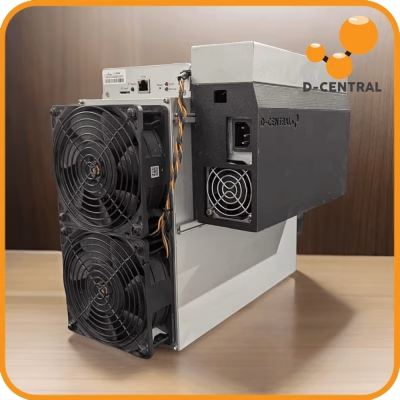
Air cooling has served Bitcoin miners for over a decade, but it was never the endgame. Fans clog with dust. Heatsinks lose efficiency. Noise drives your household to madness. For AvalonMiner operators running the 1066, 1246, or 1346, the stock cooling solution is the single biggest bottleneck between you and peak hashrate.
Hydro cooling — replacing the OEM fan-and-heatsink assembly with a liquid-cooled plate — eliminates every one of those constraints. Lower junction temperatures, near-silent operation, extended ASIC chip lifespan, and stable hashrate output around the clock. This is not some exotic datacenter fantasy. This is a practical upgrade any home miner can execute on the workbench.
D-Central Technologies has been converting AvalonMiners to hydro cooling since these machines first hit the market. We have handled hundreds of A10, A11, and A12 series hashboard upgrades, and this guide distills everything we have learned into a single, actionable resource.
Why Air Cooling Falls Short on AvalonMiners
The AvalonMiner 1066 (16nm), 1246 (12nm), and 1346 (7nm) each pushed Canaan’s chip architecture further, but every generation shipped with the same fundamental cooling approach: aluminum heatsinks bolted to the hashboard, with axial fans blowing ambient air across the fins.
This design has three critical failure modes for home miners:
Thermal throttling. When ambient temperature climbs above 25-30 degrees Celsius — easily reached in a garage, basement, or spare room — the stock heatsinks cannot dissipate heat fast enough. The control board throttles frequency to protect the chips, and your hashrate drops.
Dust ingestion. Fans pull air through the machine continuously. That air carries dust, pet hair, pollen, and moisture. Over months, dust coats the heatsink fins, acts as an insulator, and accelerates thermal throttling. We see this constantly in our ASIC repair shop — machines that ran perfectly for six months, then slowly degraded because nobody cleaned the heatsinks.
Noise. AvalonMiners at full speed push 75+ dB. That is louder than a vacuum cleaner running non-stop in your home. For anyone mining in a living space, this is a dealbreaker without mitigation.
Hydro cooling addresses all three problems simultaneously, and it does so with physics that are simply superior to forced air convection.
How the Avalon Hydro Cooling Plate Works
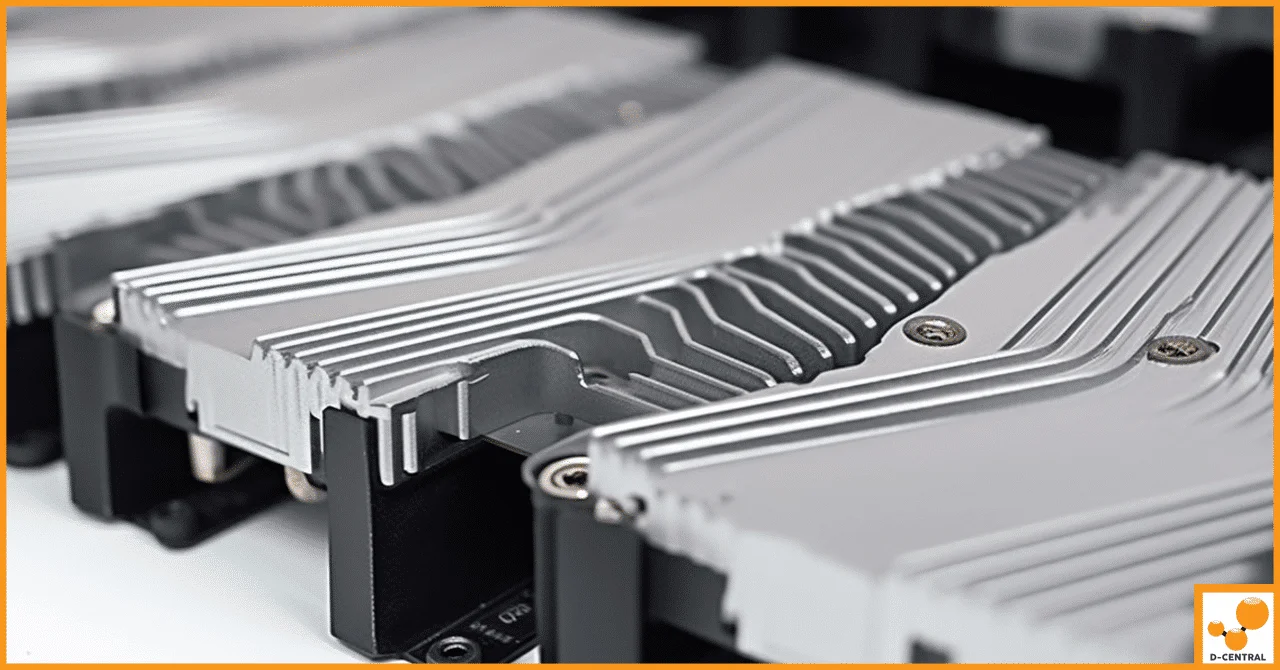
The hydro upgrade replaces the OEM heatsink on each hashboard with a custom-machined aluminum alloy cold plate. Coolant — typically distilled water or a water-glycol mix — circulates through internal channels machined into the plate, absorbing heat directly from the ASIC chips through a thin layer of thermal paste.
The key engineering details that matter:
| Feature | Detail |
|---|---|
| Material | 6063 aluminum alloy — excellent thermal conductivity (200+ W/mK), corrosion-resistant |
| Manufacturing | Laser-cut and welded channels — high precision, airtight seals, zero leak risk when properly assembled |
| Channel Design | Extended serpentine water channels — maximizes contact time between coolant and hot surface |
| Compatibility | AvalonMiner 1066 (A10), 1246 (A11), 1346 (A12) hashboards |
| Dust Protection | Sealed liquid loop — no airflow over chips means zero dust ingestion |
| Installation | Drop-in replacement for OEM heatsink — same mounting holes, same screw pattern |
Water has roughly 25 times the heat capacity of air. That single physical fact is why liquid cooling dominates every high-performance computing application on the planet — from gaming GPUs to datacenter servers to, yes, ASIC miners.
Performance Gains: Air vs. Hydro Cooling
The numbers tell the story. Here is what we consistently observe across AvalonMiner conversions in our shop:
| Metric | Stock Air Cooling | Hydro Cooling Plate |
|---|---|---|
| Chip Junction Temperature | 75-90°C (throttles above 85°C) | 50-65°C (well below throttle threshold) |
| Noise Level | 75-80 dB (industrial fan noise) | 30-40 dB (pump + radiator fans only) |
| Hashrate Stability | Fluctuates with ambient temp | Rock-solid — coolant temp buffered |
| Dust Accumulation | Significant — requires monthly cleaning | Zero — sealed liquid loop |
| Expected Chip Lifespan | 3-5 years (thermal cycling stress) | 5-8+ years (stable low temps) |
| Home Mining Viability | Noise makes indoor placement difficult | Quiet enough for basement or utility room |
The 20-30 degree Celsius drop in junction temperature is the headline number. Cooler chips hash more consistently, consume marginally less power at the same frequency, and degrade far more slowly. For a home miner running a machine 24/7/365, that translates directly into more sats stacked over the lifetime of the hardware.
Step-by-Step: Converting Your AvalonMiner to Hydro Cooling
This is a workbench project that takes 2-4 hours depending on your experience. Here is the full process.
What You Need
| Item | Notes |
|---|---|
| Avalon hydro cooling plate | Matched to your specific model (A10/A11/A12) |
| Water pump (DC 12V, 800+ L/h) | Submersible or inline — must provide adequate flow rate |
| Radiator (240mm or 360mm) | Larger radiator = lower coolant temps = better performance |
| Reservoir / water tank | 1-2 litre capacity, placed near pump |
| Tubing and fittings | Match barb size to cooling plate ports (typically 8-10mm ID) |
| Distilled water or premixed coolant | Never use tap water — mineral deposits will clog channels |
| High-quality thermal paste | Apply fresh paste between chips and cold plate |
| Phillips screwdriver, wrench set | Basic hand tools for disassembly and reassembly |
| Isopropyl alcohol (99%) | For cleaning old thermal paste off chips |
The Conversion Process
1. Power down and disassemble. Disconnect all power. Remove the AvalonMiner’s outer casing and carefully detach the stock heatsink and fans from each hashboard. Take photos as you go — these will be your reassembly reference.
2. Clean the ASIC chips. Use isopropyl alcohol and a lint-free cloth to remove all old thermal paste from the chip surfaces. Inspect for any physical damage while the board is exposed. If you spot cracked chips or burnt components, that hashboard needs professional repair before proceeding.
3. Apply fresh thermal paste. Apply a thin, even layer of high-quality thermal paste to each ASIC chip. Avoid excess — too much paste actually insulates rather than conducts. A rice-grain-sized amount per chip, spread evenly, is the target.
4. Mount the hydro cooling plate. Align the cold plate over the hashboard using the original mounting holes. Fasten screws in a cross pattern (like tightening lug nuts) to ensure even pressure across all chips. Uneven pressure means uneven thermal contact, which means hot spots.
5. Connect the liquid loop. Attach tubing from the pump to the cold plate inlet, and from the cold plate outlet to the radiator, then back to the reservoir. Ensure all fittings are tight. Fill the reservoir with distilled water or premixed coolant.
6. Leak test before powering on. This is critical. Run the pump for 15-30 minutes with the miner unpowered. Inspect every fitting, every joint, every connection point. A single drip will destroy a hashboard. If you find a leak, fix it and restart the test from zero.
7. Power up and monitor. Once the loop is confirmed leak-free, connect your AvalonMiner to its power supply and controller. Monitor chip temperatures through the Avalon management interface for the first 24 hours. You should see junction temperatures settle 20-30 degrees Celsius below what you saw on air.
Maintenance: Keeping Your Hydro Loop Running
A hydro cooling system is not set-and-forget. It requires periodic maintenance — but far less effort than constantly cleaning dust-clogged heatsinks.
Coolant replacement (every 6-12 months). Distilled water degrades over time as it absorbs CO2 and develops microbial growth. Premixed coolants with biocide additives last longer. Drain, flush, and refill the loop on a regular schedule.
Visual leak checks (monthly). A quick visual inspection of all fittings and tubing connections takes two minutes and can prevent a catastrophic failure. Look for discoloration, swelling, or moisture at connection points.
Radiator fan cleaning (every 3-6 months). Your radiator fans are the only air-moving components in the system. Keep them dust-free for optimal heat rejection.
Pump health check (every 6 months). Listen for unusual noise — rattling or grinding indicates bearing wear. A dead pump means zero coolant flow, which means overheating within minutes. Keep a spare pump on hand.
D-Central’s Hydro Upgrade Service for AvalonMiners
Not every home miner wants to build a liquid loop from scratch. That is why D-Central offers a professional hydro-heatsink upgrade service for Canaan AvalonMiner A10, A11, and A12 series hashboards.
Here is what the service includes:
| Detail | Specification |
|---|---|
| Compatible Models | AvalonMiner 1066, 1246, 1346 (A10/A11/A12 series) |
| Price Range | $200 – $325 per hashboard |
| What Is Included | OEM heatsink removal, chip cleaning, thermal paste application, hydro plate installation, leak testing |
| Additional Diagnostics | Full hashboard health check included — we flag any chip or component issues before reassembly |
| Location | D-Central repair facility, Montreal, Quebec, Canada |
We handle AvalonMiner repairs across Canada and offer cross-border ASIC repair service for U.S. customers as well. Whether you need a hydro conversion, a hashboard repair, or a full diagnostic, our technicians have the tools and experience to get your machine running at its best.
Is Hydro Cooling Worth It for Home Miners?
The honest answer: it depends on your situation.
Hydro cooling makes strong economic sense if you are running your AvalonMiner in a living space where noise is a constraint, in a warm climate where ambient temperatures push air-cooled machines into thermal throttling, or if you plan to run the hardware for 3+ years and want to maximize its productive lifespan.
The upfront cost — whether you build the loop yourself or use our upgrade service — pays for itself through reduced thermal degradation, more consistent hashrate, and a machine that can actually coexist with humans in a home environment.
For miners running machines in a dedicated, climate-controlled space with proper ventilation, air cooling may still be adequate. But even in those setups, the noise reduction and lifespan benefits of hydro cooling are compelling.
If you are interested in other cooling approaches, our guide on immersion cooling for home Bitcoin miners covers full submersion setups, and our Whatsminer hydro heatsink guide covers the same upgrade path for MicroBT hardware.
The bottom line: every degree Celsius you shave off your ASIC chips is more uptime, more hashes, and more sats in your wallet. Hydro cooling is one of the most impactful upgrades a home miner can make — and for AvalonMiner operators, the path is well-proven.
Frequently Asked Questions
Which AvalonMiner models are compatible with hydro cooling plates?
The hydro cooling plates are designed for the AvalonMiner 1066 (A10 series, 16nm), AvalonMiner 1246 (A11 series, 12nm), and AvalonMiner 1346 (A12 series, 7nm). Each model uses a plate matched to its specific hashboard layout and chip placement. Make sure you order the correct plate for your model.
How much does it cost to convert an AvalonMiner to hydro cooling?
A DIY conversion typically costs $150-300 in parts (cooling plate, pump, radiator, tubing, fittings, coolant). D-Central’s professional upgrade service runs $200-325 per hashboard, which includes full disassembly, chip cleaning, thermal paste application, hydro plate installation, and leak testing. Most AvalonMiners have 3 hashboards, so budget accordingly for a full machine conversion.
Can I use tap water in my hydro cooling loop?
No. Never use tap water. Minerals, chlorine, and other dissolved solids in tap water will deposit inside the cooling channels over time, restricting flow and reducing cooling efficiency. Always use distilled water or a premixed PC coolant with biocide and corrosion inhibitors. This is a non-negotiable requirement for any liquid cooling system.
How loud is a hydro-cooled AvalonMiner compared to stock air cooling?
Stock air-cooled AvalonMiners run at 75-80 dB — comparable to a vacuum cleaner. A hydro-cooled setup with a quality pump and radiator fans typically runs at 30-40 dB, which is roughly the level of a quiet conversation. That is a dramatic reduction that makes home mining in living spaces actually practical.
How often does the coolant need to be replaced?
Plan to drain, flush, and refill your cooling loop every 6-12 months. Distilled water degrades faster (6 months) while premixed coolants with biocide can last up to 12 months. Set a calendar reminder — neglecting coolant maintenance is the most common cause of hydro cooling failures.
What happens if a leak occurs while the miner is running?
A leak while the miner is powered on can cause a short circuit that permanently damages the hashboard. This is why the leak test before first power-on is absolutely critical. Run the pump for at least 15-30 minutes with the miner unpowered, inspecting every connection. During normal operation, monthly visual inspections catch developing issues before they become catastrophic. Keeping paper towels under the fittings during the first week of operation is a simple precaution that can save expensive hardware.
Does D-Central offer hydro cooling upgrades for non-Avalon ASIC miners?
Yes. D-Central offers hydro heatsink upgrades for multiple ASIC platforms including Antminer S19 series and Whatsminer models. Contact our repair team for pricing and availability on your specific hardware. We also offer full immersion cooling consulting for miners looking to go beyond plate-based hydro cooling.