Ask ten miners what shroud fits an Antminer and you will get ten answers, because “Antminer” is not one machine. Bitmain has changed the exhaust-fan layout three times between the S9 and the S21 Pro, and a shroud built for one layout does nothing useful on the next. The S9 pushes air out through a single 120 mm fan. The S17 moved to a dual-120 exhaust face. The S19 kept dual-120 and standardized the geometry that most of the aftermarket now designs around. The S21 standard kept it again — and then the S21 Pro switched to dual 140 mm fans and quietly broke compatibility with everything before it.
This guide is the model-by-model fitment map. Not what a shroud is or why you want one — our refreshed complete shroud guide covers that, and our 6-inch vs 8-inch duct guide covers sizing. This one answers a narrower question: you own a specific Antminer, so which shroud in the D-Central Shroud System actually matches the fans on the back of it, and which mount style should you pick. We have handled every one of these generations across thousands of repairs at our shop in Montreal, Quebec, and the fitment differences below are exactly the ones that cause returns when they get ignored.
The One Question That Decides Everything: What Is on the Exhaust Face?
Every Antminer since the S9 moves air front to back: intake fans pull cool air in, the hashboards heat it, exhaust fans throw it out. A shroud mounts on the exhaust face, so the exhaust face defines the fitment. Here is the whole family at a glance:
| Model | Exhaust fan layout | Fitment geometry | Matching shroud |
|---|---|---|---|
| Antminer S9 / S9i / S9j | Single 120 mm | Fan-housing end of the case, roughly 135 × 158 mm panel | S9 housing-wrap shroud to 6″ |
| Antminer S17 / S17 Pro / T17 | Dual 120 mm (two more on intake) | Full fan-panel end, roughly 298 × 178 mm | S17 full housing wrap to 6″ |
| Antminer S19 / S19j Pro / S19 XP | Dual 120 mm | 120.0 mm fan pitch, 105 mm screw square | Dual-120 to 6″ or to 8″ |
| Antminer S21 (standard) | Dual 120 mm | Same dual-120 face as the S19 series | Same dual-120 shrouds as the S19 |
| Antminer S21 Pro | Dual 140 mm | Larger fans, wider face — not S19-compatible | S21 Pro dual-140 to 6″ |
Two traps hide in that table. First, the S21 standard and the S21 Pro are different animals: the standard keeps the dual-120 face, the Pro runs dual 140 mm fans. Second, the S21 XP and the S21+ sit with the Pro rather than with the standard: all three carry a 140 mm exhaust pair on one shared face, so the S21 Pro dual-140 body is the part for them too.
Antminer S9: One Fan, One Wrap
The S9 is the simplest fitment in the lineup and still one of the most common machines we see — as a heater, a starter miner, or a workhorse that refuses to die. One 120 mm exhaust fan sits in a compact fan-housing end roughly 135 × 158 mm.
Our S9 shroud takes the housing-wrap approach: it slides over the whole fan-housing end of the case and converts it to a 6-inch duct collar, rather than bolting to the fan’s screw holes. On a machine this age that matters — S9 fan screws have often been in and out a dozen times, and a wrap does not care about the state of the threads. One 120 mm fan into a 6-inch duct is also a comfortable pairing; this is not a machine that needs 8-inch ducting for a typical home run.
Antminer S17 and T17: Four Fans, One Wrap
The 17 series runs four 120 mm fans — two intake, two exhaust — so the exhaust face is a dual-120 panel on a case noticeably different from the S19 that followed it. The 17-series case geometry never became the aftermarket standard the way the S19’s did, which is why we build its shroud differently.
The S17 full housing wrap slides over the entire fan-panel end of the chassis — roughly 298 × 178 mm — and seals the whole face into a single 6-inch collar. No fan screws involved: the wrap grips the case end with a close slide-on fit, and we recommend a strap or a run of foil tape as belt-and-suspenders.
Antminer S19 Family: The Standard Everything Else Is Measured Against
The S19, S19j Pro, and S19 XP share the exhaust geometry that defines the modern aftermarket: two 120 mm fans side by side at a 120.0 mm fan pitch, each on the standard 105 mm screw square. If you own any S19 variant, you have the widest choice in the catalog, because this face is what most of our dual-120 family is built around.
The core choice: fan-face mount or full wrap
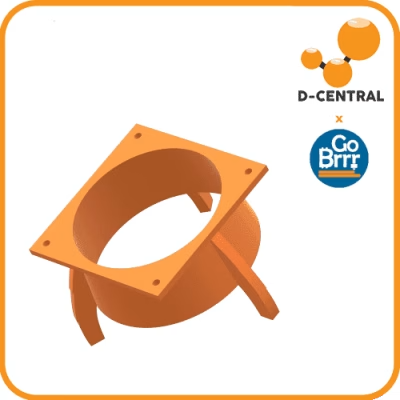
The dual-120 to 6-inch shroud is the standard answer: a one-piece funnel that bolts to both exhaust fans’ own screw positions and converges them into one 6-inch collar. Its 8-inch sibling is the pick for long duct runs and shared plenums — the sizing guide walks through when the bigger duct earns its cost. Use long M4 screws with proper flat washers (or the miner’s own large-head fan screws); the flange slots are sized for exactly that hardware.
The alternative is the S19 full housing wrap, which slides over the entire fan-panel end of the case — the same philosophy as the S17 wrap. Pick the wrap when you do not want to touch the fan screws at all, when the fan grilles are damaged, or when you want a full-panel seal on a machine headed into a rack. Pick the fan-face mount when you want the lighter, cheaper part with a positive bolted connection.
Mount-style variants on the same dual-120 face
Because the S19 face is standardized, we build it in more flavours than any other fitment. All of these share the same flange, screw pattern, and 6-inch collar — they differ in how the duct side behaves:
- Venturi — a contoured bell inside the plenum replaces the abrupt step above the fans. A gradual bell entry lets air turn into the collar instead of separating off a square step, which is why bellmouth entries are standard practice wherever a duct meets a plenum.
- Offset side-exit — the collar sits off the fan centreline, for racks where a centred duct would hit a shelf, a wall, or the next machine over.
- Bayonet quick-release — a twist-lock duct end for operators who pull ducts off frequently for maintenance or seasonal reconfiguration. It mates with its matching receiver, not with bare duct, so buy the pair.
- Tuned-notch silencer — an expansion chamber with a quarter-wave branch on the same mount interface. The chamber volume and the branch length do the work, with no lining to shed fibres into the airstream; the full story is in our silencer guide.
Antminer S21 and S21 Pro: Read the Nameplate Twice
The S21 standard is the easy case — its dual-120 exhaust face carries the same 120.0 mm pitch and 105 mm screw square as the S19 series, so every dual-120 shroud, mount variant, and silencer above fits it identically.
The S21 Pro is where people get burned. Bitmain moved it to two 140 mm exhaust fans, which means a wider face, a different screw pattern, and zero compatibility with dual-120 shrouds. The S21 Pro dual-140 shroud is built for that face specifically. One geometry fact worth knowing before you buy: two 140 mm fans discharge through a lot more area than a 6-inch collar presents, so a 6-inch exit on a dual-140 machine is a genuine contraction. For long runs on an S21 Pro, weigh the 8-inch path in the duct sizing guide before defaulting to 6-inch.
And the dual-140 body is not the Pro’s alone. The S21 Pro, the S21+ and the S21 XP all carry a 140 mm exhaust pair on one shared face, so the Pro body is the part for all three. The Hydro has no fan face at all, and no shroud applies to it.
Not an Antminer?
Whatsminer’s M30S/M50 family exposes bare 140 mm fan flanges and gets its own 140 mm to 6-inch adapter — the full fitment story is in our Whatsminer ducting guide. Avalon’s stacked vertical fans are a different geometry again, covered in the Avalon cooling guide. Everything downstream of the shroud — duct, elbows, the window exit, intake filtering — is shared across all brands.
Slotted Flanges, and Why the Designs Are Open
Bitmain fan panels carry manufacturing spread. A reference S19 gasket on our bench measures a screw pattern of 105.4 × 121.0 mm where the nominal pattern is 105.0 × 120.0 mm — a few tenths of a millimetre, and enough to bind a round hole. That is why every flange in the system uses slots instead of round holes: the screws land wherever your panel puts them, and the shroud still pulls flat against the face. The collars are treated the same way, sized to nominal duct dimensions rather than to one supplier’s tubing.
The whole system is open for the same reason. Every shroud in the D-Central Shroud System ships its design as a free STL under CC BY-SA 4.0 in our 3D models library — proudly, not grudgingly. If you own a printer, print it, run it, and modify it for whatever your rack actually needs. If you would rather have the finished part, we print to order in PETG in Montreal, Quebec, in black or D-Central orange.
Frequently Asked Questions
Which shroud fits an Antminer S19?
Any of our dual-120 shrouds: the S19 series carries two 120 mm exhaust fans at a 120.0 mm fan pitch on 105 mm screw squares. The standard choice is the dual-120 to 6-inch shroud, with an 8-inch version for long duct runs, a full housing wrap if you prefer not to use the fan screws, and venturi, offset, bayonet, and silencer variants on the same mount.
Do S19 shrouds fit the Antminer S21?
On the S21 standard, yes — it kept the same dual-120 exhaust face as the S19 series, so all dual-120 shrouds and variants fit identically. On the S21 Pro, no: it carries two 140 mm exhaust fans and takes the dedicated S21 Pro dual-140 body. The S21+ and the S21 XP share that same 140 mm face, so the Pro body is their part as well. The Hydro has no fan face and no shroud applies to it.
What shroud does an Antminer S9 need?
The S9 has a single 120 mm exhaust fan in a compact fan-housing end. Our S9 shroud slides over that whole housing end and converts it to a 6-inch duct collar, rather than bolting to the fan screws — which is kinder to a machine whose screws have usually seen years of service. One 120 mm fan into 6-inch duct is a comfortable pairing for typical home runs.
What is the difference between a fan-face shroud and a housing wrap?
A fan-face shroud bolts to the exhaust fans’ own screw positions and funnels them into a duct collar — lighter, cheaper, and positively fastened. A housing wrap slides over the entire fan-panel end of the case and seals the whole face without touching the fan screws — the pick for damaged grilles, worn threads, or a full-panel seal in a rack. We build wraps for the S9, S17, and S19, and fan-face shrouds for the dual-120 and dual-140 faces.
Can I print a D-Central shroud myself?
Yes — proudly so. Every design in the D-Central Shroud System is published as a free STL under CC BY-SA 4.0 in our 3D models library. Print it, run it, and modify it if your setup needs something different. If you would rather not print, we print to order in Montreal, Quebec.