
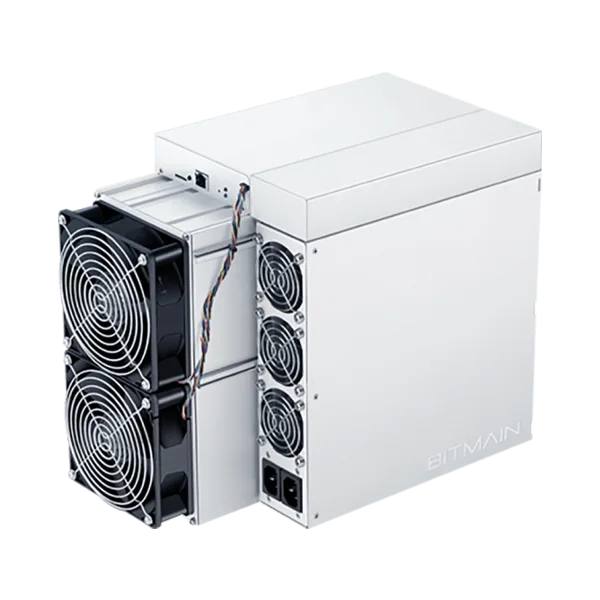
Bitmain Antminer K7 version 240-K two-bin Eaglesong reference
Official Antminer K7 version 240-K Eaglesong reference covering 58 and 63.5 TH/s bins, dual-input electrical sequencing, APW121417b boundaries, firmware and diagnostics.
Quick answer
The Bitmain Antminer K7 version 240-K two-bin Eaglesong reference is a Eaglesong miner rated about 58-63.5 TH/s at roughly 2,813 W.
Full Specifications
| Model | Bitmain Antminer K7 version 240-K two-bin Eaglesong reference |
|---|---|
| Model Number | Antminer K7 version 240-K |
| Manufacturer | Bitmain |
| Algorithm | Eaglesong |
| Hashrate | 58-63.5 TH/s |
| Power Consumption | 2,813-3,080 W |
| Cooling | Air |
| Voltage Range | 200-240 V AC; 47-63 Hz; 20 A maximum across two required AC inputs |
| Operating Temperature | 0 C to 40 C |
| Dimensions | 430 x 195.5 x 290 mm |
| Weight | 16.1 kg net |
| Interface | RJ45 Ethernet 10/100M |
| Status | OEM support reference |
Definitive two-bin OEM reference: Antminer K7 version 240-K is an Eaglesong miner. Bitmain’s K7 manual publishes exact 58 TH/s and 63.5 TH/s lanes. Hashrate and efficiency below are specific to Eaglesong and must not be compared across algorithms.
| OEM model | Algorithm | Hashrate | Wall power at 25°C | Wall efficiency at 25°C |
|---|---|---|---|---|
| K7-58T, version 240-K | Eaglesong | 58 TH/s ±3% | 2,813 W ±10% | 48.5 J/TH ±10% on Eaglesong |
| K7-63.5T, version 240-K | Eaglesong | 63.5 TH/s ±3% | 3,080 W ±10% | 48.5 J/TH ±10% on Eaglesong |
The K7-63.5T manual identifies a fixed 665 MHz frequency. No frequency is asserted here for K7-58T.
Mandatory dual-inlet electrical preflight
| PSU | APW12 is part of the K7 server |
|---|---|
| Exact compatible PSU listing | APW121417b, in Bitmain’s 12–17 V APW12 class |
| AC input voltage | 200–240 V AC |
| AC input frequency | 47–63 Hz |
| Maximum AC input current | 20 A total under the stated maximum condition: 40°C and 0 m altitude |
| Power inputs | Two AC inputs; two input wires at 10 A each |
| Power cords | Two additional cords are required; the reviewed manual does not publish their connector or cord type |
| Network | RJ45 Ethernet 10/100M |
Both power inputs must be connected simultaneously for the K7 to operate normally. When powering the server off, disconnect both inputs. Wrong input voltage can damage the server. The equipment must connect to an earthed mains socket-outlet installed near the equipment and readily accessible.
This is high-power equipment requiring a qualified installation. Before energizing it, verify the exact K7 and APW121417b nameplates, both PSU inlets, cords and connectors, supply voltage and frequency, circuit capacity, continuous-load treatment, protection, conductors, disconnecting means, grounding, and applicable local requirements. A PSU appearing in Bitmain’s compatibility table does not establish interchangeability with another APW12 version, miner, connector, or cord.
Cooling, physical, and environmental boundaries
| Fans | 4 × 12038; front and rear 6,000 RPM; 12 V / 2.7 A; 320 CFM mid airflow |
|---|---|
| Server dimensions | 430 × 195.5 × 290 mm, including PSU |
| Packaged dimensions | 570 × 316 × 430 mm |
| Net weight | 16.1 kg, including PSU |
| Gross weight | 17.7 kg |
| Operating temperature | 0–40°C |
| Storage temperature | -20–70°C |
| Operating humidity | 10–90% RH, non-condensing |
| Operating altitude | Up to 2,000 m |
From 900 m to 2,000 m, reduce the highest permitted operating temperature by 1°C for every 300 m increase in altitude. The K7 manual states that K7-63.5T firmware stops when outlet temperature reaches 95°C and reports an overtemperature error. This threshold is not extended to K7-58T without exact evidence.
Firmware, recovery, and diagnostics
- Photograph the complete K7, PSU, inlet, cord, and installed-board labels; record the exact bin, serial, revisions, and current firmware version.
- Use the manufacturer’s official firmware selector and select K7. Read the complete package description and stop if it does not explicitly match the installed unit and revision.
- Follow the official K7 support hub and K7 Server Manual v2.0 for setup, firmware, reset, and operating procedures.
- Keep the K7 powered throughout a firmware upgrade. Bitmain warns that loss of power before completion may require returning the server for repair.
- For power, zero-hashrate, fan, temperature, control-board, hashboard-signal, or network symptoms, start with Bitmain’s ANTMINER failure diagnostic guide. Do not swap parts or flash unrelated images based only on a similar symptom.
Repair and symptom routing
- Use the ASIC fault finder to organize symptoms, logs, and the next diagnostic step.
- Request ASIC repair diagnosis and include exact K7, bin, PSU, inlet, cord, and installed-board labels; photos; kernel logs; symptoms; and prior firmware actions.
Evidence boundaries: no sound level, ASIC identity or count, fabrication process, control-board identity, board or chain count, voltage-domain architecture, third-party firmware support, tuning range, residential suitability, heat-reuse recommendation, profitability or other economics, release date, or cross-model firmware, control-board, hashboard, PSU, cord, connector, fan, chassis, or parts compatibility is asserted. No nonexistent model-specific local firmware or repair URL is used, and no cross-algorithm comparison is made.
Primary sources: Bitmain’s K7 Server Manual v2.0, K7 web specification, fan table, and current PSU compatibility table. Reviewed August 28, 2026.