Stock firmware on your Antminer S19 is a cage. Bitmain ships every unit locked to factory-defined clock speeds, power limits, and thermal profiles — settings designed to protect the manufacturer’s warranty obligations, not to maximize your hashrate per watt. For years, home miners have fought these restrictions by flashing third-party firmware and swapping control boards with varying degrees of success. The Braiins BCB 100 Control Board changes that equation entirely: a purpose-built, drop-in replacement board that ships with Braiins OS+ pre-installed, turning your S19 series miner from a locked-down appliance into a fully tunable hashing machine.
At D-Central Technologies, we have been working with Braiins products since our early days. As Canada’s Bitcoin Mining Hackers — taking institutional-grade ASIC technology and adapting it for home miners — we see the BCB 100 as a natural extension of the open-firmware philosophy that drives everything we do. Below, we break down the hardware, the performance gains, the supported models, and why this board matters for anyone serious about mining Bitcoin at home.
What Is the Braiins BCB 100 Control Board?
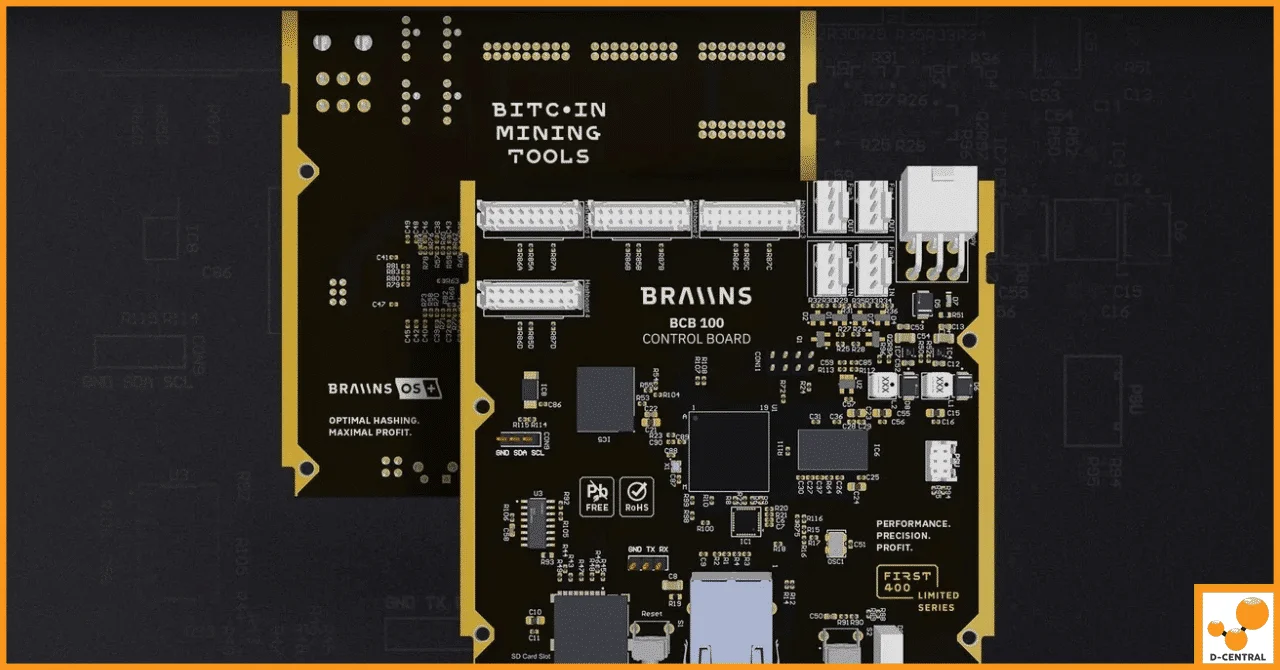
The BCB 100 is a single-board computer designed exclusively for the Antminer S19 family. It replaces the stock Bitmain control board — the component that orchestrates communication between your hashboards, network connection, fan controllers, and the mining pool. Where Bitmain’s stock board runs proprietary firmware with hard limits on tuning, the BCB 100 runs Braiins OS+ out of the box, giving you immediate access to autotuning, granular underclocking/overclocking, and per-hashboard voltage control.
This is not a hack or a workaround. The BCB 100 was custom-designed by Braiins’ engineering team in Prague, assembled with components sourced exclusively from top-tier EU suppliers, and tested on the same firmware stack that runs on over 200,000 devices worldwide. It is a precision-engineered upgrade that slots directly into your existing S19 chassis — no soldering, no adapter cables, no firmware flashing required.
BCB 100 Technical Specifications
| Specification | Detail |
|---|---|
| Processor | STMicroelectronics dual-core 650 MHz MPU |
| RAM | 256 MB DDR3L |
| Internal Storage | 4 GB high-speed flash |
| Hashboard Support | Up to 4 hashboards |
| Expansion | SD card slot for data/logs |
| Controls | 2 physical buttons (restart, state report) + LED indicator |
| Pre-Installed Firmware | Braiins OS+ (autotuning enabled) |
| Design Origin | Custom-designed in Prague, Czech Republic |
| Component Sourcing | EU-based tier-one suppliers |
The dual 650 MHz cores and 256 MB of DDR3L RAM represent a significant step up from the stock Bitmain boards in the S19 lineup. This extra headroom matters: Braiins OS+ autotuning algorithms run continuously, adjusting voltage and frequency on a per-chip basis. More processing power means faster tuning cycles and more stable operation, especially when pushing overclocked configurations.
Supported Antminer S19 Models
The BCB 100 is compatible with the most widely deployed S19 series machines:
| Model | Stock Hashrate | BCB 100 Compatible |
|---|---|---|
| Antminer S19 | 95 TH/s | Yes |
| Antminer S19 Pro | 110 TH/s | Yes |
| Antminer S19j | 90 TH/s | Yes |
| Antminer S19j Pro | 104 TH/s | Yes |
| Antminer T19 | 84 TH/s | Yes |
If you are running any of these models — whether as a standalone home miner, inside a Bitcoin space heater build, or in a hosted rack at a facility like our Quebec hosting operation — the BCB 100 is a direct upgrade path. The board’s 4-hashboard support also future-proofs it for any custom configurations where you might run modified S19 setups.
Performance: Underclocking vs. Overclocking with the BCB 100
The real value of the BCB 100 is what Braiins OS+ lets you do with your miner’s power curve. Every ASIC chip has a sweet spot — a voltage/frequency combination where it produces the most hashes per joule of energy consumed. Stock firmware ignores this entirely and runs every chip at the same settings. Braiins OS+ autotuning finds each chip’s optimal point individually.
Here is what that looks like in practice:
Underclocking Results (Efficiency Mode)
| Model | Hashrate Change | Efficiency Gain |
|---|---|---|
| Antminer S19 Pro | -5% | +11% |
| Antminer S19j Pro | -6% | +21% |
Underclocking is the home miner’s best friend. A 5-6% drop in raw hashrate is barely noticeable on your pool dashboard, but an 11-21% improvement in J/TH (joules per terahash) translates directly into lower electricity bills and extended hardware lifespan. If you are running on residential power rates — especially here in Canada where rates vary dramatically by province — that efficiency gain can be the difference between profitable mining and bleeding sats to your utility company.
Overclocking Results (Performance Mode)
| Model | Hashrate Gain | Efficiency Gain |
|---|---|---|
| Antminer S19 Pro | +19% | +3% |
| Antminer S19j Pro | +15% | +11% |
The overclocking numbers are where things get interesting. A 19% hashrate increase on the S19 Pro — while simultaneously improving efficiency by 3% — defies what most miners expect from pushing hardware harder. This is the power of per-chip autotuning: instead of brute-forcing every chip to the same high frequency (which is what manual overclocking does), Braiins OS+ identifies which chips can handle more and which cannot, pushing only the strong ones while keeping the weak ones stable. The result is more total hashrate with less wasted energy.
Why the BCB 100 Matters for Home Miners
With the Bitcoin network hashrate now exceeding 800 EH/s and the block reward at 3.125 BTC after the 2024 halving, efficiency is no longer optional — it is survival. Home miners operating on residential electricity do not have the luxury of sub-$0.03/kWh industrial power contracts. Every joule matters. Every watt that does not produce useful hashes is money lost.
The BCB 100 addresses this directly by giving you three capabilities that stock firmware refuses to provide:
- Per-chip autotuning — each BM1398/BM1366 chip is individually optimized for its silicon quality, eliminating the “weakest chip dictates the whole board” problem.
- Dynamic power targeting — set a watt limit and let Braiins OS+ figure out the best hashrate it can produce within that envelope. Perfect for matching your miner to your available circuit capacity.
- Real-time telemetry — per-hashboard and per-chip data visible in the web dashboard. Know exactly what your hardware is doing, not just what Bitmain’s dumbed-down interface shows you.
For miners who have converted their S19 units into Bitcoin space heaters — using the waste heat for home heating during Canadian winters — the underclocking mode is particularly valuable. You can dial your miner down to match your heating needs while maintaining excellent efficiency, effectively turning your electricity bill into sats and BTUs simultaneously.
Installation: A 10-Minute Swap
One of the best things about the BCB 100 is what it does NOT require. There is no firmware flashing process. No SD card preparation. No SSH configuration. The board comes with Braiins OS+ pre-installed and ready to mine.
The installation process:
- Power down your Antminer S19 and disconnect all cables.
- Remove the top cover (4 screws on most S19 models).
- Disconnect the hashboard ribbon cables and fan connectors from the stock control board.
- Unscrew the stock control board and remove it.
- Mount the BCB 100 in its place and reconnect all cables.
- Power on, connect to your network, and access the Braiins OS+ web interface.
- Configure your pool settings and let autotuning do the rest.
Total time: about 10 minutes with a Phillips screwdriver. If you have ever swapped a control board or hashboard — or if you have done any kind of ASIC repair work — this is a straightforward operation. And if you are not comfortable doing it yourself, our repair team at D-Central handles control board swaps as part of our standard service offering.
BCB 100 vs. Stock Bitmain Control Board
| Feature | Stock Bitmain Board | Braiins BCB 100 |
|---|---|---|
| Firmware | Bitmain proprietary (locked) | Braiins OS+ (open, autotuning) |
| Underclocking | Limited or none | Full per-chip autotuning |
| Overclocking | Not supported | Up to +19% hashrate with efficiency gains |
| Power Targeting | Fixed power draw | Dynamic watt-level targeting |
| Telemetry | Basic summary stats | Per-domain voltage, per-chip frequency, temperature |
| Hashboard Support | 3 (standard S19) | Up to 4 |
| Processor | Varies by generation | Dual 650 MHz STMicro MPU, 256 MB DDR3L RAM |
| Update Path | Manual firmware flash (risk of brick) | OTA updates from Braiins |
Sourcing the BCB 100 Through D-Central
D-Central Technologies is a long-standing Braiins partner and an authorized source for the BCB 100 in Canada. But we do not just sell you a board and disappear. Our approach to hardware is the same approach we bring to everything: full-lifecycle support.
- Pre-sale consultation — Not sure if the BCB 100 is the right upgrade for your setup? Our mining consulting team can assess your current hardware and power situation.
- Installation support — Whether you install it yourself or ship your miner to our facility, we have you covered.
- Repair and diagnostics — If your S19 has underlying issues (dead hashboard, failing power distribution), our ASIC repair technicians can diagnose and fix the problem before or after the BCB 100 upgrade.
- Ongoing optimization — Questions about autotuning profiles, power targets, or pool selection? We are here.
We stock the Braiins BCB 100 alongside our full inventory of S19 replacement parts, including hashboards, fans, power supplies, and ASIC chips. If your miner needs more than a control board upgrade, we can handle the complete rebuild.
The Bigger Picture: Open Firmware and Mining Sovereignty
The BCB 100 is not just about squeezing out more terahashes. It represents a fundamental shift in who controls your mining hardware. When Bitmain ships a miner with locked firmware, they retain a degree of control over your machine — they decide what settings you can access, what data you can see, and what modifications you can make. The BCB 100, running Braiins OS+, returns that control to you.
This is the same principle that drives the entire open-source mining movement — from Bitaxe solo miners to NerdAxe boards to community-developed firmware projects. At D-Central, we believe that the decentralization of Bitcoin mining starts with the hardware in your hands. You should be able to see every metric, adjust every parameter, and understand every watt your machine consumes. The BCB 100 delivers that for the S19 platform.
In a network where hashrate concentration is a real threat to Bitcoin’s censorship resistance, every home miner who takes control of their hardware is strengthening the protocol. Whether you are running a single S19 in your garage or a rack of machines in your basement, the BCB 100 ensures that YOUR hardware works for YOU — not for the manufacturer’s bottom line.
What models does the Braiins BCB 100 support?
The BCB 100 is compatible with the Antminer S19, S19 Pro, S19j, S19j Pro, and T19. It supports up to 4 hashboards and ships with Braiins OS+ pre-installed.
Do I need to flash firmware after installing the BCB 100?
No. The BCB 100 comes with Braiins OS+ pre-installed. After physically swapping the board and reconnecting cables, you power on and configure your pool settings through the web interface. No SD card flashing or SSH access required.
How much efficiency improvement can I expect?
Results vary by model and mode. In underclocking (efficiency) mode, the S19 Pro shows approximately +11% efficiency with a -5% hashrate trade-off, while the S19j Pro shows +21% efficiency with -6% hashrate. In overclocking (performance) mode, the S19 Pro gains +19% hashrate with +3% efficiency, and the S19j Pro gains +15% hashrate with +11% efficiency.
Can I use the BCB 100 in an S19 space heater build?
Absolutely. The BCB 100 is ideal for space heater configurations because its underclocking mode lets you precisely dial in your miner’s power draw to match your heating needs. You get efficient Bitcoin mining and home heating from the same machine.
Does D-Central offer installation for the BCB 100?
Yes. You can install the board yourself in about 10 minutes with a screwdriver, or ship your miner to our facility and our ASIC repair team will handle the swap as part of a standard service. We also offer full diagnostics if your miner needs additional repairs.
What is the difference between the BCB 100 and flashing Braiins OS+ on a stock board?
Flashing Braiins OS+ on a stock board gives you the firmware benefits but not the hardware improvements. The BCB 100 features a more powerful dual-core 650 MHz processor, 256 MB of DDR3L RAM, 4 GB of flash storage, and supports up to 4 hashboards. The upgraded hardware enables faster autotuning cycles and more stable operation, especially under overclocked configurations.
Is the BCB 100 compatible with immersion-cooled S19 miners?
Braiins OS+ on the BCB 100 supports both air-cooled and immersion-cooled configurations. The autotuning engine adapts to the thermal profile of your setup regardless of cooling method.