

Ducting a Mining Farm: Rack-Scale Airflow Without the Guesswork
Home » Ducting a Mining Farm: Rack-Scale Airflow Without the Guesswork One miner in a garage is an airflow problem you can solve with a…
$85.00 CAD
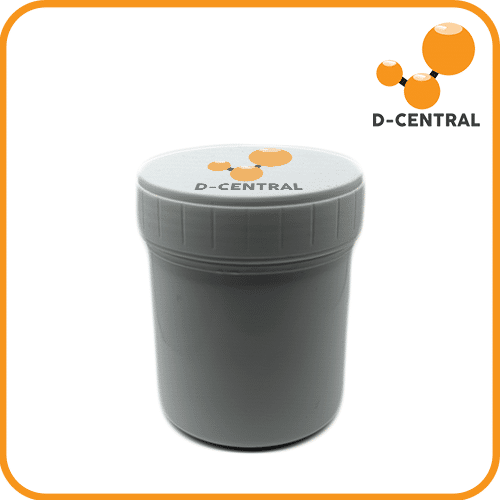
The Hashboard Thermal Paste (Gray) is a high-performance thermal compound formulated specifically for ASIC miner hashboard maintenance.
Purchase details
Save 3% when you pay in Bitcoin.
Every ASIC chip on a hashboard generates significant heat under load. The thermal interface between the chip and heatsink is critical — dried-out or insufficient thermal paste creates an insulating air gap that causes chips to throttle, produce errors, or fail entirely. If your miner is running hotter than expected, producing inconsistent hashrates, or throwing temperature warnings after 6+ months of operation, re-applying thermal paste is one of the most effective maintenance steps you can take.
This is a bulk-sized container designed for technicians and serious home miners who maintain multiple machines. A single hashboard typically has 30 to 80+ ASIC chips depending on the model, and each chip needs a fresh application. One container covers multiple hashboards, making it far more cost-effective than buying small syringes.
| Specification | Value |
|---|---|
| Product Type | Thermal interface compound (gray silicone-based) |
| Thermal Conductivity | High-performance grade suitable for ASIC chips |
| Application | ASIC chip-to-heatsink thermal interface on hashboards |
| Operating Temperature | -50°C to +300°C |
| Package Size | Bulk container (covers multiple hashboards) |
| Color | Gray |
| Compatible Hardware | All ASIC miner hashboards — Antminer, Whatsminer, Avalon, Innosilicon, and more |
The exact coverage depends on the chip count per board and application thickness, but one container is sufficient for multiple complete hashboard re-pastes. An Antminer S19 has 3 hashboards with 76 chips each (228 chips total). A Whatsminer M30 has 3 boards with 56 chips each (168 chips total). You will get several full-machine re-pastes from a single container.
While standard thermal paste will technically work, it is not ideal. PC thermal paste is designed for a single CPU/GPU die with moderate heat output. ASIC hashboards have dozens of chips packed tightly together, running 24/7 at high temperatures. Hashboard-specific thermal paste is formulated for this environment — better resistance to drying, pump-out, and thermal cycling over extended periods.
First, remove the heatsink from the hashboard. Clean all old thermal paste from both the chip surfaces and the heatsink using isopropyl alcohol (90%+) and lint-free wipes. Apply a thin, even layer of fresh paste to each chip surface using a small spatula or plastic scraper. Reinstall the heatsink with even pressure. Do not over-apply — excess paste can squeeze onto surrounding components.
No. This is a standard gray silicone-based thermal compound that is electrically non-conductive. Accidental contact with nearby components will not cause shorts. This makes it safer for hashboard work compared to liquid metal thermal compounds.
D-Central’s repair shop processes thousands of hashboard re-pastes every year. We have tested numerous thermal compounds under real mining conditions and stock the products that deliver reliable, long-term performance. When you buy thermal paste from D-Central, you are getting the same product our technicians apply to every hashboard that comes through our bench. Need a professional re-paste or full hashboard service? Our ASIC repair team in Montreal, Quebec handles it all.
The exact coverage depends on the chip count per board and application thickness, but one container is sufficient for multiple complete hashboard re-pastes. An Antminer S19 has 3 hashboards with 76 chips each (228 chips total). A Whatsminer M30 has 3 boards with 56 chips each (168 chips total). You will get several full-machine re-pastes from a single container.
While standard thermal paste will technically work, it is not ideal. PC thermal paste is designed for a single CPU/GPU die with moderate heat output. ASIC hashboards have dozens of chips packed tightly together, running 24/7 at high temperatures. Hashboard-specific thermal paste is formulated for this environment — better resistance to drying, pump-out, and thermal cycling over extended periods.
First, remove the heatsink from the hashboard. Clean all old thermal paste from both the chip surfaces and the heatsink using isopropyl alcohol (90%+) and lint-free wipes. Apply a thin, even layer of fresh paste to each chip surface using a small spatula or plastic scraper. Reinstall the heatsink with even pressure. Do not over-apply — excess paste can squeeze onto surrounding components.
No. This is a standard gray silicone-based thermal compound that is electrically non-conductive. Accidental contact with nearby components will not cause shorts. This makes it safer for hashboard work compared to liquid metal thermal compounds.
| Weight | 80 g |
|---|---|
| Dimensions | 10 × 3 × 3 cm |
Only logged in customers who have purchased this product may leave a review.
Home » Ducting a Mining Farm: Rack-Scale Airflow Without the Guesswork One miner in a garage is an airflow problem you can solve with a…
Open up any S9-through-S19-era Antminer control board and the biggest chip on it isn’t just a CPU — it’s a Xilinx Zynq, a hybrid part…
Poolin, once Bitcoin’s largest mining pool, filed Chapter 11 owing $163.7M in frozen IOUs to 11,700 customers. Why mining as a standalone business failed — and why dual-purpose mining is the decentralized future.
Last reviewed July 22, 2026.


Reviews
There are no reviews yet.