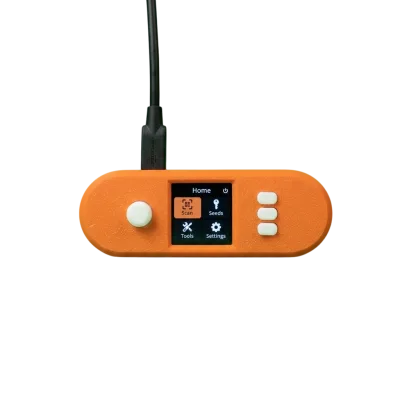
Here’s the uncomfortable truth most mining guides skip: a Bitaxe, a NerdQAxe, or an Antminer is a small Linux computer with a web interface, sitting on your home network, often with default credentials, frequently exposed to the internet by a port-forward someone set up “just to check on it from work.” That’s not a hypothetical risk. Mining hardware gets scanned, found, and hijacked — and the attack is almost never about stealing your machine. It’s about quietly rewriting one field in your config so the hashrate you’re paying to produce goes to someone else’s wallet. You’d keep paying the power bill. They’d keep the Bitcoin. This guide is about closing that gap, with the actual threat model — not a generic “use strong passwords” listicle.
What attackers actually want from a home miner
Understand the threat and the defenses become obvious. There are three things worth protecting, and they’re not equally exposed:
- Your payout address. This is the prize. Every miner’s config points its hashrate at a pool, under a worker name tied to your wallet. An attacker who reaches the device’s web UI changes that one string and silently redirects your earnings. Your miner still shows green lights. Your sats land in their account. This is the single most common, lowest-effort, hardest-to-notice attack on home miners.
- The device itself, as a foothold. A compromised miner is a Linux box inside your LAN. From there an attacker can scan for your other devices — laptops, NAS, phones — and pivot. The miner is the soft entry point to everything else.
- Your actual Bitcoin holdings. Critically, this is not on your miner. Your mined coins live in whatever wallet your pool pays out to. The biggest single security mistake in home mining is conflating “securing the miner” with “securing the Bitcoin.” They’re separate problems with separate solutions.
The non-negotiables: do these before the miner hashes a single share
1. Change the default credentials — immediately
Open-source miners like the Bitaxe and NerdQAxe ship with a known default web interface. Antminers ship with the infamous root / root. Botnets scan for these defaults around the clock. The very first action after a device joins your network — before you even configure the pool — is setting a unique, strong password. Not “password123 with a capital P.” A real one, from a password manager, different per device. This single step defeats the overwhelming majority of automated attacks, because automated attacks don’t guess — they try the default and move on.
2. Never port-forward your miner to the internet
This is the big one, and it’s the mistake almost everyone makes. You want to check your Bitaxe from your phone while you’re out, so you forward port 80 to it on your router. Congratulations — you’ve just published your miner’s login page to the entire internet, where it will be found by a scanner within hours. Mining hardware web interfaces are not built to survive direct internet exposure. They are LAN-only management tools.
If you genuinely need remote access — and most people don’t, they just think they do — the answer is a VPN into your home network, not a port forward out of it. A modern self-hosted VPN like WireGuard, or your router’s built-in VPN server, lets you tunnel into your LAN and reach the miner as if you were on the couch. The miner stays invisible to the public internet; only your authenticated VPN connection gets in. This one decision eliminates an entire category of attack.
3. Segment the miners onto their own network
Treat your mining hardware as untrusted, because honestly, IoT-class firmware deserves that suspicion. Put it on a separate VLAN, or at minimum the “guest” network most modern routers offer. The goal: if a miner is ever compromised, it’s trapped on a segment with nothing valuable to reach — it cannot scan or touch your laptops, your phones, your NAS, or anything holding real data. The miner needs exactly two things: an internet route to its mining pool, and a way for you to reach its interface. Everything else, block. This is the same containment logic a data center uses, scaled to a closet.
The next layer: harden the setup
Keep firmware current
Firmware updates patch real, exploited vulnerabilities. The open-source miner community moves fast — AxeOS for the Bitaxe line gets regular releases — so check for updates periodically and apply them. If you run Antminers, this is also the argument for running a trustworthy aftermarket firmware rather than whatever shipped years ago. D-Central develops DCENT OS, our own open-source Antminer firmware, precisely so home miners have a transparent, maintained alternative they can actually audit — alongside the other community options like Braiins OS+, LuxOS, and Vnish. Whatever you run, “set it and forget it for three years” is how you end up on a botnet.
Lock down your router first
Your router is the front door, and the miner is only as safe as the door is. Change the router’s admin password off the default. Update its firmware. Turn off UPnP — that’s the feature that lets devices silently open ports for themselves, which is exactly the behavior you don’t want from IoT-class hardware. Disable WPS. Use WPA2 or WPA3 on the Wi-Fi. None of this is mining-specific; all of it is foundational, and skipping it makes every other step weaker.
Watch the one number that matters
The clearest signal that a miner has been hijacked is in plain sight: the payout address and pool URL in its config. Get in the habit of glancing at them. Better, audit them after any firmware update, any power event, any time the device reboots — because a config reset can also be an attacker’s cover. If your hashrate is steady but your pool dashboard shows nothing arriving, that mismatch is the breach. You don’t need an intrusion-detection system to catch the most common attack; you need to occasionally read your own config.
Where your actual Bitcoin lives — and why it’s the real prize
Securing the miner protects your hashrate. It does almost nothing to protect your coins, because the coins were never on the miner. Your pool pays out to an address you control, and that address is only as safe as the wallet behind it.
So: do not point your pool payouts at an exchange account and leave them there. Use a wallet where you hold the keys — and for any amount you’d be upset to lose, a hardware wallet (Trezor, Blockstream Jade, Ledger, and similar) that keeps the private keys offline. Write the seed phrase on paper or steel, store it somewhere a house fire or a burglar won’t reach it, and never type it into a website. This is sovereignty-grade self-custody, and it’s the whole point of mining your own Bitcoin in the first place — you produced it yourself, on your own hardware, in your own home. Don’t hand it back to a custodian at the finish line. A hijacked Bitaxe costs you some hashrate. A compromised wallet costs you everything you ever mined.
Don’t forget the physical layer
Network security is most of the battle, but not all of it. Anyone with physical access to a miner can factory-reset it and reconfigure it. If you’re running visible hardware — a Bitaxe on a desk, a fleet in a garage — basic physical sense applies: don’t broadcast your setup, keep valuable hardware out of casual reach, and put it on a UPS so a power blip doesn’t corrupt firmware or force a risky cold restart. The bigger your fleet, the more this matters; a single Bitaxe on a shelf is low-stakes, a rack of ASICs is not.
A 10-minute security checklist
- Change every miner’s default password to a unique strong one — before configuring anything else.
- Confirm no miner is port-forwarded to the internet. If you need remote access, set up a VPN into your LAN instead.
- Move mining hardware to its own VLAN or guest network, isolated from your personal devices.
- Update miner firmware now, and set a recurring reminder to check again.
- Harden the router: new admin password, latest firmware, UPnP and WPS off, WPA2/WPA3 on.
- Read each miner’s config — confirm the pool URL and payout address are yours.
- Make sure pool payouts go to a self-custodied wallet; move serious amounts to a hardware wallet with an offline seed backup.
- Apply basic physical security and put the hardware on a UPS.
Frequently asked questions
Can someone steal my Bitcoin by hacking my Bitaxe?
Not your existing Bitcoin — that lives in your wallet, not the miner. But they can hijack the device’s config to redirect your future earnings to their address, and you’d keep paying the power bill while they collect. That’s why changing default credentials and never exposing the miner to the internet are the top priorities.
Do I really need a VPN to check my miner remotely?
You need a VPN or you need to give up remote access — those are the safe options. What you must not do is port-forward the miner’s web interface to the internet. A VPN into your home network lets you reach the miner securely as if you were on your couch, with nothing exposed publicly.
Why isolate the miner from my other devices?
Mining hardware runs IoT-class firmware that doesn’t get the security scrutiny your laptop’s OS does. If a miner is ever compromised, network segmentation traps it — it can reach its pool and nothing else, so it can’t be used as a launchpad against your personal data.
Is aftermarket firmware safer than stock?
For older Antminers, maintained aftermarket firmware is generally safer because it’s actively patched, where years-old stock firmware is not. D-Central’s open-source DCENT OS exists for exactly this reason — a transparent, auditable, maintained option for home miners — alongside Braiins OS+, LuxOS, and Vnish. The key word is maintained: run something that still gets updates.